


The front desk has a booking on screen, a membership spreadsheet open beside it, and a golfer waiting to find out whether a bay is included in their plan. Finance has marked the dues payment as received, but the access list still says inactive. Meanwhile, yesterday's practice session sits in a separate device app that the coach can't connect to the member record.
Club essentials software should remove those handoffs, not just put a newer screen in front of them. The buying test is whether bookings, dues, access, payments, and practice records stay consistent when something changes. A polished demonstration matters less than a lapsed membership, a failed payment, and a real migration file handled correctly.
Table of Contents
- Core Modules Every Club Software Needs
- How Booking, Memberships and Front Desk Work Together
- Launch Monitor Data and Practice Integration
- Dues, Reporting and Integration Without Duplicate Records
- Security and Data Ownership to Require in Writing
- Pricing Models and What They Cost Over Three Years
- Migration and Rollout Playbook for Smaller Clubs
- Shortlist Club Software With a Scoring Checklist
Core Modules Every Club Software Needs
A club needs software that supports repeated visits, not just isolated reservations. According to the National Golf Foundation, 48.1 million Americans aged six and older played on-course or off-course golf in 2025, and U.S. courses recorded more than 500 million rounds in each of the six years through 2025.
That activity includes different operational needs: a lesson booking, a recurring membership, a practice session, and a payment adjustment shouldn't require unrelated customer records. The essential modules must work individually and share the information staff need to complete a visit.
Core modules and what each must do
| Module | What It Handles | Daily User | Fails When Missing |
|---|---|---|---|
| Booking | Tee times, bays and lesson slots | Front desk and golfers | Double-booked bays and manual phone calls |
| Memberships | Tiers, dues, joining fees and renewal terms | Membership staff | Dues tracked in spreadsheets |
| Front desk | Member check-in and access verification | Front desk staff | Long queues and unverified visitors |
| Practice data | Launch-monitor session import and live capture | Coaches and golfers | Practice results stuck in device apps |
| Reporting | Utilization, renewals and revenue trends | Managers and owners | Decisions made from memory |
| Billing and payments | Recurring charges and payment status | Finance and membership staff | Failed payments found too late |
A single-site range may prioritize booking and front desk. A private club may start with memberships and billing, particularly where household eligibility, joining fees, and commitment terms affect access. Neither facility should buy an unused module merely because it appears in a bundle.
Practice records also need clear boundaries. A launch-monitor session, a posted round, and a handicap calculation serve different purposes; the guide to calculating a golf handicap provides context for keeping those records distinct.
Practical rule: Mark every module required, nice-to-have, or not needed before watching a demonstration.
Count the gaps, then identify how staff would bridge each required gap. An integration can be a sensible answer. Re-entering member names and payment status every morning isn't.
How Booking, Memberships and Front Desk Work Together
Consider a member booking a practice bay before an evening lesson. The reservation looks straightforward, but the software must answer several different questions: whether the slot is available, whether the plan permits it, and whether access remains valid at arrival.
The visit should follow a connected path.
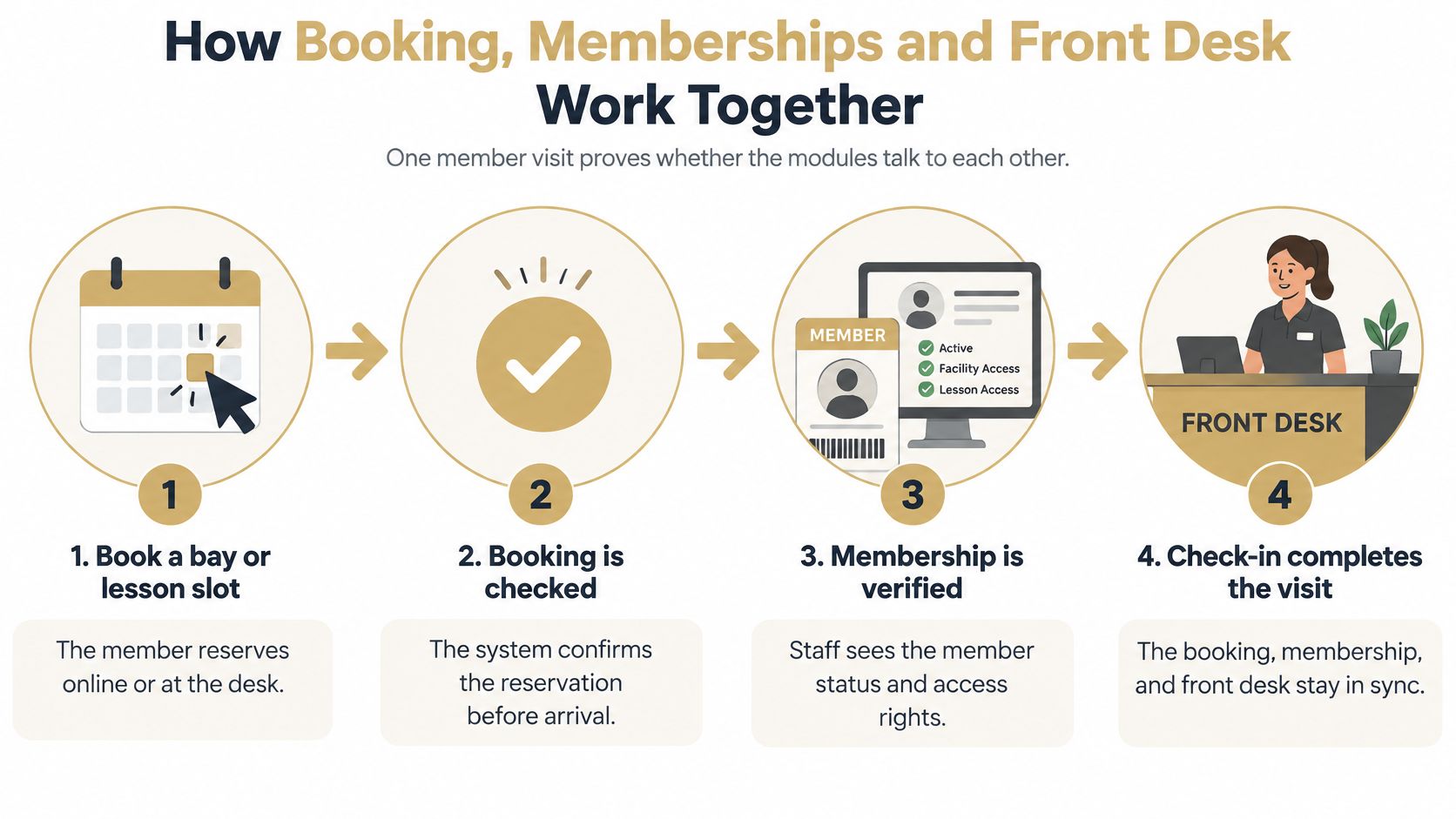
Follow the member through the visit
Reserve the right resource. The member books online or staff reserve at the desk. The system should distinguish a bay reservation from a lesson that also requires a coach, preventing a confirmed lesson with nowhere to teach it.
Check the membership rules. Before confirmation, the booking workflow should evaluate tier eligibility, dues status, and applicable seat limits. Separate membership and booking lists can allow an expired account to reserve an included session.
Verify the arriving member. Dialed Golf Academy supports exact member lookups or revocable QR codes for front-desk verification. Staff should resolve ambiguous names against the actual account rather than accepting a screenshot or selecting the closest match.
Apply access to the booked slot. Where access-control integration is required, the demonstration should show the permitted time window and the resulting attendance record. A successful reservation shouldn't automatically grant unrestricted facility access.
Attach additional charges. A usage overage or lesson add-on should follow the correct member account. Staff shouldn't collect it at the desk and then unknowingly add it again during reconciliation.
Record the completed visit. Reporting should distinguish reservations, arrivals, cancellations, and unused slots. Otherwise, a manager may mistake a fully booked evening for a fully used facility.
Test exceptions, not just successful check-ins
The difficult case is a member whose payment failed after booking but before arrival. Staff need a clear decision, including whether a grace rule permits entry and who can authorize an exception. Any override should record the staff member and reason.
The accompanying video provides another viewing point for the workflow discussion.
During any demonstration, the evaluator should ask the vendor to move a lapsed member through eligibility, identity verification, and access. The vendor should show the underlying records that change, not merely a green approval screen. A workflow that requires staff to remember an exception outside the system hasn't passed.
Launch Monitor Data and Practice Integration
A coach comparing two practice sessions needs to know whether a change in carry came from the golfer, the club label, or how the session was imported. That depends on more than whether a launch monitor appears on a compatibility list. The desktop app is practice software that works with launch monitors golfers already own.
Dialed Golf's macOS and Windows apps pair with or import sessions from Garmin, Rapsodo, SkyTrak, FlightScope, Uneekor, GSPro, Awesome Golf, and other sources. Live capture starts with Garmin R10 on desktop; file import gives facilities another route for bringing sessions into the golfer's record. The launch-monitor app guide offers context for assessing the practice application alongside the hardware.
Launch monitor connection routes by device
| Device | File Import | Test Before Signing |
|---|---|---|
| Garmin R10 | Yes | Desktop live capture keeps the session for review |
| Rapsodo | Yes | Shot counts and club labels |
| SkyTrak | Yes | Timestamps and device identifiers |
| FlightScope | Yes | Shot counts and club labels |
| Uneekor | Yes | Session filtering by golfer |
| GSPro | Yes | Session filtering by golfer |
| Awesome Golf | Yes | A real export from a trial account |
A listed device does not guarantee that every field, export version, or connection mode will work as expected. Test the specific workflow and files the facility uses.
Prove that the session remains useful
Live capture records shots locally and lets the golfer review the session. During a trial, check how interrupted connections, resumed sessions, and discarded shots appear. Local capture helps only if the golfer can later identify the intended session.
Useful session records should retain timestamps, device identifiers, club labels, and measurement units. When a coach compares sessions, those details help distinguish a change in performance from a different club label or an import that interpreted units incorrectly.
- Export actual sessions. Use files from the devices and export workflows already used at the facility.
- Match the contents. Compare imported shot counts, club names, and available metrics with the original.
- Separate golfers. Confirm a shared practice computer does not assign the next session to the previous golfer.
- Check repeat imports. Find out whether importing the same file again creates another session or recognizes it as already present.
The app can highlight club gaps, overlaps, personal bests, and changes between sessions. It also shows trends in carry, total distance, ball speed, spin, launch, and club speed. These practice features do not, by themselves, establish that a facility-wide coaching dashboard or administrative integration is available. Test those requirements separately before buying.
Dues, Reporting and Integration Without Duplicate Records
A re-run sync creates a second member, then charges the same dues twice. The failure often starts with records that lack a reliable link between the club's system and its payment or membership system. Before buying, test how the software prevents duplicate records, traces corrections, and reconciles reports.
Market Intelo's golf-course management software analysis identifies member profiles, billing, payment processing, and access control as membership-administration functions, and notes compatibility across operational systems as an implementation challenge. Treat integration as an operating workflow to test, not a feature label to accept.
Require traceable synchronization
A successful first CSV upload does not prove that ongoing synchronization is safe. Staff need to trace a record from its source through processing to its current state. Check for:
- Source identifiers that connect an imported member or transaction to its original record.
- Timestamps that distinguish an older update from a later correction.
- Transaction status that separates pending, completed, failed, refunded, and reversed activity.
- Failure logs that show which updates stopped and what needs repair.
The CSV import guide can help staff prepare file-based transfers. An initial import and ongoing synchronization have different responsibilities. Set out who handles rejected rows, how corrections are submitted, and whether retrying a failed record can create a duplicate.
Membership status and access rules also need clear ownership. Specify which event changes a member's status and which event changes their access. For dues reporting, confirm that the system distinguishes amounts billed from amounts collected, and shows refunds and outstanding balances.
Make reports reconcile to the operating record
Monthly reports should define their terms, so finance and the front desk can explain a member's position consistently. Include:
- Renewal rate by tier, with a clear definition of who was eligible to renew.
- Utilization by bay or hour, separating booked capacity from attended sessions.
- Dues billed against dues collected, with refunds and outstanding balances visible.
- New versus lapsed members, using consistent status definitions.
A report is useful only when its totals can be traced to individual members and transactions. Separate reporting copies may work, but require the vendor to disclose refresh timing and show how late corrections appear.
A total that looks right is not enough. Staff must be able to trace it to individual members and transactions.
Finish with an export test covering members, payments, and visits together. Check whether the club's accounting workflow can read the files without losing identifiers, relationships, or transaction status. A readable spreadsheet with disconnected totals is not an adequate exit route.
Security and Data Ownership to Require in Writing
A front-desk login used to export the entire membership file can expose far more information than the employee needs for check-in. Global Market Statistics' golf-course software report identifies payment processing, customer information, and membership databases as cybersecurity exposure areas, and reports that roughly 38% of clubs regard data security as a major provider-selection concern. Require contractual controls for member and payment records, and use a security badge only as a secondary signal.
The written requirements should cover access, stored information, payment handling, recovery, and ownership.
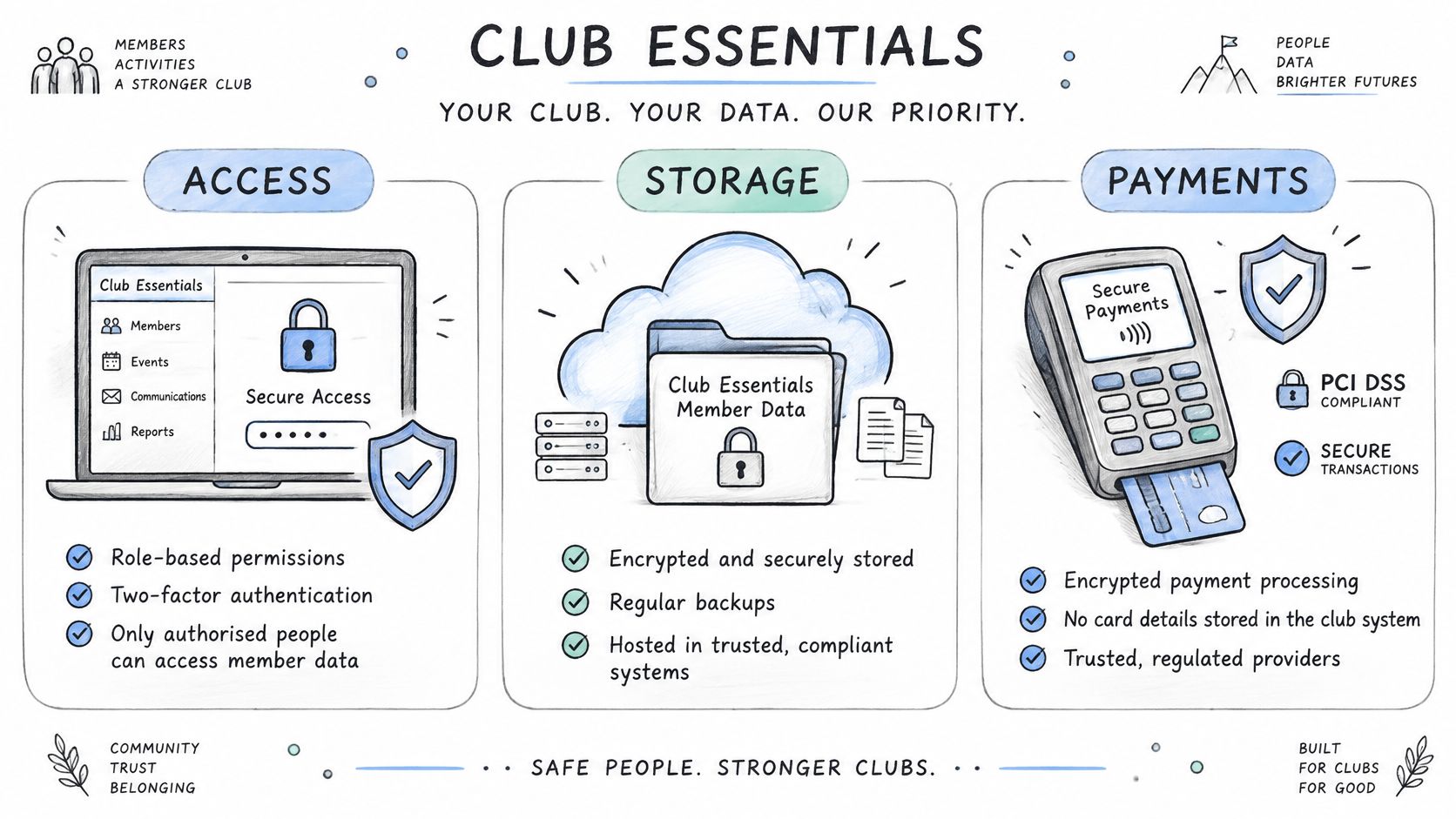
Set minimum technical controls
- Access controls. Require role-based permissions, least-privilege defaults, and administrator MFA. Front-desk staff need check-in tools, not unrestricted authority to change bank details or export the full membership.
- Network separation. Keep operational devices separate from guest Wi-Fi. A visitor's device should not share the trusted environment used by a check-in workstation.
- Data protection. Require encryption in transit and at rest, automated backups, and immutable audit logs for member and payment changes.
- Payment handling. Require card data to be handled by a PCI-compliant processor rather than stored in the club application.
MFA makes stolen credentials less useful for taking over an account. Audit logs should identify who changed a dues rate, what was changed, and when, with controls that prevent users from erasing that history.
Put recovery and ownership in the contract
ISO/IEC 27001 concerns the management of information security. Distinguish an independently certified scope from a general claim that a vendor follows similar principles, then request evidence for the specific service under consideration.
Require documented recovery objectives, scheduled restore tests, incident-notification timelines, and an independent security assessment at least annually. Recovery terms should specify acceptable data loss and restoration time. Restore tests should demonstrate that backups can rebuild a usable service.
Ownership terms must cover exports, retention, deletion, and access after termination. Dialed Golf states that users retain ownership of submitted golf data and other content, and limits its license to hosting, processing, transmitting, displaying, and backing up that content solely to provide, secure, and improve the service.
The contract should name who receives the records when service ends, the format provided, and the delivery deadline. A stated ownership right has limited operational value if the club cannot retrieve usable records on time.
Pricing Models and What They Cost Over Three Years
A low subscription can carry a high operating cost if it excludes needed modules or leaves staff to manage recurring exceptions by hand. Compare the full cost of running the system, including payment charges and launch-monitor integration, rather than choosing on the platform fee alone.
Club software pricing models compared
| Model | How It Charges | Best Fit | Cost to Check |
|---|---|---|---|
| Per-facility platform fee | Flat monthly or annual fee | Single site with a stable member count | Add-on modules billed separately |
| Per-seat or per-member | Charged per active member or staff seat | Facilities with growing memberships | Total climbs with each new member |
| Per-transaction | Fee per payment or percentage of sales | Low-volume membership sales | Fees rise as sales grow |
| Bundled suite | One price for several modules | Multi-function clubs | Paying for modules that go unused |
| Dialed Academy | $99.99 per month or $999.99 per year per facility | Clubs running memberships and front desk | Implementation time and migration help require a written quote |
Dialed Golf Academy lets clubs model dues, joining fees, seats, and commitment terms. For a comparable estimate, confirm in writing what implementation and migration support cost, and whether the system connects to the club's payment setup.
Build a comparable ownership estimate
Include platform subscriptions, required modules, staff implementation hours at an internal hourly cost, payment processing, migration assistance, training, and any parallel-running period. Keep unquoted items unknown until confirmed in writing rather than treating them as zero.
Apply each vendor's quoted billing basis across the same three-year period, then add non-subscription costs. Divide the total by a defined active-member baseline to estimate cost per member. If membership is expected to grow, calculate a second scenario using the anticipated increase.
A hypothetical crossover shows how membership count affects the result. If a per-member quote equals a flat facility fee at 300 active members, the per-member option costs more above that point, provided the rate, flat fee, and included services remain unchanged. Below it, the per-member option may cost less.
Buying discipline: A cheaper subscription can still produce a more expensive operation if staff must reconcile exceptions by hand.
Keep individual golfer software separate from the club's operating budget. Golfer Pro is $9.99/week, $29.99/month, $149.99/6 months, or $249.99/year, with one Pro plan across app and desktop. That is consumer pricing, not the facility membership platform subscription.
Free web tools need no account and cost nothing; they are not a substitute for club administration. Treat the golfer's software costs and the facility's membership, payment, and integration costs as separate line items. When comparing quotes, check whether the launch-monitor workflow fits the club's practice setup and whether required connections add fees or staff work. A lower subscription is only a saving if the functions and integrations the club needs are included.
Migration and Rollout Playbook for Smaller Clubs
Write the acceptance plan before the first upload, with named owners for billing and front-desk sign-off. Define a reversible cutover and staff training that covers routine exceptions, so the club can manage the launch without depending on the implementation team.
Prepare, move, and verify
Clean the CSV before import. Remove confirmed duplicates, standardize tier names, and preserve original source identifiers. Similar names alone are not enough to merge records, particularly within households.
Assign permissions before moving data. Define front-desk, membership, and finance responsibilities. Test restricted accounts as well as administrator accounts, so staff can confirm access before a busy check-in period.
Move member and dues records first. Compare balances, statuses, and membership terms with the original system. Resolve unmatched records before activating automated billing.
Run a controlled overlap. Staff can compare check-in outcomes across systems. Designate one billing authority during overlap, since two active billing engines can collect the same dues twice.
Retire the old workflow after reconciliation. Keep it available until the new system's reports match legacy totals through a complete billing cycle. Resolve discrepancies individually rather than adjusting totals to make them agree.
Tell members what changes when they arrive, whether existing credentials remain valid, and where to direct account questions. Give staff a short desk procedure for missing records, disputed balances, and failed identity checks.
Define rollback before launch
Keep a dated legacy export, name the person authorized to stop the cutover, and agree on rollback triggers. These might include unexplained payment failures, inaccessible member records, or unresolved differences in opening balances.
Specify how to preserve activity recorded after cutover. A software rollback that loses new payments or visits creates another reconciliation problem.
Measure success through duplicate rate, billing variance, peak-hour check-in time, and staff training completion. Set acceptance thresholds before testing begins, so the decision rests on agreed results rather than whether the launch feels manageable. A reversible rollout gives the club room to correct problems without improvising at the desk.
Shortlist Club Software With a Scoring Checklist
Score each candidate from 1 to 5 against the same operational evidence. A presentation should earn less credit than a successful test using the club's own records and membership rules.
The checklist helps organize the discussion.
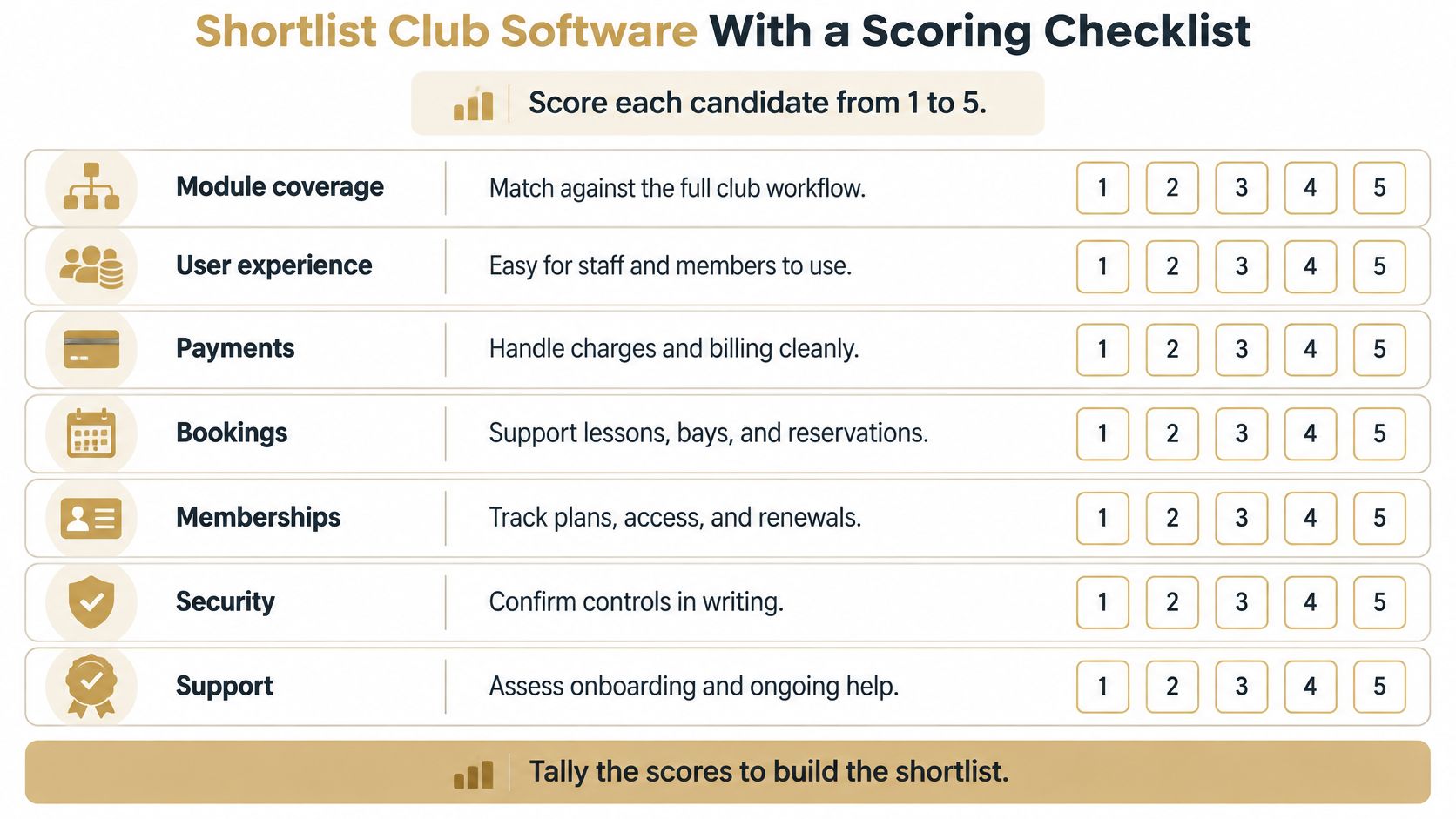
Apply the same acceptance checks
- Module coverage. Match required functions to demonstrated workflows.
- Front-desk verification. Test a lapsed account and an authorized exception.
- Practice connections. Prove the connection routes required by the facility's devices.
- Reconciliation. Inspect synchronization results and exported identifiers.
- Security commitments. Require written controls and recovery obligations.
- Ownership cost. Compare the same cost period and membership assumptions.
- Rollout readiness. Require accountable owners, fallback procedures, and acceptance criteria.
The GCMA's Golf Club Software Technology Report summary describes a 2025 survey of 134 UK and Ireland golf-club managers, with implementation typically taking seven to eight months; it also identifies product fit as a greater concern than price and membership management as the largest satisfaction shortfall.
That implementation duration is a planning benchmark for the surveyed clubs, not a promised timeline for every range. It reinforces the need to test membership rules before committing, rather than assuming configuration will be straightforward.
Academy is a separate B2B memberships and front-desk product for clubs. A facility considering it should request the same dues-rule walkthrough and test migration required of every candidate, without granting an exception because the price or product presentation looks appealing.
Shortlist the strongest candidates, then run the same test file through each. A high total shouldn't override a failed mandatory security or export requirement. This week's concrete action is to book the walkthroughs and send an identical, appropriately anonymized migration file with written pass criteria.
Dialed Golf offers an on-course pocket caddy, desktop launch-monitor practice, and Academy memberships and front desk around one golfer record. Visit Dialed Golf to explore the relevant product and arrange an Academy walkthrough using the club's dues rules and a test migration file.