

You've got the export file open, the range session is over, and the question is not whether the file exists. It's whether that CSV import will turn scattered shot rows into sessions you can compare next week, next month, and after the next equipment tweak. Most golfers get stuck right there, because a file that looks “loaded” can still be useless if the mapping is sloppy or the session can't be queried cleanly later.
Table of Contents
- Why CSV Import Matters for Golf Data
- The Four-Stage Import Workflow
- Device-Specific Mapping for Popular Launch Monitors
- Common Mapping Failures and How to Fix Them
- Beyond Import Making Data Actually Usable
- Validation Checklist and Best Practices
Why CSV Import Matters for Golf Data
The first time I opened a launch monitor export, I had a mix of relief and annoyance. Relief, because the shots were finally out of the device. Annoyance, because raw rows don't tell you whether your 7-iron is really gapping from your 8-iron, whether a new ball changed spin windows, or whether one session is even comparable to the next.
That's why CSV import became the backbone of serious golf data work. CSV is deliberately simple, rows and columns separated by commas, which makes it a durable interchange format for moving historical records into analytics tools. In practice, that simplicity is what lets a launch monitor export become structured history instead of a dead spreadsheet sitting in Downloads. Klaviyo's historical event import only requires a timestamp and a customer identifier, with the timestamp in YYYY-MM-DD HH:MM:SS, which shows how CSV often serves as a normalization layer for event history rather than a human-facing sheet Klaviyo historical import requirements.
For golf, that same principle matters. A launch monitor session is useful only when the data lands in a shape that the software can group, compare, and search later. If the import process preserves date, club, shot metrics, and session boundaries, you can start asking better questions about carry windows, dispersion, and trends.
Dialed Golf tools make that post-import analysis more practical when you're trying to move from raw exports to decision-ready practice data. The point isn't just to get rows into a database, it's to turn those rows into a history you can trust.
Practical rule: If you can't tell whether a session is queryable after import, the import wasn't really successful, it was just accepted.
The Four-Stage Import Workflow
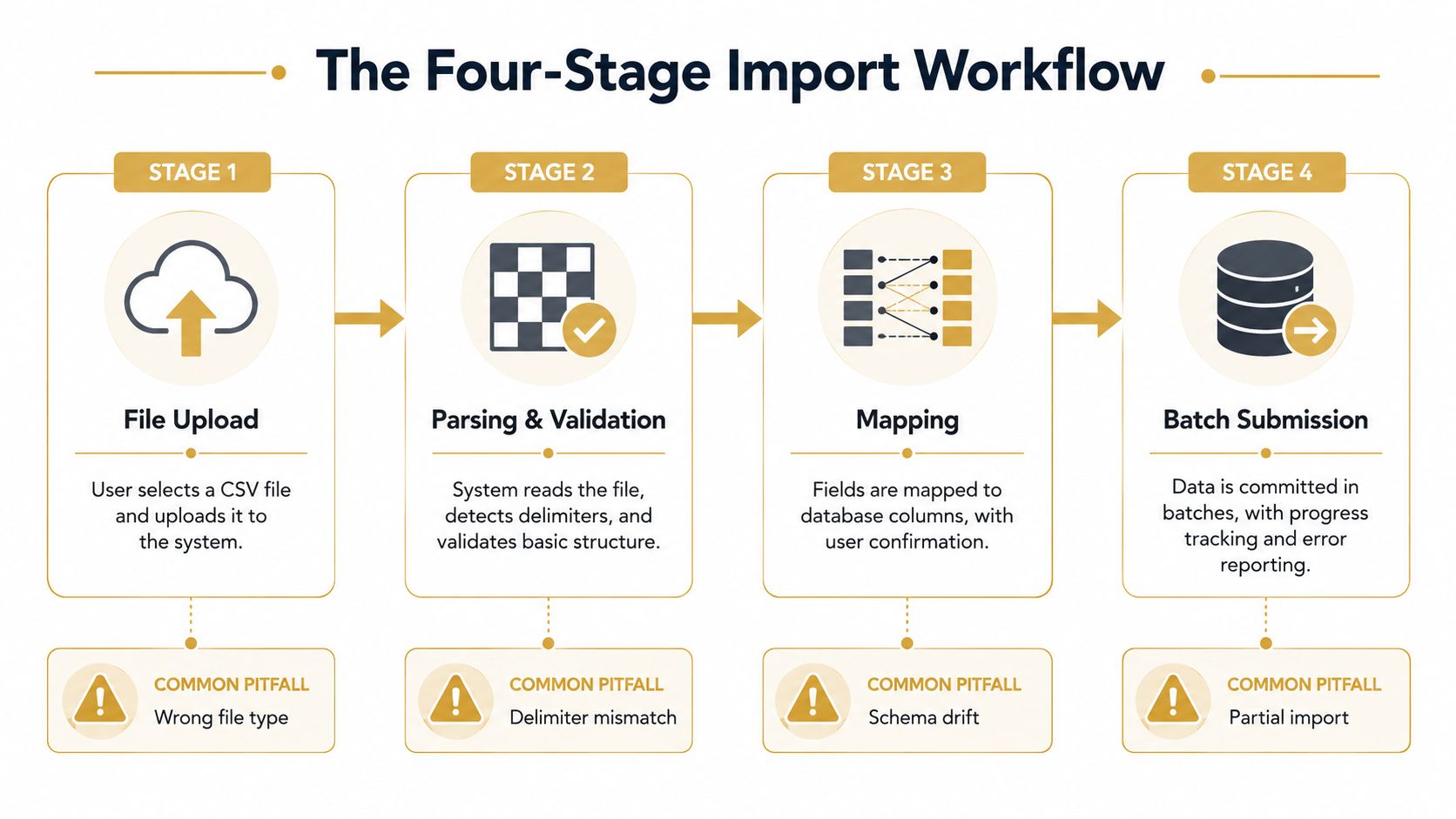
A reliable import should be treated as four instrumented stages, file upload, column mapping, row validation, and batch submission. That structure gives you a place to catch problems before they contaminate the whole dataset, so you can see whether a launch monitor export becomes usable session history or just a pile of accepted rows that never line up correctly CSVBox large CSV import guidance.
File Upload
Start by checking the file before you upload it. If a device export is zipped, renamed, or saved in an odd encoding, fix that first. For large launch-monitor files, client-side chunking or streaming reads are safer than loading the whole thing into memory, especially when a practice bucket has hundreds of shots.
Column Mapping
Mapping is where golf data usually goes sideways. A column called “Carry” in one export may be “Carry Distance” in another, and a club field might be missing entirely if the device doesn't capture it. Map by meaning, not habit, and confirm that the file's columns line up with the fields your analysis system uses.
Row Validation
This stage should catch the obvious failures, missing timestamps, malformed numbers, duplicate headers, and rows that drift away from the expected schema. Simple checks belong up front, while business rules can stay server-side, because that split reduces round trips and makes row-level error messages possible.
Batch Submission
Batch submission is where idempotency matters. If a network retry happens, the system should not double-insert the same 80 shots. That matters in golf workflows because one duplicated session can distort averages, create false gapping gaps, or make a club change look better than it was.
Practical rule: Import in batches, then verify a single session before you trust the rest of the file.
The cleanest systems report which rows passed, which rows failed, and whether a retry would be safe. They also make it obvious when a session is queryable instead of merely loaded, which is the difference between a usable practice history and a database full of rows you still cannot compare. For golfers trying to turn raw exports into something they can act on, the workflow at Dialed Golf tools is only helpful if the import preserves session structure well enough to support later filtering, comparisons, and bag decisions. A practical import should leave you with data you can query by session, club, and shot type, not just a success message.
Device-Specific Mapping for Popular Launch Monitors
Generic import advice breaks down fast when you're dealing with launch monitors. Garmin, Rapsodo, SkyTrak, FlightScope, and Uneekor all expose data differently, and the field names don't always line up cleanly with how golfers think about a shot. A good mapping workflow starts by deciding which metrics you care about most, then translating each device's export into those shared meanings.
The table below is a practical reference for the core fields golfers usually want to preserve. Treat it as a mapping aid, not a promise that every export will contain every value.
| Metric | Garmin R10 | Rapsodo | SkyTrak | FlightScope | Uneekor |
|---|---|---|---|---|---|
| Carry distance | Carry or carry distance | Carry | Carry | Carry | Carry |
| Ball speed | Ball speed | Ball speed | Ball speed | Ball speed | Ball speed |
| Spin rate | Spin or spin rate | Spin rate | Spin | Spin rate | Spin |
| Launch angle | Launch angle | Launch angle | Launch angle | Launch angle | Launch angle |
| Club speed | Club speed | Club speed | Club speed | Club speed | Club speed |
Garmin R10 exports usually need the most attention around session structure, because the useful fields are there, but the file may not always make the shot grouping obvious. Rapsodo data tends to be straightforward for speed and carry, but the naming can still vary across app exports. SkyTrak and FlightScope often present cleaner metric sets, yet you still need to confirm whether a value is present, optional, or repeated across multiple export views.
Uneekor exports can be strong for session depth, but the mapping still has to preserve the same shot semantics every time. If one export stores carry and another stores total, you need a consistent rule before you compare them.
A practical way to keep this manageable is to normalize every device into the same practice vocabulary, then analyze the results from there. Dialed Golf's golf bag gap analyzer is one example of a tool that makes that kind of normalization useful once the CSV fields are mapped consistently.
Practical rule: Don't ask whether the export is “complete.” Ask whether it can be translated into the same session language as your other devices.
Common Mapping Failures and How to Fix Them
A file can import cleanly and still fail the real test. The rows are there, but the sessions no longer compare cleanly because the mapping broke delimiter handling, quotes, schema consistency, or field order. That is the part that matters for golf data, since a loaded CSV is useless if it cannot become a queryable practice log.
At the file level, CSV discipline still has to hold. Each record belongs on its own line, every row needs the same field count, and any field that contains a comma, a line break, or a quote needs to be wrapped in double quotes. Oracle's CSV import guidance also calls out a few details that trip up golf exports, spaces count as part of the value, the last field should not end with a comma, and a header row is optional but should match the structure of the data when it is present Oracle CSV import guidance. A Rapsodo export with semicolon delimiters can split one shot's carry and ball speed into separate columns, which gives you two malformed rows instead of one usable shot record.
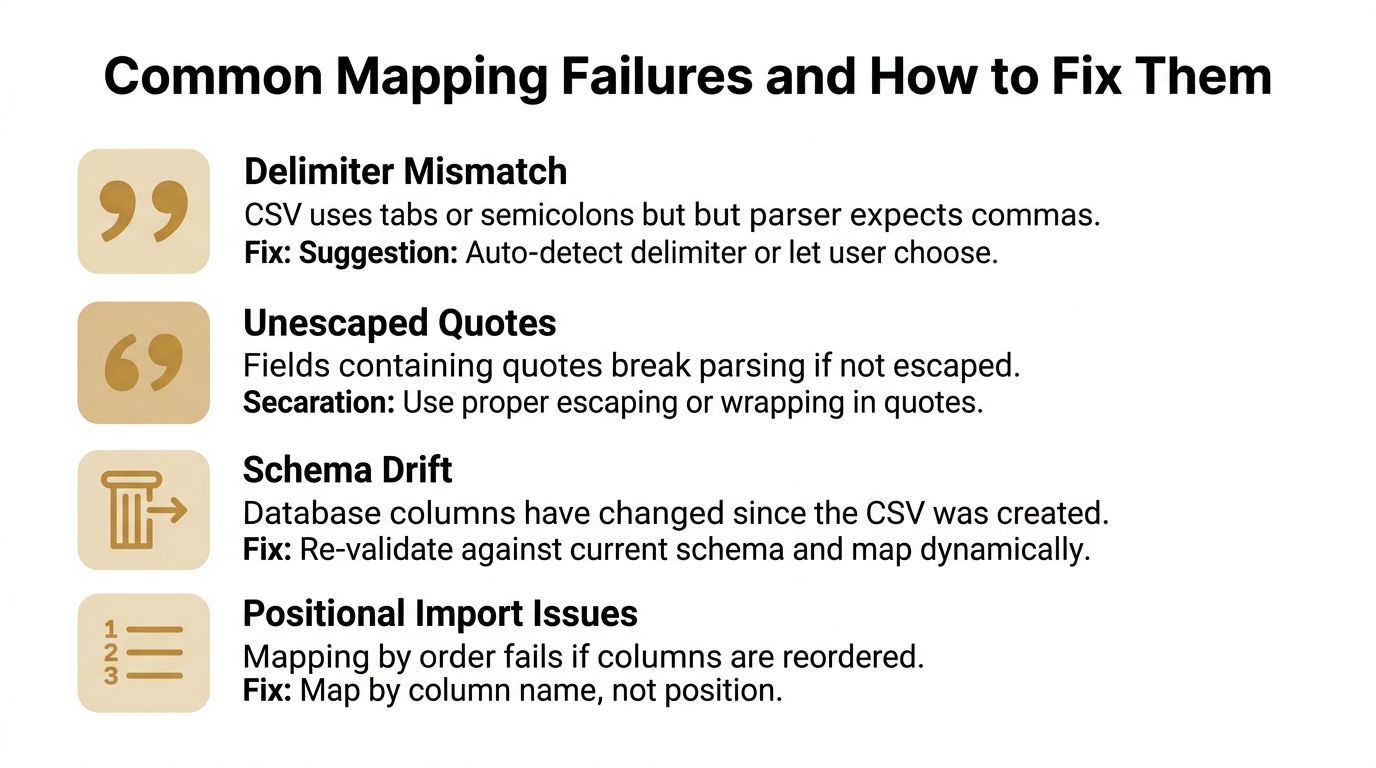
Delimiter Mismatch
A file exported with tabs or semicolons will confuse a parser that expects commas. In golf exports, that usually shows up as one shot being broken across the wrong number of fields, which makes the whole session harder to trust. Auto-detect the delimiter when you can, or force the user to choose it before parsing starts.
Unescaped Quotes
A quote inside a note field or label can break the row if it is not escaped correctly. Golf exports often include notes, club labels, or session comments that carry punctuation the parser does not like. Wrap or escape the field properly before import, then verify that the shot still reads as a single row after parsing.
Schema Drift
Export templates change. Device firmware changes. App updates rename columns or add new ones. If the downstream schema is stale, the import can appear to work while dropping the field that mattered most.
A normal-looking export can still create bad practice decisions. A carry column that gets renamed, or a launch-type field that moves, can leave you comparing sessions that do not mean the same thing anymore.
Positional Import Issues
Importing by column order is fragile. A reordered export can put spin in a carry column, or club speed in a launch angle slot. The safer approach is to map by field name, because positional imports can corrupt data any time the layout changes. That matters in golf exports where a single device update can shift the column order without changing the shot content.
Use a carry-distance reference like the Dialed Golf carry distance chart after the mapping is stable, not before it. If the import is still misaligned, the chart only helps you compare bad rows faster.
The fix is boring, and that is the point. Validate the file shape first, map by name, and fail fast when the schema no longer matches what your system expects. That is how you keep longitudinal golf data from turning into a pile of almost-right numbers.
Beyond Import Making Data Actually Usable
The post-import reality is where most CSV workflows disappoint. A file can be technically ingested and still fail the true test, can you query it, compare it, and trust it when you're deciding whether to change a club, a ball, or a swing cue.
Braze's CSV import documentation makes that distinction obvious in a different context. To verify targeting availability, you have to check whether “Go to Segment” appears for the import. If it doesn't, the CSV isn't available in the Updated/Imported from CSV segment filter Braze CSV import notes. That's the same operational question golf users should ask after every launch monitor import, is this data reusable downstream, or did it just land in storage?
Queryable Sessions Matter More Than Loaded Rows
For golf, a session only becomes useful when it's comparable to the sessions before and after it. That means the import has to preserve identifiers, timestamps, and metric semantics so you can group shots by day, club, or device without re-cleaning the file each time. If a session can't be queried later, it can't support trend work, gapping checks, or device-to-device comparisons.
Semantic Correctness Beats Technical Success
Geospatial and coordinate-system ambiguity from GIS workflows has a useful lesson for golf data. The same CSV can open cleanly and still land in the wrong place if the meaning of the values is off, because field mapping alone doesn't guarantee semantic accuracy QGIS CSV geometry import context. Launch monitor data has the same risk when the export uses different units, different labels, or different shot definitions across software versions.
That's why I care less about whether a file “imported” and more about whether the result supports real practice decisions. If carry windows are stable, dispersion is visible, and club comparisons survive across sessions, then the data is doing work.
What a Good Workflow Looks Like
A solid system preserves lineage, keeps session history editable, and lets you trace each shot back to the original export. It should also make it obvious when one import came from a different device or a different mapping template, because mixed workflows are where comparison breaks first.
If you're trying to turn exports into practice decisions, Dialed Golf's carry distance chart is one of the clearest ways to see whether your imported numbers are lining up the way you expect. The value isn't the chart itself, it's the confidence that your imported data still means the same thing session to session.
Validation Checklist and Best Practices
A CSV can import without errors and still fail the real test. If the rows do not line up with the way you practice, the file is only parked in the system, not turned into usable session history.
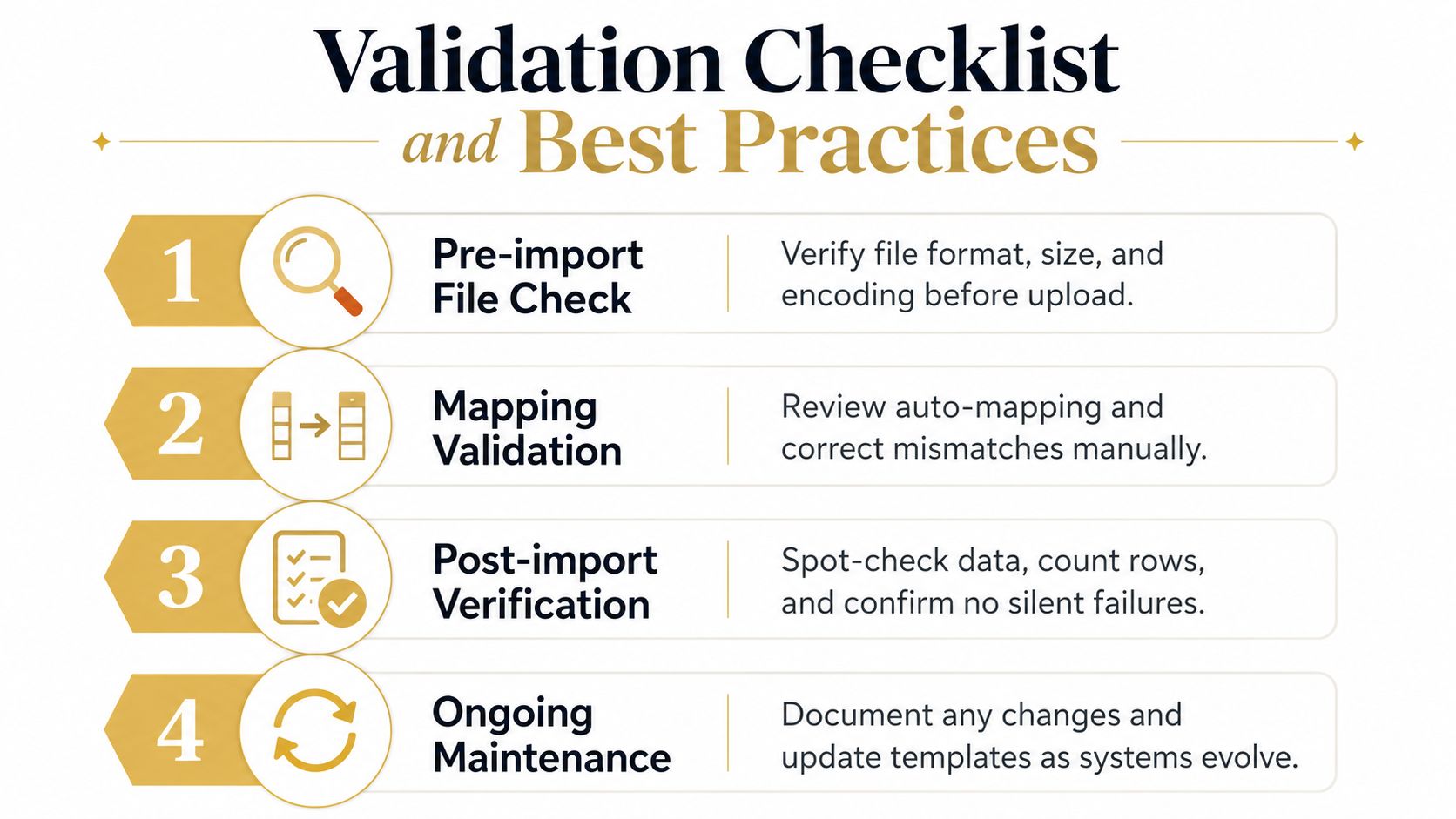
A short checklist keeps that from happening.
- Pre-import file check. Confirm the export came from the right device profile, then check file type, encoding, and whether the column order still matches the template you built around.
- Mapping validation. Review auto-mapping field by field. Carry, spin, club speed, and shot labels are the places where a clean import can still turn into misleading data.
- Post-import verification. Compare the number of imported shots with the session you expected to load, then open one session and check that the rows read like a practice bucket, not just a pile of records.
- Ongoing maintenance. Keep notes on export template changes, software updates, and any device-specific quirks you had to work around. That makes the next import easier to trust.
File shape still matters, so row lengths, delimiters, and quoted values need to stay consistent. The difference is that golf imports also need semantic checks. One session should match the device's own on-screen summary closely enough that you can tell the metrics landed with the right meaning, not just the right column names.
Use the first imported session as a control sample. If the session count matches the shots you hit on the range, the key metrics agree with the device summary, and the club splits look believable, the rest of the file has a good chance of being useful. If one mapping is off, fix it before you load more data, because a small semantics error can distort every trend you pull from that export.
[…] broader workflows, Dialed Golf's CSV import guide explains how to prepare launch-monitor files for analysis. Cross-platform imports can support data […]
[…] structure turns a CSV into part of a repeatable feedback loop. This guide to CSV import reflects the practical starting point, bringing device data into a form that can be reviewed rather […]