

You're at the range with a phone propped on a tripod, a bucket of balls at your feet, and a simple question in your head. Is the app on the screen giving you something useful, or just turning swings into numbers you'll forget by the ninth ball?
A good launch monitor app does more than show a yardage after impact. It sits between the sensor and your next decision, turning shot data into a session you can review, compare, and learn from. That's the difference between hitting balls and building a practice plan.
Table of Contents
- What a Launch Monitor App Actually Does
- Core Shot Metrics Every App Tracks
- How Launch Monitors Capture the Numbers
- Standard Features That Make an App Useful
- Device Compatibility and CSV-First Design
- From Captured Data to Practice Decisions
- Setup Habits That Make App Data Trustworthy
What a Launch Monitor App Actually Does
A golfer sets a phone on a tripod, takes a couple of waggles, and hits a 7-iron into a net. The screen flashes a number, then another, and the session starts to feel either useful or annoying depending on whether those numbers line up with what the player felt. That's where the app matters.
A launch monitor app is the layer that organizes raw shot data into something readable after the swing is over. It can pair with a launch monitor, or it can ingest a CSV export from another system, then store each shot in a session so the golfer can look back at what happened instead of guessing. In practice, that means the app is not the sensor itself, it's the place where the shot history becomes visible and sortable.
The clearest way to think about it is this. The monitor captures the shot, the app turns the capture into a session, and the golfer uses that session to decide what to work on next. That could be a club gap that looks too tight, a start direction that keeps drifting, or a carry window that's less stable than the player thought it was.
Practical rule: if the screen only gives you a number and no way to compare it later, you're looking at a display, not much of a practice system.
That's why the best app experience feels less like a gadget and more like a notebook that writes itself. You're not just chasing the last shot. You're building a record of how your bag performs and how your swing changes over time.
Core Shot Metrics Every App Tracks
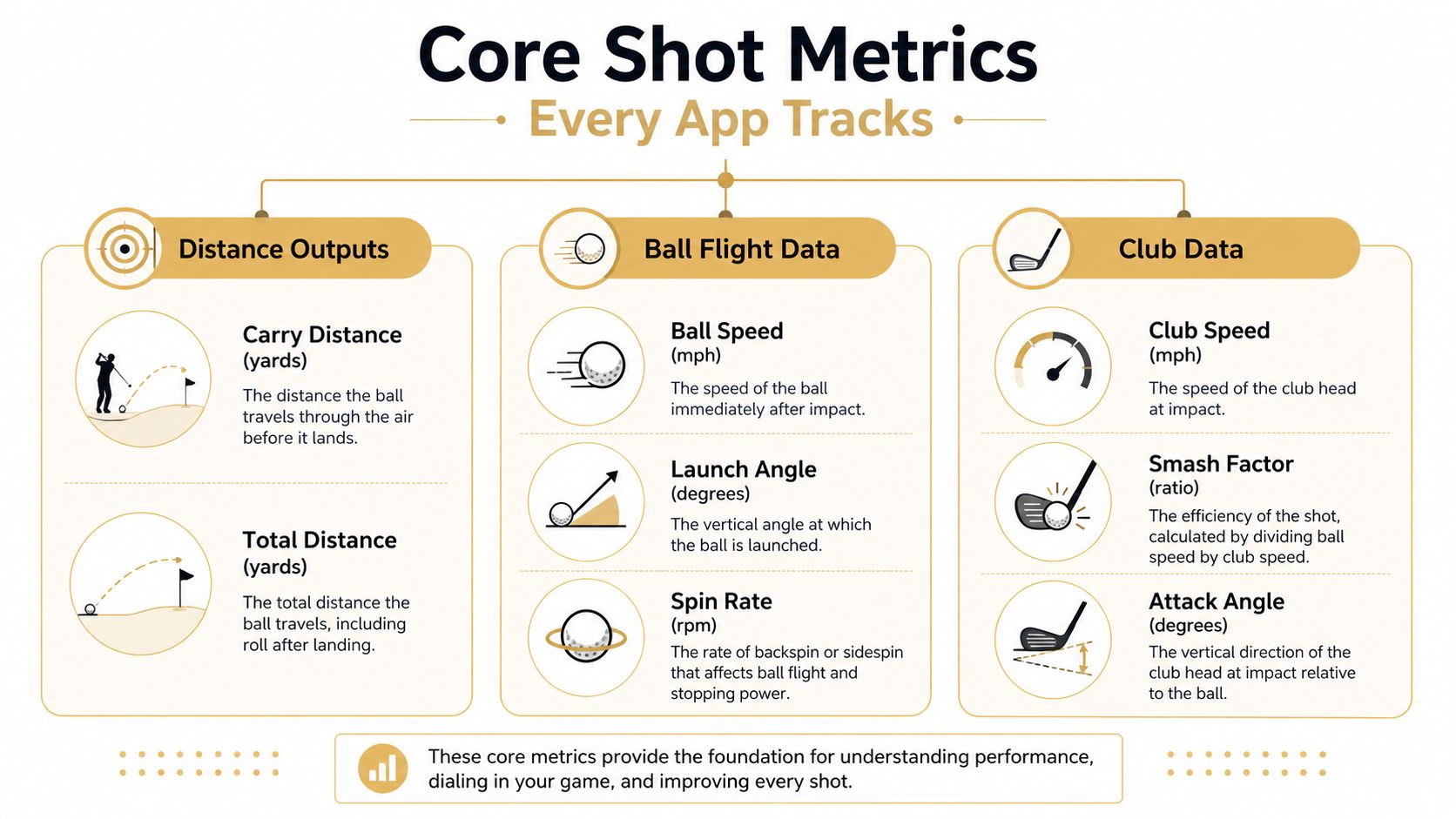
A launch monitor app is only useful if the numbers on the screen mean something to the golfer standing over the next shot. The core metrics are the basic vocabulary, and once you know what each one describes, the session stops feeling like random telemetry and starts looking like a practice log you can act on.
The most common foundational shot metrics are ball speed, club speed, smash factor, club path, face-to-path, dynamic loft, spin rate, and low point distance (HackMotion). Different apps may arrange those labels in different places, but the same family of numbers usually sits underneath the session summary.
Distance outputs
Carry distance is the distance the ball travels before it lands. Total distance includes rollout after landing, so it has a place in fitting and course planning, but it is also more sensitive to turf, slope, and firmness. That makes carry the cleaner number for most range work, especially if you are trying to compare two sessions or check whether a club gap holds up from one day to the next.
The distinction is simple. Carry answers how far the ball flew. Total distance answers where it finished. If you are building a yardage chart, checking gapping, or comparing strikes across sessions, carry usually gives the clearer picture.
Strike quality
Ball speed is the ball's speed after impact. Club speed is how fast the clubhead is moving through the strike. Smash factor shows how efficiently that swing speed turned into ball speed, so it helps reveal whether a fast swing produced a centered strike.
These three metrics work together like a replay of contact quality. A player can swing quickly and still lose energy through poor contact, while another player can produce strong ball speed without posting an especially flashy club speed number. The app gives you both halves of that picture, which is useful when a shot feels solid but the numbers say otherwise.
Launch conditions
Club path and face-to-path explain where the ball started and why it curved. Dynamic loft shows how much loft the club presented at impact. Spin rate shows how fast the ball is rotating, which affects flight shape, carry window, and stopping power. Low point distance helps show where the club bottomed out relative to the ball.
The practical value is in using each metric as an answer to a specific question. If carry is falling short, check strike and launch. If the ball keeps starting in the wrong direction, look at club path and face-to-path. If the flight balloons or falls out of the sky, spin and dynamic loft usually deserve the first look.
A simple companion for that kind of checking is the Carry Distance Chart tool for comparing sessions, especially when you want to compare yardages without trying to hold every shot in your head at once.
How Launch Monitors Capture the Numbers
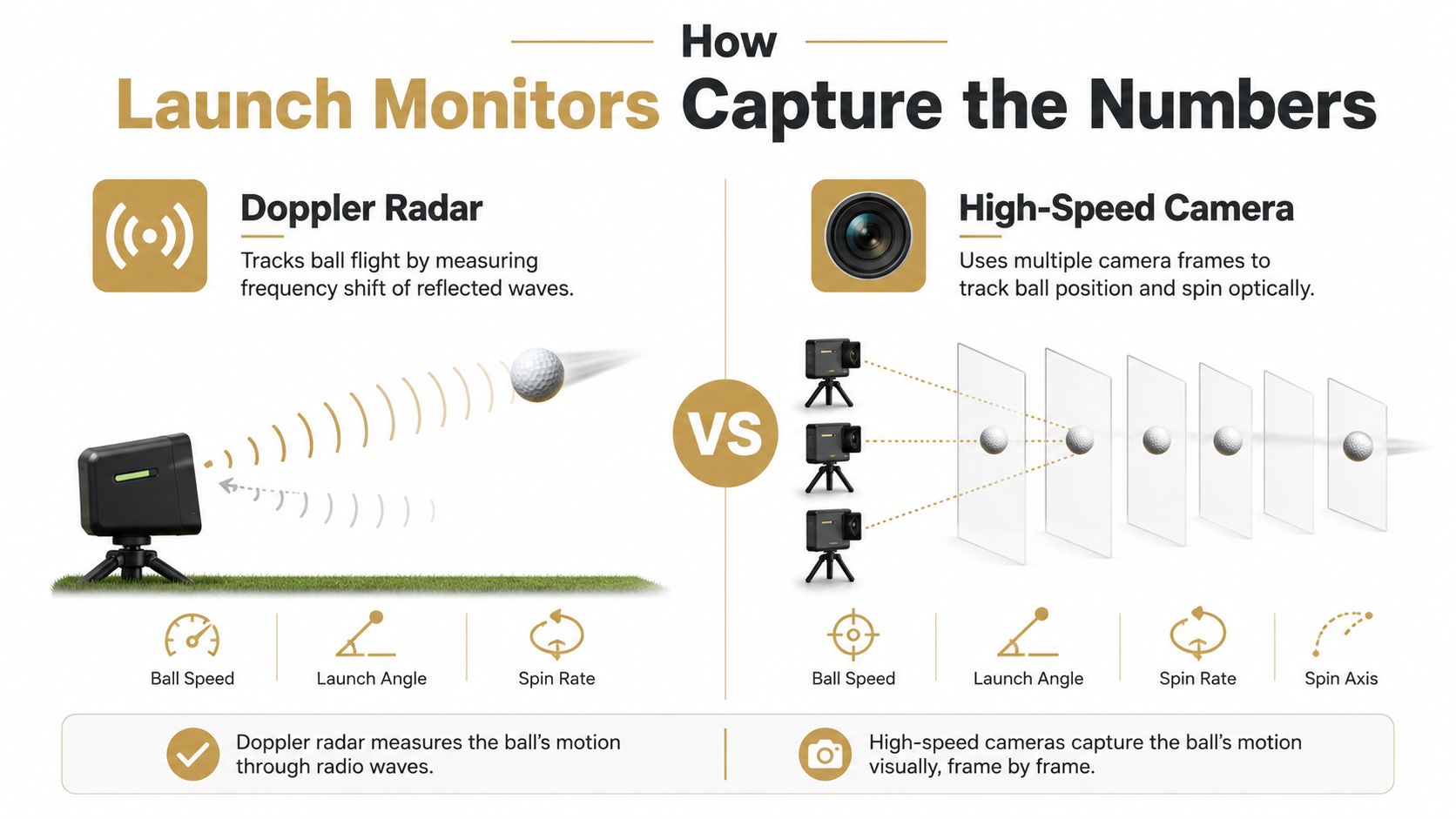
Two launch monitor apps can show similar screens and still arrive at those numbers in very different ways. The capture method under the app shapes what the system reads directly, what it estimates, and how carefully you need to set it up.
Radar based systems
Doppler radar watches reflected waves and infers club and ball speed from the frequency shift. A documented 24 GHz Doppler radar unit can report club-head speed from 25 to 220 mph and ball speed from 34 to 220 mph (Shot Scope). That range helps explain why radar units often work well for portable range practice, where you want to set up quickly and keep hitting.
Radar usually fits outdoor sessions because it can track the ball farther and does not depend as much on a tightly controlled image frame. Setup geometry still matters, though. If the sensor is misaligned or its line of sight is blocked, the app can only report clean data up to the limits of that positioning.
Photometric camera systems
Camera-based systems use multi-frame capture to reconstruct launch conditions. The Shot Scope guide describes a photometric stack using IR placement detection, laser alignment, high-speed cameras, and an accelerometer to measure ball speed, launch angle, back spin, and side spin with stated tolerances such as ±1 mph on ball speed and ±1° on launch angle.
That approach is built around the impact frame, which is why camera systems are often chosen for controlled environments. Lighting, position, and level setup matter more here, but the tradeoff is stronger detail around launch and spin. For players who want to compare session results later, the shot data can also be organized with Dialed Golf tools after the range work is done.
Radar is usually the better fit for portable outdoor tracking. Photometric stacks are usually better when the setup is controlled and the priority is impact-frame precision.
What this means for your practice
The useful question is not which method sounds more advanced. It is which one matches the session you are trying to run. If you want to hit balls at the range without much setup hassle, radar is usually easier to live with. If you are practicing indoors or want tighter launch and spin detail, a camera-based system can make more sense.
Phone-based apps need extra scrutiny for the same reason. They depend heavily on stable positioning, lighting, and angle, so the same number on screen can mean different things depending on how carefully the setup was done.
Standard Features That Make an App Useful
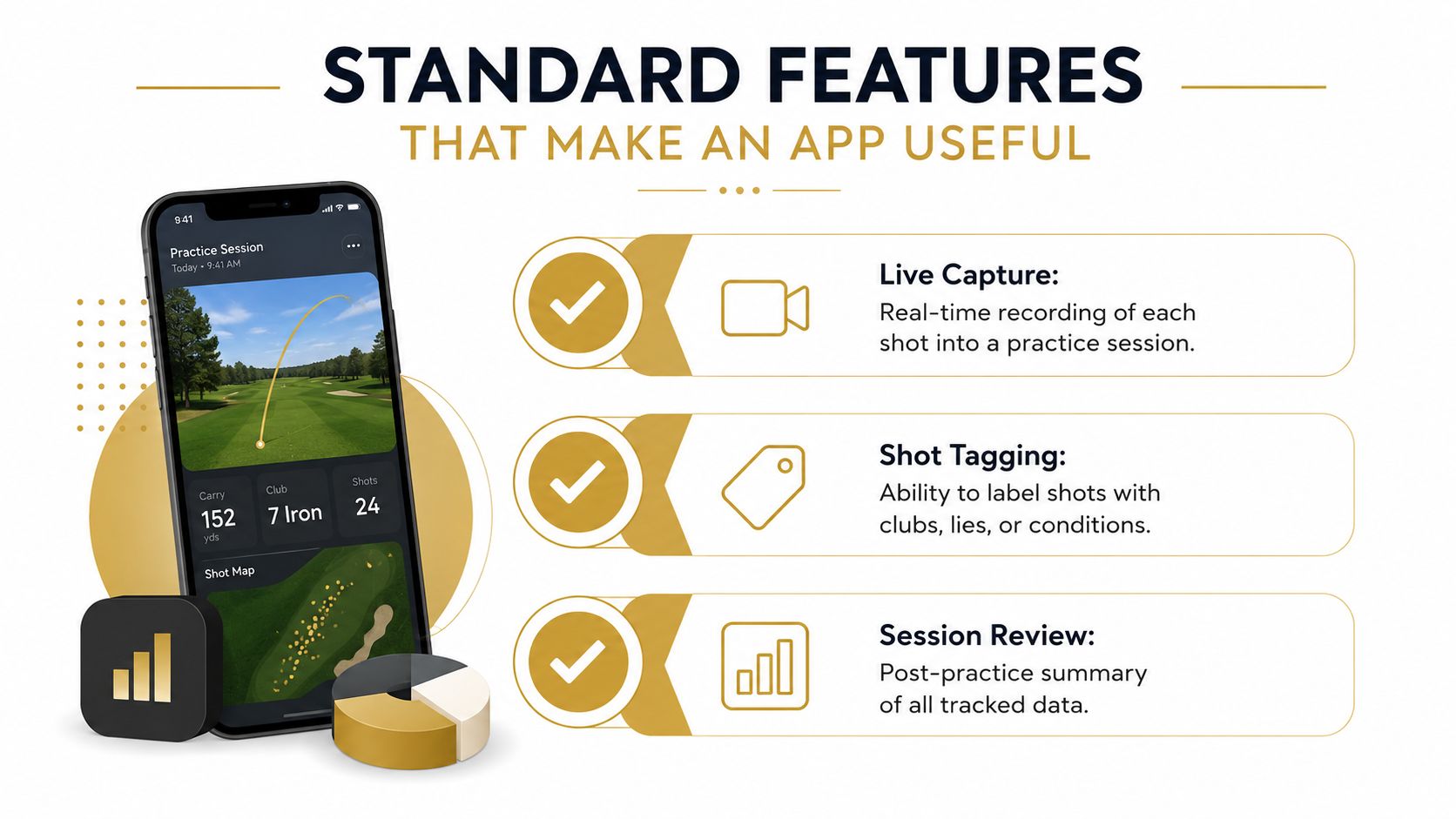
A useful launch monitor app does more than show numbers on a screen. It keeps each session organized so you can return later and understand what happened, much like a well-labeled bucket of range balls versus a pile scattered across the mat. The point is not just capture, it is making the captured data readable when practice is over.
Live capture
Live capture records each swing as it happens, inside the session instead of after the fact. That matters because you stay in the same rhythm as your practice, rather than stopping to enter shots by hand between swings. The app becomes part of the bay routine, not a separate admin task you have to clean up later.
For a golfer, that means fewer breaks in attention. You can keep the same club in your hands, hit the next ball, and still know the shot is being saved with the rest of the session.
Shot tagging
Shot tagging gives context to each swing. A tag can mark the club, the lie, or the purpose of the shot, so “7-iron” becomes something more useful than a loose note about a club you happened to hit. It works like placing tabs on a notebook page, the shot is still there, but now you can find the exact section you need later.
That extra context matters because range sessions are messy by nature. One bucket may include a stock shot, a low punch, and a few swings you were using to chase a feel. Without tags, those shots get lumped together, and the pattern is harder to trust.
Session review and export
A real app should give you a session review that lets you step back and see the whole practice block, not just one isolated swing at a time. That review is where the session starts to become useful for decision-making, because you can compare clusters of shots, spot trends, and notice whether your changes helped or hurt.
It should also let you move data out cleanly if you already track work in spreadsheets or want to share it elsewhere. That is why free tools that work without an account can matter after the range session is done, because the value of the app is not limited to the screen where the shot first appears. Dialed Golf fits into that workflow as one option, since it can ingest launch-monitor CSVs and organize sessions into club histories, carry windows, and practice priorities without forcing you to rebuild everything by hand.
A few habits make these features more useful:
- Record every shot in session: Leave out the cherry-picked swings if you want trends that reflect real practice.
- Tag the club while you're still fresh: Once you switch clubs a few times, memory gets blurry fast.
- Review the whole session, not just the best shot: The useful pattern usually sits in the cluster, not the outlier.
If you like learning by watching, this walkthrough is worth a look:
A lot of golfers check whether the app can show ball speed. The better question is whether it helps you remember what that ball speed was attached to.
Device Compatibility and CSV-First Design
A lot of golfers already own a monitor, and it may not be the same one their buddy uses. That's why compatibility needs to mean more than “it opens on a phone.” A practical app has to handle both live pairing and imported exports without turning every device change into a new workflow.
What compatibility really means
The cleanest live example is direct pairing with the Garmin R10, which gives the app a proven end-to-end path for real-time capture. That matters because one complete pairing flow is better than half a dozen fragile ones. Some apps deliberately start that way, then broaden support after the first path is stable.
Why CSV-first matters
A CSV-first design treats exported shot files as normal input, not a backup plan. That matters for devices and ecosystems like Garmin, Rapsodo, SkyTrak, FlightScope, and Uneekor, where the app can map fields from exports when the structure lines up. If a monitor can export the shot history, the app should try to make that data usable instead of asking the golfer to start from zero.
This is especially helpful for golfers who switch between range sessions and simulator sessions. One device may capture directly, another may export later, and the app can still normalize the data into the same club locker and session history.
Platform fit
Cross-platform access on macOS and Windows also matters more than people expect. Some golfers review data on a laptop after practice, others want the same setup at home and on the range. If the workflow stays consistent across platforms, the app feels like one system instead of two separate ones.
A good compatibility page should tell you two things clearly, what pairs live, and what imports cleanly.
The important part is not broad logo collecting. It's whether your actual shots survive the transfer from monitor to app without losing enough structure to become noise.
From Captured Data to Practice Decisions
A session full of numbers still leaves you guessing unless the app turns raw capture into something you can use. That is the point where the work becomes useful. The goal is not a bigger dashboard, it is a clearer decision about what to change next.
What the session should surface
A good workflow highlights carry windows, dispersion, and start direction, then narrows that into one practice priority. If your 8-iron carry stays clustered but your 6-iron spreads out, the app should make that obvious without forcing you to search for it. If your start direction keeps leaking right, that trend should rise to the top instead of getting buried under a stack of shot cards.
The same idea applies to reading a range session like a coach would. You are not trying to memorize every shot, you are trying to spot the pattern that deserves attention. A useful app makes that pattern easier to see, then leaves the rest in the background.
Turning data into a gapping chart
Practical tools help, but they should support the decision, not become the decision. A Carry Distance Chart Generator can turn session carries into a simple chart, and a Wedge Distance Matrix Builder can separate partial wedge windows into ranges you can trust on the course. If you need a structured way to compare wedge numbers after a session, the Wedge Distance Matrix Builder keeps those distances organized in one place.
Those tools matter because raw averages do not always explain club selection. You need to know whether the 7-iron and 8-iron overlap enough to matter, or whether the wedge numbers stay tight enough to trust under pressure. A session review should make that answer easier to see, not harder.
The decision quality problem
The bottleneck is not data capture anymore. It is decision quality. Many golfers already have enough numbers to work with, they just need the app to show which change matters and which one is only noise.
Practical takeaway: if the app cannot tell you what changed enough to act on, it is not done doing its job.
That is why the best next step after a session is not another bucket of shots. It is one clear priority, based on the trends that moved.
Setup Habits That Make App Data Trustworthy
Many golfers blame the app when the setup is the actual problem. Stable tripod position, decent lighting, and a level setup do more for trust than you might think, especially with phone-based capture where camera angle can distort the result. The bigger mistake is reacting too fast to one noisy session.
Wait for enough shots before you decide a trend is real.
Tripod stability matters because the phone can't reconstruct consistent motion from a moving frame. Lighting matters because camera-based systems need a clean view of the impact zone. Leveling matters because alignment errors can change what the app thinks it saw, which is why setup quality and patience both belong in the routine.
If you only remember one rule, make it this. Trust patterns, not single shots. A few swings can be messy for reasons that have nothing to do with your actual strike, and the smartest golfers leave room for that before they rewrite their whole practice plan.
Dialed Golf turns launch monitor data into something you can use after the session, from shot history and gapping to trend tracking and practice priorities. If you want to see how that fits into your own range workflow, visit Dialed Golf and take a look at the tools that help turn raw shot data into clearer decisions.
[…] useful workflow begins with the launch-monitor practice workflow, then treats every derived number as an estimate with a range. That approach works better for […]
[…] a fairer test, provided the golfer records distance buckets instead of relying on memory. The launch-monitor practice workflow can help organize broader practice habits, although putting still requires direct start-line and […]
[…] match loft and bounce to the delivery that appears most often, not to an idealized swing. The launch-monitor app guide can help frame that process around measured results rather than the loft number […]
[…] launch-monitor app workflow becomes more useful when the player treats every row as evidence. A shot with acceptable spin but […]
[…] a practical overview of the desktop workflow, the launch-monitor app guide provides the relevant context. The key is a shared schema. If on-course and simulated sessions use […]
[…] becomes especially important for golfers practicing with personal launch monitors. A useful launch-monitor practice workflow should help separate speed gains from strike gains, because the number that swings isn't […]
[…] launch-monitor practice guide can help organize sessions. Compatible launch monitors, whether paired directly or used through CSV […]
[…] same principle applies to practice data. Operators building a connected workflow can use the launch monitor app guide to understand how a golfer's practice activity can sit alongside the membership relationship, […]
[…] from Garmin, Rapsodo, SkyTrak, FlightScope, Uneekor, GSPro, Awesome Golf, and other systems. Launch-monitor CSV compatibility matters because a facility shouldn't have to discard historical practice data because every […]
[…] For a practical explanation of how launch-monitor data fits into a broader practice system, see Dialed Golf's launch-monitor app workflow. […]
[…] Dialed Golf handles this from a broader golfer-record view. The product stack is three products, one golfer record, one Pro plan. The consumer app is a pocket caddy on the course and is currently in TestFlight rather than App Store general availability. Desktop is built for launch-monitor practice at the range or in a garage sim, with live pair first for Garmin R10 and expanding, plus CSV import from Garmin, Rapsodo, SkyTrak, FlightScope, Uneekor, GSPro, Awesome Golf, and more. Golfers who want the larger context around that setup can read the related overview of a launch monitor app workflow. […]
[…] Garmin R10 users can export session data through the Garmin Golf app as CSV. A documented export flow includes fields such as club, ball speed, launch angle, spin rate, carry, total distance, and smash factor, which makes the data portable for later comparison in a launch-monitor app workflow. […]
[…] practice data and handicap data separate, even when they come from the same golfer. The Dialed Golf launch monitor app workflow can organize launch-monitor sessions and support CSV imports, while a qualifying round still needs […]