


The Garmin R10 is behind the ball, the session is already paired, and the carry column looks good enough to keep swinging. Then the driver spin rate moves from 2,400 rpm to 3,100 rpm, and nothing about the swing feels different. Tee height changes, face angle gets adjusted, and another ball goes airborne with a completely different number.
That pattern frustrates data-driven golfers because carry distance only shows the outcome. Spin rate is one of the quiet controls shaping that outcome, alongside launch, attack angle, speed, and strike location. Once those fields are read together, a wandering spin number becomes a useful clue instead of a reason to chase the lowest possible figure.
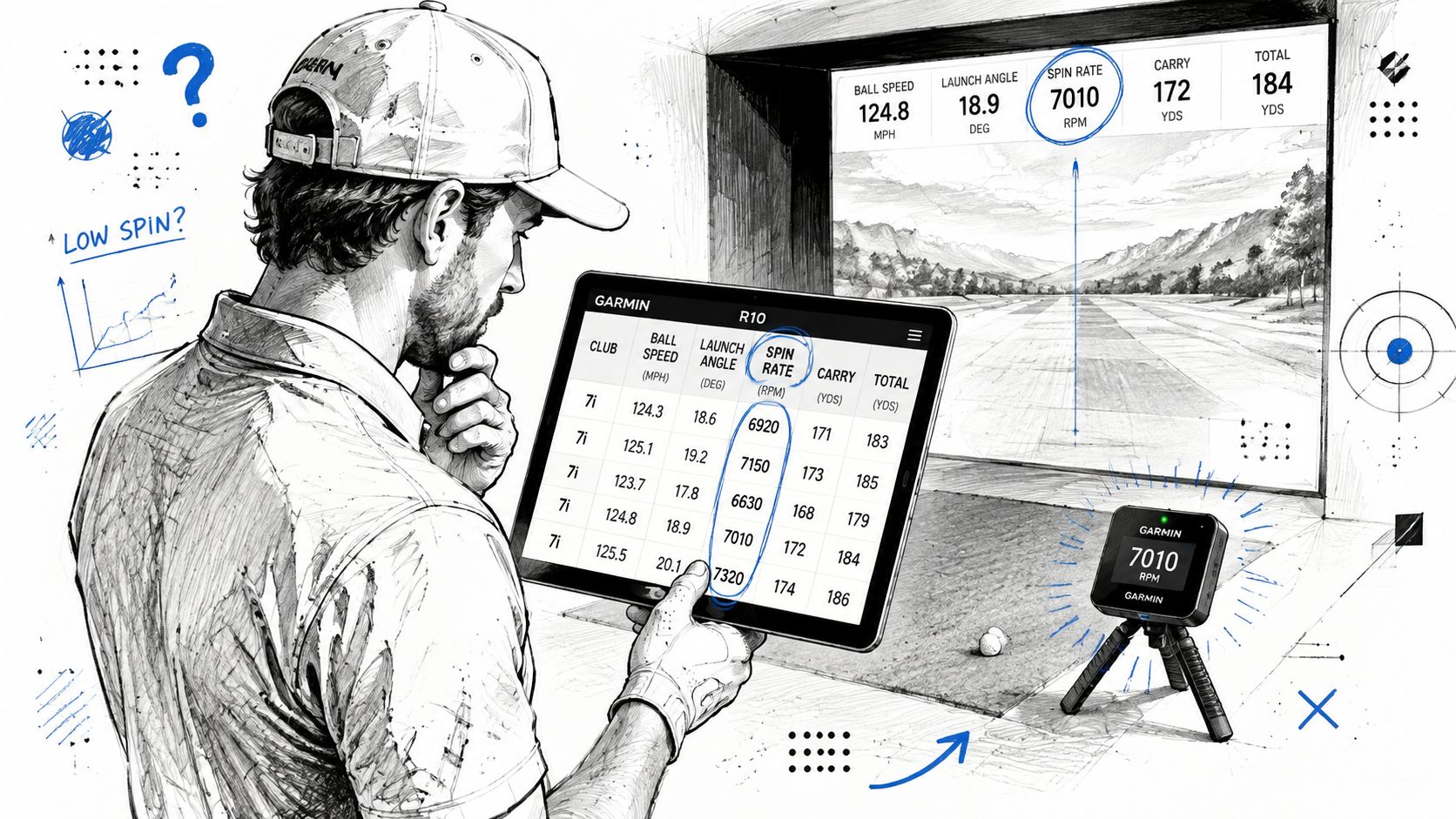
Table of Contents
- The Number on the Screen You Keep Ignoring
- What Spin Rate for Driver Actually Means
- Why One Ideal Spin Number Is the Wrong Question
- How Spin Shows Up in Launch Monitor Data
- Ideal Spin Windows by Swing Speed and Launch
- Equipment, Launch Conditions, and Strike as Spin Controls
- Turning Imported Sessions into a Spin Decision
- Your Next Range Session and a Spin Re-Test Plan
The Number on the Screen You Keep Ignoring
A Garmin R10 session often starts with a simple goal, hit the driver and see how far the ball carries. The first few shots produce familiar results, but the spin column tells a more complicated story. One ball launches high with plenty of spin, another comes out flatter, and a third falls from the sky earlier than expected. The player sees different carry numbers, yet the cause remains hidden if spin is treated as a reading rather than a variable.
The temptation is to make a quick equipment change. A golfer may lower the tee, move the ball forward, or alter the face setting after only a few shots. Those changes can affect launch and strike, but they also make diagnosis harder because several inputs move at once. A session becomes a sequence of guesses instead of a controlled test.
Practical rule: A spin number has meaning only when the nearby launch conditions explain how it was created.
A driver can produce a respectable carry number while spinning outside a useful window. Too much backspin can send the ball upward and reduce forward momentum. Too little can create a flight that looks fast at first, then loses lift before it reaches its potential carry. A tilted spin axis can also turn a seemingly efficient shot into a large curve, even when total spin looks acceptable.
The useful question isn't “How do you lower driver spin?” It's “What spin window fits this swing speed, launch, attack angle, and strike pattern?” The answer becomes much easier to find when every shot is captured and compared under similar conditions.
A session review should separate the baseline from the experiments. First, identify the normal spin pattern. Then change one input, record another group of shots, and compare carry, launch, dispersion, and spin together.
The video below provides another visual reference for reading driver metrics during practice.
The aim isn't to force every shot toward a tour-style number. It's to place the golfer's number in the right window, identify why it moves, and create a repeatable way to adjust it from session to session.
What Spin Rate for Driver Actually Means
Spin rate is the speed at which the golf ball rotates immediately after impact, measured in revolutions per minute. In driver discussions, the useful focus is primarily backspin, the rotation that helps the ball stay airborne. It isn't the same as spin axis, which describes the tilt of the rotation, and it isn't a verdict on whether a swing is good or bad.
TrackMan's published example gives a concrete reference point. For a golfer with 94 mph club speed, a 0° attack angle, and optimized carry, the recommended driver spin rate is 2,772 rpm according to TrackMan driver spin guidance. The same guidance discusses PGA and LPGA driver spin at about 2,500 rpm in 2023, showing that elite players still use meaningful backspin rather than trying to eliminate it.
Backspin acts along the lift axis of the ball. If the number is too low for the player's speed and launch, the ball can lose height and carry. If it's too high, the flight can climb excessively, spend energy moving upward, and arrive with less useful forward speed. Wind makes that trade-off more visible, because a high-spinning flight can rise and remain exposed instead of penetrating.
Three fields that golfers often confuse
- Spin rate measures how quickly the ball rotates.
- Spin axis measures the tilt of that rotation, which influences curvature.
- Spin loft describes the relationship between delivered dynamic loft and attack angle, helping explain why a shot produces more or less spin.
A launch monitor may also display backspin, sidespin, total spin, or spin-rate type. The labels vary by system, so the golfer should confirm what each field represents before comparing sessions. Two shots with similar total spin can still fly differently when their spin axes or launch conditions differ.
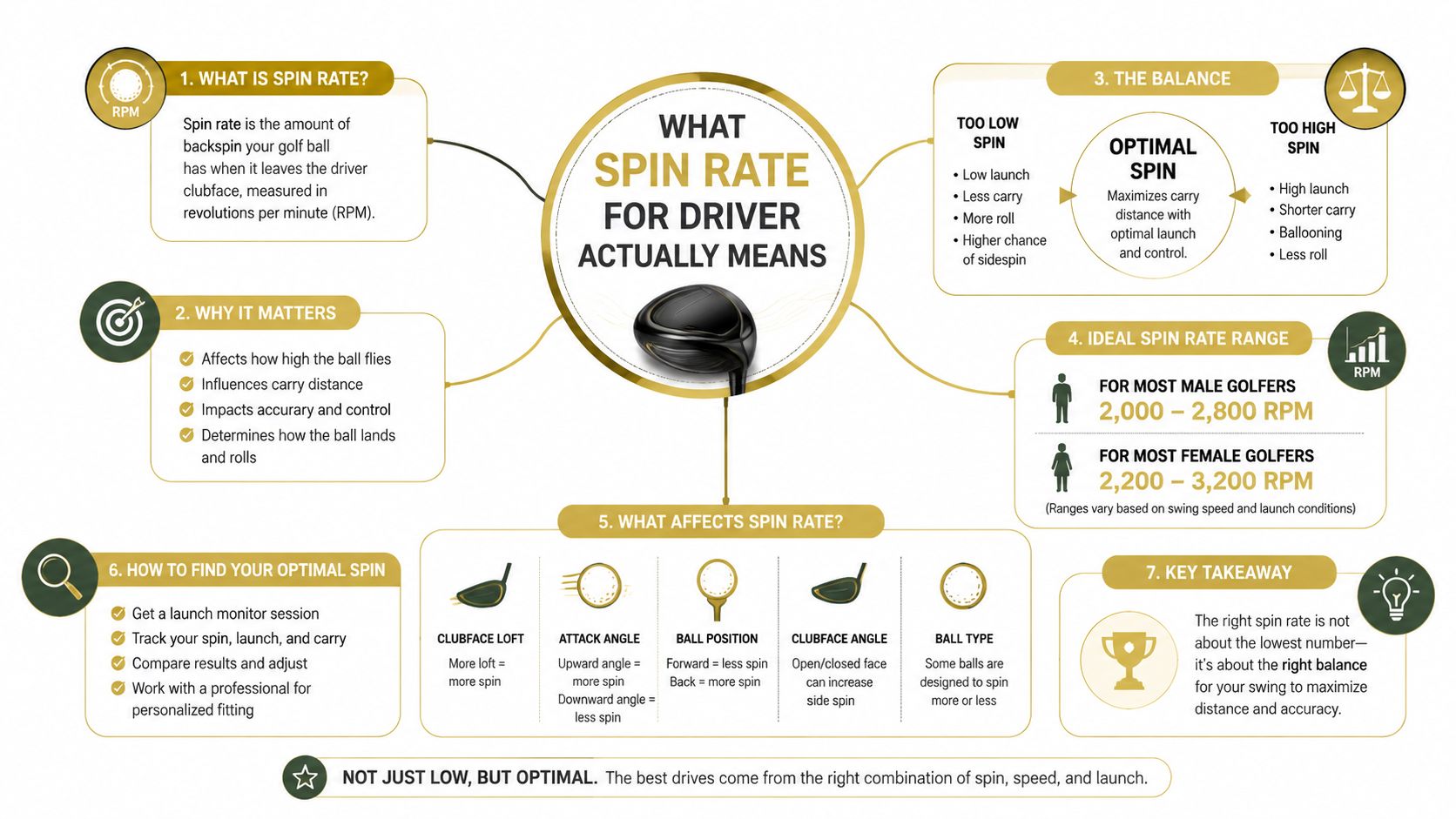
The practical takeaway is simple. Driver spin isn't a number to minimize in isolation. It's a launch condition that must support enough height, carry, and directional stability for the golfer producing it.
Why One Ideal Spin Number Is the Wrong Question
The phrase “ideal driver spin” creates trouble when it turns a fitting window into a universal target. A golfer swinging at a moderate speed may need more spin to keep the ball airborne, while a faster golfer can create a strong flight with less. The same 2,500 rpm reading can be useful for one player and inefficient for another.
Independent launch-monitor guidance places slower swings around 70 to 80 mph in a higher-spin requirement, roughly 2,600 to 3,200 rpm, while players above 100 mph may perform better closer to 1,750 to 2,500 rpm. The swing-speed-based driver spin guidance also places the TrackMan example at 2,772 rpm for 94 mph club speed and a 0° attack angle.
That spread is why “lower is better” fails as general advice. Lowering spin can help a fast player who already launches the ball high enough, but it can hurt a slower player whose flight needs more lift. A low-spin shot may look powerful at launch and still carry poorly because it can't stay airborne.
Read the number as a window
| Golfer profile | Swing speed | Attack angle | Spin rate | Launch angle | Real-world result |
|---|---|---|---|---|---|
| Slower-speed player | 70–80 mph | Neutral to slightly upward | 2,600–3,200 rpm | Higher launch needed | More spin can preserve height and carry |
| Moderate-speed player | Around 94 mph | 0° example | 2,772 rpm | Optimized launch required | A measurable reference window, not a universal rule |
| Faster-speed player | 100+ mph | Neutral to upward | 1,750–2,500 rpm | Moderate to higher launch | Lower spin can support a flatter, efficient flight |
The table isn't a replacement for a fitting. It's a way to avoid the first major mistake, judging spin without speed and launch. Carry depends on the interaction between club speed, ball speed, launch angle, attack angle, and spin.
Better question: Does this spin rate keep the ball airborne efficiently while limiting unnecessary height and curve?
A player should also consider dispersion. A lower-spin shot with a badly tilted axis can curve sharply, while a slightly higher-spin shot with a stable axis may finish closer to the target. Distance matters, but a useful driver window has to produce a playable pattern, not one isolated long ball.
How Spin Shows Up in Launch Monitor Data
A launch-monitor export turns the driver swing into a row of connected measurements. Typical shot-level fields can include Spin Rate, Spin Axis, Spin Tilt, Club Speed, Ball Speed, Launch Angle, and Attack Angle, along with carry, total distance, club path, face angle, dynamic loft, and other delivery information. Independent documentation of launch-monitor CSV structures shows how these files can contain detailed fields for mechanics, gapping, and trend analysis, including shot-level launch data fields.
The useful habit is to stop reading Spin Rate alone. A golfer should inspect the neighboring fields and ask whether the spin came from speed, delivered loft, attack angle, strike, or an unusual axis.
| Field | Units | What It Tells You About Spin |
|---|---|---|
| Spin Rate | rpm | The speed of ball rotation |
| Spin Axis | degrees | The tilt that influences curve |
| Spin Tilt | degrees | Another representation of rotational tilt |
| Club Speed | mph | The speed available to create launch and spin |
| Ball Speed | mph | The speed transferred into the ball |
| Launch Angle | degrees | The initial vertical direction |
| Attack Angle | degrees | Whether the club approaches upward or downward |
The fitter's mental model
Spin loft helps connect delivered loft and attack angle. In simplified terms, spin loft minus attack angle equals dynamic loft, so the relationship between delivery and strike matters more than a spin number viewed in isolation. Launch angle relative to spin rate also helps indicate whether the ball is launching efficiently, while the club-to-ball speed relationship, commonly expressed as smash factor, separates speed transfer from spin problems.
A Garmin CSV can make this review practical because each row represents an individual shot. The golfer can filter spin outliers, compare averages for a club, and isolate the ten shots that reveal the pattern instead of allowing one unusually high or low reading to define the session.
The launch-monitor app workflow becomes more useful when the player treats every row as evidence. A shot with acceptable spin but poor ball speed may point to strike. A high-spin shot with a downward attack angle may point to delivery. A normal spin number with excessive axis tilt may point to face-to-path.
Spin isn't a verdict. It's a relationship among several neighboring numbers.
Ideal Spin Windows by Swing Speed and Launch
A golfer needs a starting window before changing equipment or mechanics. The safest reference comes from the player's own speed and launch conditions, then gets refined through repeated strikes. The benchmark guidance supports the broader principle that slower swings generally need more spin and faster swings can often use less, but the final decision still belongs to the complete ball flight.
The table below uses qualitative launch and height descriptions where a precise verified benchmark isn't available. It's intended as a sorting tool, not a promise of a particular peak height or carry result.
| Swing Speed | Target Spin (rpm) | Launch Window | Typical Peak Height | What Happens Outside the Window |
|---|---|---|---|---|
| Under 80 mph | Roughly 2,600–3,200 | Higher launch | Enough height to sustain carry | Too little spin can produce a falling, low-energy flight |
| 80–90 mph | Higher than a fast-swing window | Moderate to higher launch | Stable and visibly airborne | Too much can climb and lose forward momentum |
| 90–100 mph | Around the mid-window | Moderate launch | Balanced carry and rollout | Too high can balloon, too low can reduce carry |
| 100–110 mph | Roughly 2,000–2,500 | Moderate launch | Flatter, efficient flight | Excess spin can create drag and height |
| 110+ mph | Often toward the lower end | Launch must remain sufficient | Penetrating flight | Too little can turn into a knuckleball |
The only precise speed-linked figures available here should be treated carefully. The independent guidance places 70–80 mph at roughly 2,600–3,200 rpm, and players at 100+ mph closer to 1,750–2,500 rpm. TrackMan's concrete example, 2,772 rpm at 94 mph with a 0° attack angle, sits between those broad speed profiles.
Launch changes the interpretation
Spin can't be separated from attack angle and dynamic loft. A golfer delivering more loft with a neutral or upward attack angle may need a different spin window from a golfer delivering less loft with a steep attack. Even if both players swing at the same speed, their launch conditions can produce different efficient combinations.
The dispersion result matters too. High-spin players may see ballooning and wider misses when the axis tilts, while low-spin players may see knuckleballs that drop before they reach useful carry. The correct number is therefore the one that supports height, carry, and a manageable curve together.
A player should first locate the speed band, then check launch and attack angle, and only then decide whether the spin reading needs to move.
Equipment, Launch Conditions, and Strike as Spin Controls
Driver spin usually changes through three connected control groups: equipment, launch conditions, and strike. Those groups don't deserve equal priority during a range session. Strike and tee setup provide fast feedback, delivery changes can be tested with practice, and shaft or head changes require a more controlled comparison.
Equipment sets the boundaries
Driver loft, shaft profile, shaft weight, and ball construction can all influence the delivered result. A stiffer or lower-launch profile may reduce spin for some deliveries, while a softer ball can raise spin in certain conditions. Those outcomes aren't automatic, so equipment should be tested against the golfer's actual launch, speed, strike, and dispersion rather than selected from a label.
The launch-monitor buying guide is relevant because the monitor's value depends on how well it helps compare controlled conditions. A lower-lofted head may reduce spin but also lower launch. A shaft change may alter delivery without solving an inconsistent strike.
Delivery is faster to test
Attack angle, dynamic loft, face-to-path, and clubhead speed shape the launch window. Tee height and ball position are practical starting points because they can change strike and delivery without requiring a new club. A golfer should change one variable, hit a consistent group, and record what happened to spin, launch, carry, and dispersion.
A useful session sequence looks like this:
- Tee height: Test a lower or higher setup while keeping the ball position consistent.
- Ball position: Move the ball slightly forward or back and watch attack angle and launch.
- Strike location: Use face spray or impact tape to connect contact height with spin changes.
- Equipment: Compare a shaft, loft, or ball only after the baseline strike pattern is understood.
Strike often explains the largest visible swings. Low-face contact can add spin and lower launch, while high-face contact can reduce spin and produce a higher launch. Toe and heel contact also interact with gear effect and spin axis, so a centered strike isn't only about energy transfer. It helps make the spin pattern repeatable.
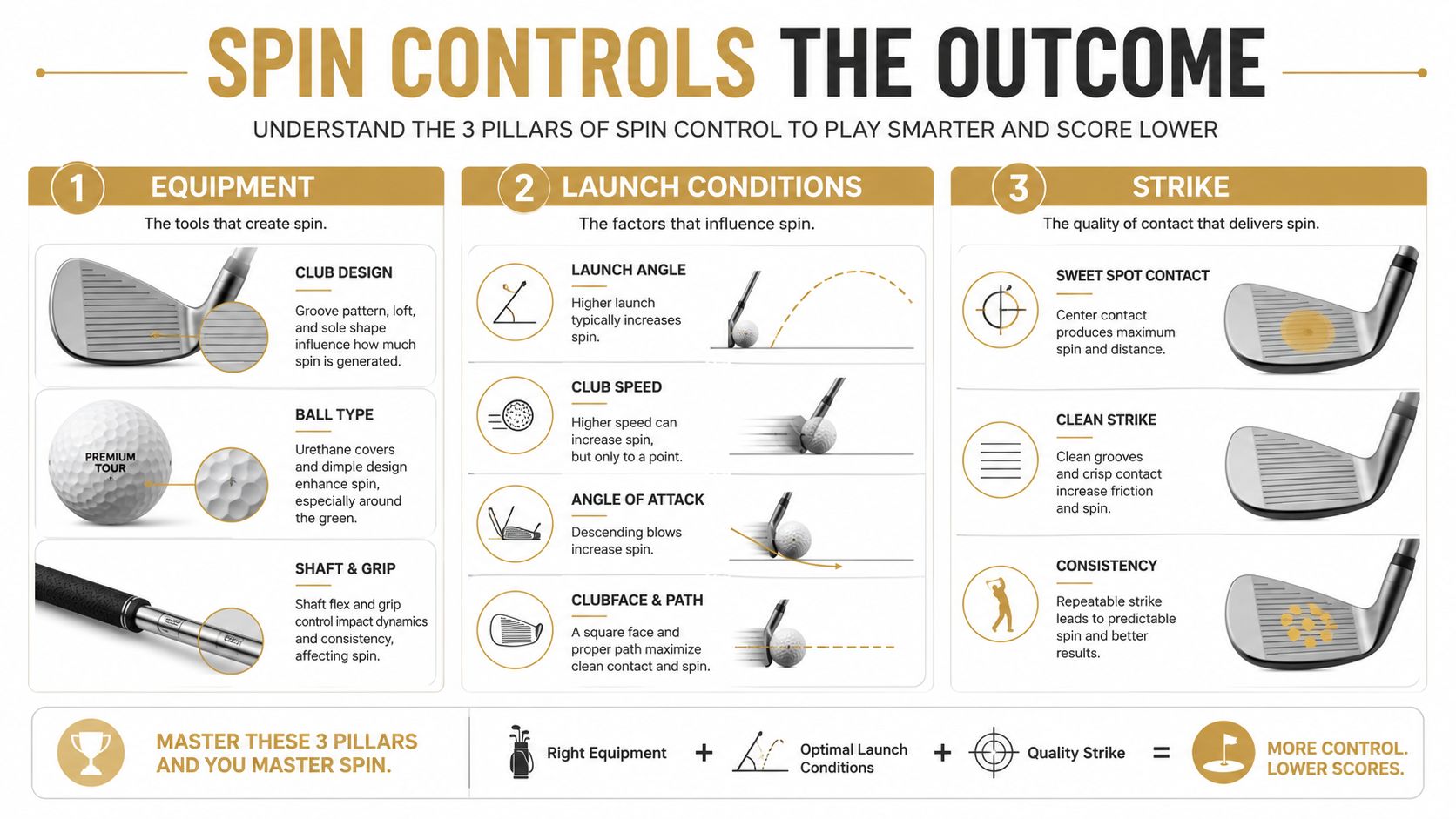
The fastest feedback comes from tee height and contact location. Ball position and attack angle require a more repeatable swing. Shaft and head changes need a full reswing and enough comparable shots to avoid mistaking normal variation for an equipment effect.
Turning Imported Sessions into a Spin Decision
A Garmin R10 session can become more useful after it leaves the phone. Garmin's Golf app supports CSV export from an R10 or R50 through an activity session, with the flow running through Activity, the selected session, and Export to CSV, as described in Garmin's CSV export instructions. That file gives the golfer a portable record instead of a result that disappears into a single practice screen.
The practical workflow starts with mapping the columns. Spin Rate belongs beside Launch Angle, Attack Angle, Club Speed, Ball Speed, and Spin Axis. Carry and total distance remain useful outcome fields, but they shouldn't replace the launch conditions that created them.

Treat each row as an experiment
Suppose the golfer's speed places the session in a moderate-spin window. The first imported group shows several shots with higher spin and a downward attack angle. The next group changes tee height while keeping the ball and club constant. If launch rises, attack angle improves, and spin moves toward the player's window without a dispersion penalty, the practice decision becomes clear.
The point isn't to make a spreadsheet look tidy. It's to connect the change to an observable result:
- Baseline: Import the original session and identify the normal spin range.
- Map fields: Group spin, launch, attack angle, speed, carry, and axis on the shot card.
- Isolate one input: Change tee height, ball position, or strike intention.
- Compare groups: Review averages and outliers rather than the single longest drive.
- Choose the next drill: Keep the input that improves the complete launch pattern.
The CSV import workflow supports this move from raw session file to repeatable practice record. A golfer can compare conditions across sessions, identify whether spin changes persist, and avoid making equipment decisions from one unusual shot.
Dialed Golf's desktop practice product is built around launch-monitor sessions, with live pairing starting on desktop for Garmin R10 and expanding, plus CSV and import support for a range of launch-monitor and simulator data sources. Its consumer app is a pocket caddy delivered through TestFlight rather than general App Store availability, while free web tools remain separate from the Pro plan.
Your Next Range Session and a Spin Re-Test Plan
A useful spin test doesn't require a complicated practice session. It requires consistent inputs, a clear baseline, and one change at a time.
- Warm up: Hit enough shots to establish a normal driver rhythm before recording the baseline.
- Record five drives: Keep the club, ball, tee position, and target consistent.
- Check the window: Compare average spin with the swing-speed and launch window that fits the player.
- Choose one lever: Change tee height, ball position, strike intention, or equipment, not several at once.
- Record five more drives: Keep the second condition as consistent as possible.
- Compare the groups: Review spin, launch, attack angle, carry, ball speed, axis, and dispersion together.
- Select the next practice task: Keep the change only if it improves the complete flight pattern.
The golfer shouldn't chase the lowest spin reading or reward one unusually long drive. The better result is a repeatable combination that keeps the ball airborne, limits unnecessary curve, and produces a predictable carry pattern.
Use Dialed Golf to bring Garmin R10 sessions into a structured desktop practice record, compare imported shot data, and turn driver spin readings into clear next-session decisions. Visit Dialed Golf to explore the tools and choose the workflow that fits the golfer's practice setup.