


A golfer can finish a round with a completely filled scorecard and still lack the information needed to make the next decision. The card may record gross strokes, but it might not show whether the round supports handicap posting, Stableford points, match-play status, practice diagnosis, or tournament administration. That's why the best scorecard examples aren't interchangeable forms. Each one is built around a different job.
The six formats below compare the fields that matter, the trade-offs each format creates, and the situations where a printable template, mobile workflow, or structured launch-monitor file makes more sense. Dialed Golf keeps free web tools free, while its consumer product is a pocket caddy on TestFlight, not App Store general availability, and its desktop product supports launch-monitor practice. Neither replaces every paper card. Each solves a different part of the golfer record.
Table of Contents
- 1. Traditional 18-Hole Scorecard with Handicap Index
- 2. Launch Monitor CSV Import Template for Range Practice
- 3. On-Course Pocket Caddy Scorecard with Mobile-First Design
- 4. Front Desk and Membership Scorecard Integration with Dialed Academy
- 5. Practice Session Scorecard with Gapping and Dispersion Analysis
- 6. Tournament and Competition Scorecard with Real-Time Scoring Sync
- Scorecard Examples, 6-Way Feature Comparison
- Choose the Scorecard That Matches the Decision
1. Traditional 18-Hole Scorecard with Handicap Index
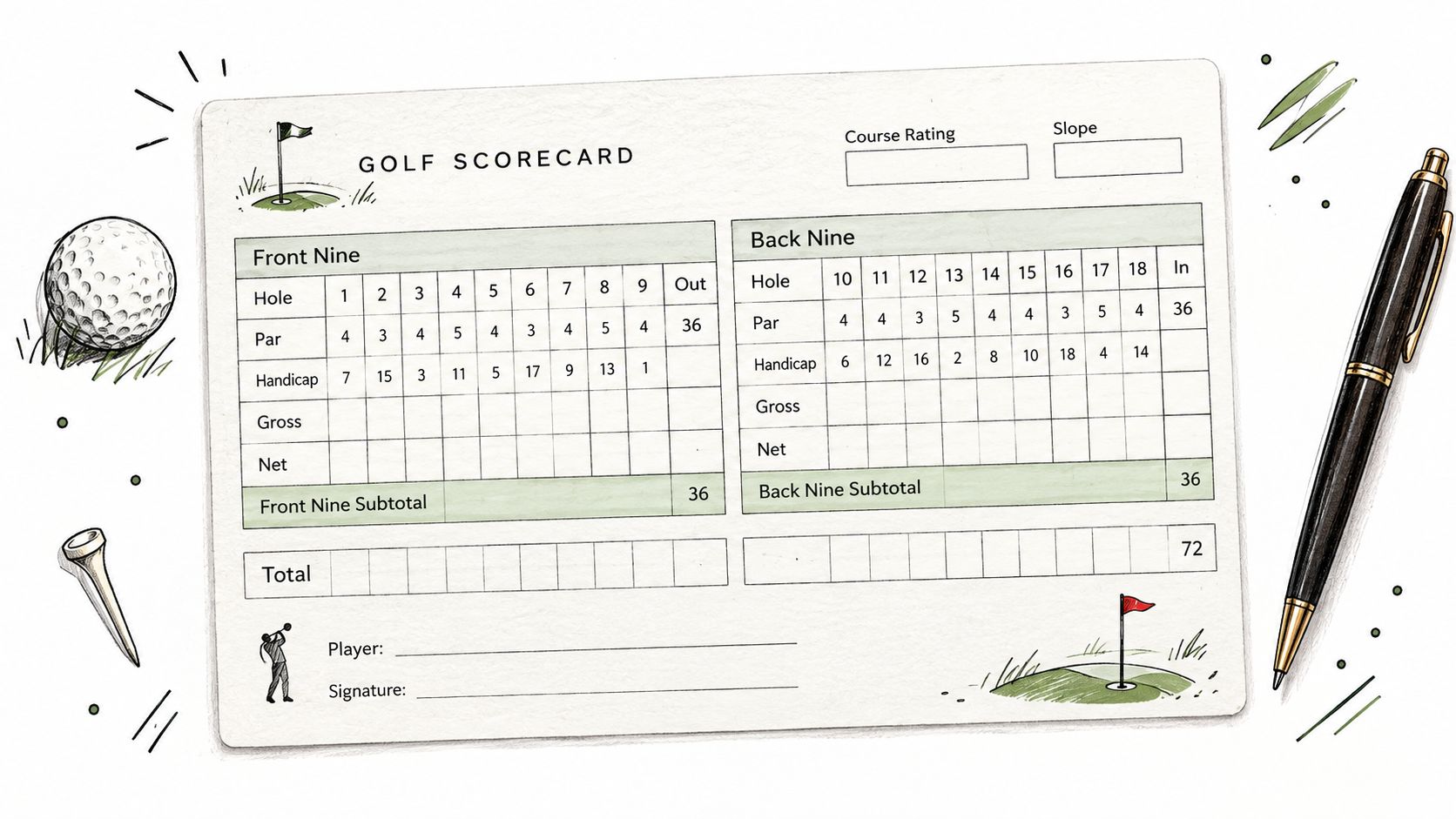
The traditional 18-hole scorecard remains the most recognizable format because it handles the basic record cleanly. It normally includes the hole number, par, handicap index, tee information, player details, and gross score columns, with space to total the front nine, back nine, and full round.
The handicap index row matters when a round is played under a net scoring format. A handicap-based match-play example from Quail Run Golf Links shows the higher handicap being identified and strokes allocated on the hardest holes. In that example, a player with a five-stroke handicap difference receives one stroke on each of the five toughest holes, and net scores determine hole points. The card therefore does more than record strokes. It converts raw scores into an equitable competition record.
The traditional format works well for club verification, championship records, and any round where a player or marker needs a physical audit trail. It's also the right printable template when the main decision is simple: what score should be recorded for each hole?
Fields that improve the basic card
A standard card can become more useful without becoming crowded. Add a small notes area for tee choice, penalties, unusual lies, or weather. Keep the primary score grid uncluttered, because too many diagnostic fields slow down marking and increase incomplete entries.
For long-term use, golfers can photograph the card before submitting it and store the image in a digital folder. A scorecard photo workflow can also help turn a paper round into an editable record, including course name, date, par, score, putts, fairway result, greens in regulation, and penalties.
Practical rule: Use paper for verification, then use digital history for pattern recognition.
Golfers who need a refresher on the relationship between posted scores and handicap calculations can use Dialed Golf's handicap calculation guide. Dialed Golf's pocket caddy builds on this familiar structure, but the paper card remains the dependable fallback when a phone battery, connection, or sync workflow gets in the way.
2. Launch Monitor CSV Import Template for Range Practice
A launch-monitor CSV template isn't a scorecard in the traditional sense. It's a structured practice record, where each row represents a shot or a grouped result and each column gives the desktop system something it can sort, filter, or compare.
Useful fields include session date, club, target distance, carry, total distance, ball speed, club speed, launch angle, spin, side angle, dispersion result, and a practice-block label. The exact available fields depend on the device export, so consistent file handling matters more than forcing every session into an identical layout.
Dialed Golf's desktop workflow supports live pairing first with Garmin R10 and expanding device support, along with CSV or import workflows from Garmin, Rapsodo, SkyTrak, FlightScope, Uneekor, GSPro, Awesome Golf, and more. Independent compatibility documentation lists these launch-monitor ecosystems alongside export and manual file-upload workflows through Up Your Club's compatibility information.
Make imports useful instead of messy
A file named only “session.csv” becomes difficult to interpret once a golfer has several practice days. A clearer naming convention combines the date, primary club, and session purpose, such as 2024-01-15_Driver_Session.csv. The date in that example is a file-naming illustration, not a performance claim.
Three habits protect the value of imported data:
- Separate warm-up shots: Keep loose swings apart from focused practice blocks.
- Preserve export consistency: Use the same device export settings where possible.
- Connect practice to play: Compare launch-monitor patterns with course scorecards to identify gaps between range performance and on-course decisions.
A coach might import a student's iron session, group shots by club, and then connect the result to lesson notes. A club fitter might compare two equipment setups using the same target and outcome fields. A garage-simulator golfer can use the desktop record to organize practice without manually retyping every shot.
The biggest limitation is context. A CSV can tell a coach what the device measured, but it won't automatically explain whether the golfer chose the wrong target, rushed the routine, or misread the lie. Dialed Golf's CSV import guide provides the workflow context. The golfer still needs a disciplined session label and a clear question for every practice block.
3. On-Course Pocket Caddy Scorecard with Mobile-First Design
A mobile-first scorecard succeeds by reducing friction. During a live round, the golfer usually needs quick course setup, yardage reference, hole information, and fast score logging, not a deep analytics dashboard after every shot.
That changes the design priority. Buttons should be easy to reach, score entry should take minimal taps, and the interface should keep attention on the next shot rather than on navigating menus. Dialed Golf's consumer app is designed as a pocket caddy, with the current release on TestFlight rather than App Store general availability. Apple's official TestFlight documentation describes beta distribution through App Store Connect, including tester invitations by email or public link and external tester groups.
Capture decisions without turning the round into data entry
The best time to enter a score is immediately after leaving the green. A short note about wind, lie, club selection, or penalty can add useful context, but the golfer shouldn't be forced to complete a long form before moving to the next tee.
This format works for casual rounds, personal handicap tracking, and stroke-play events where players want a live digital record. Free tools can handle basic scorecard needs without requiring a Pro subscription. That distinction matters because free web tools are the top of the funnel, not a disguised replacement for the paid product.
A pocket caddy should support the round, not compete with it.
The app's role is decision support. It can help a golfer review course information before the round, check yardage between shots, and log scores quickly. Post-round analysis belongs in the desktop environment, especially when the golfer wants to connect course results with launch-monitor practice.
Mobile live pairing is a later step in the product direction. Live pair is desktop-first, so golfers shouldn't treat the mobile app as a substitute for desktop launch-monitor workflows. That separation keeps each product focused: mobile for the course, desktop for practice data, and paper for situations where a physical record remains operationally important.
4. Front Desk and Membership Scorecard Integration with Dialed Academy
A club or range needs more than a golfer's hole-by-hole score. Staff may need to connect a member record with lessons, bookings, progression notes, and front-desk activity. This makes the scorecard an operational record, not just a personal playing log.
Dialed Academy is built for memberships and front-desk workflows at ranges and clubs. Its club plan is $99.99 per month or $999.99 per year, and the club keeps its dues. The recurring structure reflects how club software is commonly packaged. A separate golf club software pricing page shows monthly plans beginning at £99 per month, with higher tiers at £179 per month and £299 per month for different club types. Those prices are market context, not Dialed Golf pricing.
Design the record around staff decisions
A front-desk scorecard integration should make it easier to answer practical questions:
- Member engagement: Which members are actively using the facility or academy?
- Coaching continuity: What scores or practice notes should the instructor review before a lesson?
- Progression evidence: Can staff connect a golfer's recorded performance with coaching activity?
- Retention conversations: Is the club delivering enough visible value for the membership?
The limitation is governance. If front-desk staff enter inconsistent names, dates, or lesson categories, the record becomes difficult to trust. Operators need clear permissions, consistent onboarding, and a defined policy for what members can see versus what staff keep internal.
A country club might connect member rounds with lesson progression. An academy could use score records to frame accountability during coaching reviews. A range operator might use membership and practice activity to identify golfers who need a more relevant program, rather than sending generic promotions.
The scorecard should remain useful to the golfer while supporting the business behind the facility. That means avoiding a sprawling dashboard of metrics. Balanced scorecard guidance from ClearPoint Strategy's industry examples recommends 3 to 5 KPIs per perspective and about 20 total, with measures balanced across financial, customer, internal-process, and learning or growth perspectives. For a golf facility, a smaller set of connected measures is more actionable than collecting every available data point.
5. Practice Session Scorecard with Gapping and Dispersion Analysis
A practice scorecard answers a different question from a course card: what pattern should change before the next round? It records the relationship between club, target, distance, dispersion, and outcome instead of treating every shot as part of a final score.
A useful template might include club, intended target, carry result, left or right miss, strike quality, launch conditions, and notes about the swing or setup. The golfer can then compare a driver block with an iron block, or compare one equipment setup with another, without pretending that a range session is equivalent to tournament play.
Dialed Golf's desktop product supports launch-monitor practice with live pairing first for Garmin R10 and expanding, plus imported files from other supported ecosystems. The desktop-first approach suits golfers practicing at a range or in a garage simulator, where a larger screen and organized session history are more practical than a phone interface.
Use the card to test a decision
A club fitter might use a gapping scorecard to check whether iron distances separate cleanly. A coach could track dispersion patterns across a lesson block. A Garmin R10 owner might compare driver results under different practice conditions, while an equipment-focused golfer could compare a ball or shaft setup using consistent targets.
The strongest practice templates define the block before the first swing. The planned shot count should be chosen for the session's purpose, not treated as a universal rule. One block might focus on start direction, another on carry distance, and another on dispersion around a target. Mixing all three makes the final record harder to interpret.
Practice principle: Track the pattern that changes a club, target, or routine decision.
A gapping record shouldn't be judged by one memorable shot. Week-to-week comparisons are generally more informative than reacting to a single session, especially when warm-up swings, fatigue, and setup conditions vary. For a structured approach to distance relationships, golfers can use Dialed Golf's gap analysis guide.
The limitation is measurement dependence. Launch-monitor data can organize a practice session, but the golfer still has to decide whether the result matters on the course. A clean chart isn't automatically a useful conclusion.
6. Tournament and Competition Scorecard with Real-Time Scoring Sync
Competition scoring adds status, verification, and communication to the basic score record. A tournament scorecard may need competition name, player and marker details, course information, gross scores, net scores, format rules, approval fields, and leaderboard status.
The scoring format determines the necessary columns. Stroke play needs hole scores and totals. Stableford needs points by hole and a running total. Match play needs hole status, such as won, lost, or tied, and should show how handicap strokes affect net comparisons. A published match-play example from Quail Run Golf Links demonstrates how stroke allocation and net results can be written directly onto the card, including hole points and total match points.
Digital competition scoring can add live leaderboard visibility and a shared event record. Dialed Golf's app supports organized scoring workflows for club championships, member-guest events, academy competitions, and weekend formats. The product should be treated as a scoring and course-management tool, not as hardware, a swing-analysis camera, or a ranked list of golf apps.
Protect scoring integrity
Real-time scoring creates convenience, but it also creates operational dependencies. Event staff should test the app, confirm player setup, explain scoring rules, and assign responsibility for resolving discrepancies. A tournament director shouldn't discover on the final hole that players used different formats or entered scores under the wrong profile.
A practical competition workflow includes:
- Pre-event verification: Confirm player names, tees, handicaps, and scoring format.
- On-course responsibility: Assign a scoring official or marker to review questionable entries.
- Audit trail: Keep photographs or approved records where the event requires verification.
- Post-event export: Preserve the final leaderboard for awards, handicap administration, and event communication.
A club championship can use a live leaderboard for players and spectators. An academy tournament can connect student results with later coaching conversations. A scramble can use shared scoring while keeping payout and rules administration separate from the basic hole-entry screen.
The limitation is that a digital leaderboard can make a small data-entry error visible to everyone. Paper backup cards and a clear correction process remain sensible, especially for formal competitions. The right format doesn't eliminate administration. It makes responsibilities visible before the first tee time.
Scorecard Examples, 6-Way Feature Comparison
| Template | Implementation Complexity | Resource Requirements | Expected Outcomes | Ideal Use Cases | Key Advantages |
|---|---|---|---|---|---|
| Traditional 18-Hole Scorecard with Handicap Index | Low, simple paper form and manual scoring | Paper scorecards, pens, storage | Official handicap records; archival round logs | Casual rounds; handicap submissions; backup when digital fails | Universally accepted; low cost; easy long-term archiving |
| Launch Monitor CSV Import Template for Range Practice | Medium, requires format mapping and import workflows | Personal launch monitor, desktop software, CSV familiarity | Shot-by-shot metrics ready for batch analysis | Range/Garage sim practice; coach-led gapping and equipment testing | Automates data entry; multi-brand support; fast batch analysis |
| On-Course Pocket Caddy Scorecard (Mobile-First Design) | Medium, mobile UI and sync logic, low friction UX | Smartphone, app, cellular/Wi‑Fi, battery | Quick in-round scoring and yardage guidance; synced rounds | Live rounds, casual tournaments, players wanting minimal device interaction | Fast one-tap scoring; real-time yardage/strategy; reduces distraction |
| Front Desk and Membership Scorecard Integration (Dialed Academy) | High, integrates membership, billing, lesson systems | Club management system, staff training, subscription cost | Unified member data; lesson-linked performance reports | Clubs, academies, driving ranges managing members and lessons | Consolidates admin and coaching data; improves retention; reduces overhead |
| Practice Session Scorecard with Gapping and Dispersion Analysis | Medium–High, analytics and LM integration needed | Launch monitor ($500–$3k+), desktop analytics, coach input | Club gapping, dispersion stats, equipment recommendations | Focused practice sessions; club fitting; coach performance tracking | Precise gapping and dispersion insights; data-driven equipment choices |
| Tournament and Competition Scorecard with Real-Time Scoring Sync | High, live sync, leaderboard and verification systems | Reliable venue connectivity, player devices, event staff | Live leaderboards, transparent scoring, instant results | Club championships, member‑guest events, organized competitions | Real-time engagement; reduces manual leaderboard work; dispute visibility |
Choose the Scorecard That Matches the Decision
The right scorecard starts with the decision that follows the entry. A traditional 18-hole card is the dependable choice for an official round, handicap support, club verification, and tournament records. It captures gross scores clearly and can support net scoring when the handicap strokes are marked correctly.
Stableford and match play need format-specific additions. Stableford requires points by hole and a running points total. Match play needs hole status, handicap-stroke allocation, and a clear method for resolving ties. A standard stroke-play card can be adapted, but it shouldn't be used unchanged when the competition depends on a different scoring logic.
A pocket caddy fits golfers who need quick on-course decisions, yardage reference, and fast score logging. It's not designed to replace every paper workflow, and Dialed Golf's consumer app is currently distributed through TestFlight rather than App Store general availability. A CSV import template fits golfers and coaches moving launch-monitor practice into desktop analysis. A practice scorecard adds the context needed to study gapping, dispersion, target choice, and equipment setup.
For ranges, academies, and clubs, Dialed Academy connects scorecard records with memberships and front-desk operations. That's a business workflow, not just a larger golfer scorecard. It needs permissions, staff training, and clear definitions for which data supports coaching, member service, or operational decisions.
Printable template checklist
Before printing or deploying a scorecard, confirm five points:
- Identify the format: Define whether the card supports stroke play, Stableford, match play, practice, or administration.
- Define required fields: Include only the information needed for the next decision.
- Leave annotation space: Make room for penalties, lies, wind, club choices, or marker notes.
- Add status markers: Use subtotals, points, hole status, or approval fields where the format requires them.
- Test the workflow: Fill out the form during a realistic round or practice session before relying on it in competition.
A scorecard is useful when it reduces uncertainty. The paper card preserves an official record. The pocket caddy supports the next shot. CSV imports organize measured practice. A practice template exposes patterns. Academy software helps staff manage a program. Tournament scoring keeps players and organizers aligned.
The strategic takeaway is simple: a useful scorecard does more than capture numbers. It makes the next golfing or operational decision easier.
Dialed Golf offers a pocket caddy on TestFlight, desktop launch-monitor practice with Garmin R10 live pairing first plus CSV and import workflows, and Dialed Academy memberships and front-desk tools at $99.99 per month or $999.99 per year. Golfers, coaches, and club operators can match the right scorecard workflow to their needs by visiting Dialed Golf.