

The golfer has thirty seconds, a creek in front, and a back-right pin. The GPS app says the green is 168 yards away, while the rangefinder shows a different number to the flag. The choice between a 7-iron and an 8-iron isn't about which device looks more advanced. It's about which number gives the golfer enough confidence to make a committed swing.
That's the practical question behind golf GPS app vs rangefinder. A GPS app helps plan the hole, identify hazards, and understand the shape of the green. A laser rangefinder confirms a specific target in the player's line of sight. The tools overlap, but they solve different parts of the same decision.
| Decision factor | Golf GPS app | Laser rangefinder |
|---|---|---|
| Primary job | Course navigation and planning | Exact target confirmation |
| Typical target | Front, middle, back, hazards, layup points | Flagstick, tree, bunker edge, or other visible target |
| Blind-shot usefulness | Strong | Limited |
| Pin precision | General green reference | Direct flag measurement |
| Practice-data role | Scores, shots, and course history | Little or no post-round workflow |
| Best fit | Planning and low-friction play | Approach-shot precision |
Table of Contents
- The Decision That Matters on the Course
- How GPS Apps and Rangefinders Measure Distance Differently
- Tournament Rules and Local Restrictions You Need to Know
- Feature Differences That Shape Your Workflow
- On-Course, Range, and Desktop Workflows Compared
- Cost of Owning Each Tool Over a Full Season
- Matching the Right Tool to Your Golfer Profile
- Recommendations and When to Upgrade to Pro
The Decision That Matters on the Course
Plan the hole before choosing a club
A golfer standing over an approach shot makes two separate decisions. First, determine how the hole should be played. Then choose the club for the intended shot.
A GPS app is useful for the first decision. It can show the front, middle, and back of the green, hazards, layup points, bunker positions, and fairway shape. That answers questions a laser cannot answer from behind the ball: Is the creek reachable? Where does the fairway narrow? Is a layup short of the bunker comfortable? Which side leaves the better angle?
The app combines the golfer's position with a digital course map. It can still provide a reference when the green or flag is hidden behind a ridge, trees, or a dogleg. Its limitation is important: a mapped green reference does not identify the flag's exact location that day.
A rangefinder addresses the next question. The player aims at the flagstick or another visible target, confirms the reading, and gets a live line-of-sight distance. That number applies to the selected target rather than a fixed point on the course map.
Practical rule: Use GPS to build the plan, then use the laser to confirm the shot when the pin, elevation, or club gap makes precision important.
The club decision is the dividing line
Suppose the GPS app shows a front distance that suits an 8-iron and a back distance that points toward a 7-iron. The rangefinder identifies a flag near the back of the green. The golfer now has to decide whether a broad landing-zone estimate is enough or whether the shot requires a precise carry number.
That distinction matters most inside the scoring range, when a few yards can move the choice between adjacent clubs. An independent test summary found that GPS and laser readings differed by a median of 4 yards, with the gap reaching 7 yards at the 90th percentile across shots (independent GPS and laser accuracy testing). The same summary reported a smaller median difference of about 2 yards from 50 to 99 yards, and a larger median difference of about 4 yards beyond 200 yards, where the 90th-percentile gap reached 9 yards.
GPS is often good enough for broad club selection. A rangefinder earns its place when a 3-to-7-yard difference could change the club, the intended carry, or the acceptable miss. The golfer still needs a dependable club-distance baseline. Practice sessions that record carry, total distance, dispersion, and strike quality give the on-course reading useful context instead of leaving the player to trust one isolated number.
Build one golfer record
Distance technology only helps when the golfer knows what the chosen club normally does. An app may show a target at 168 yards, but it cannot determine whether that calls for a full 7-iron, a controlled 7-iron, or an aggressive 8-iron without a personal baseline.
That baseline should come from repeated practice, not one perfect strike. A unified golfer record can connect launch-monitor sessions, club tables, round scores, and shot history across the app and desktop, so course decisions reflect the player's normal pattern.
The tool supplies the yardage. The record supplies its meaning.
How GPS Apps and Rangefinders Measure Distance Differently
GPS and laser tools don't measure the same object in the same way. A GPS app estimates distance from the golfer's mapped position to selected points on the course. A rangefinder measures the distance to the physical target the golfer aims at.
GPS is a map-based estimate
A GPS app uses satellite positioning to locate the player, then matches that position with mapped course geometry. It can calculate distances to the green's front, middle, and back, as well as hazards, bunkers, doglegs, and layup points when those features are included in the map.
Independent technical guidance commonly places GPS accuracy around 3 to 4 yards under ideal satellite conditions, while also emphasizing that GPS yardages are bird's-eye measurements that don't automatically account for elevation (technical guidance on golf GPS accuracy). Tree cover, tall structures, poor course mapping, and an imprecise starting position can make the practical result less dependable.
The advantage is coverage. GPS can show a target the golfer can't see, and it provides several strategic references without requiring the player to aim repeatedly.
A laser measures the selected target
A laser rangefinder sends a pulse toward a visible target and measures the return. The result is a direct distance to the flagstick or another object that reflects the signal. That makes the reading more specific than a generic center-green yardage, provided the player locks onto the intended target.
A study summary found that laser measurement was the more accurate method in the comparison it reviewed, while GPS showed reasonable agreement within 4 meters and the laser recorded a coefficient of repeatability of 2.6 meters (study summary on GPS validity and reliability). The practical takeaway isn't that GPS is unusable. It's that laser readings are generally more repeatable when the player needs a precise target distance.
How much difference should the golfer expect?
The following table uses the practical pattern from independent testing. It isn't a promise that every shot will produce the same gap. It shows why the two readings can lead to different club decisions.
| Distance | GPS app, to green center | Laser rangefinder, to flag | Typical gap |
|---|---|---|---|
| 100 yards | General mapped reference | Direct flag reading | About 2 yards in shorter approach ranges |
| 150 yards | General mapped reference | Direct flag reading | Commonly within the broader 3-to-7-yard decision band |
| 200 yards | General mapped reference | Direct flag reading | About 4 yards median |
| 250 yards | General mapped reference | Direct flag reading | Can approach the longer-shot 90th-percentile gap of 9 yards |
The difference matters most when the player is already between clubs. On a level lie, a GPS number may be perfectly adequate for choosing a conservative target. On an uneven lie, elevation and the angle of attack add another layer, and a straight-line GPS reference may not represent the shot's effective playing distance.
A slope function can help in casual play, but it introduces a competition-rule question. For a tournament round, the player must know whether the adjusted number can be displayed and whether the committee has restricted distance-measuring devices.
Tournament Rules and Local Restrictions You Need to Know
Distance-measuring devices changed status under the Rules of Golf on January 1, 2019, when the governing rules allowed them in competition for distance and direction information, subject to local prohibitions (Golf Monthly's explanation of rangefinder rules). That change made both GPS apps and rangefinders much more accepted in elite amateur and professional golf.
The permission isn't unlimited. A committee can prohibit distance-measuring devices through a local rule, and individual clubs, amateur associations, or professional tours can impose their own restrictions. The event notice controls the round, so a player shouldn't assume that a device allowed in a regular Saturday game is allowed in every competition.
What both tools can provide
Under the permitted use, a GPS app or rangefinder can provide distance and direction information. A front, middle, or back GPS number fits that purpose. A laser distance to the flag does too.
The restriction concerns extra information that changes the measurement into a playing recommendation. Slope-adjusted or “plays-like” yardages remain restricted in competition rounds when the applicable rules or local conditions prohibit them. A device with a slope switch must have the function disabled when required, and the golfer should confirm that the device isn't displaying prohibited information through another connected feature.
What to check before the first tee
- Read the notice: The committee's terms take priority over assumptions based on casual play.
- Disable adjustments: Turn off slope or other prohibited playing calculations when the competition requires it.
- Confirm app behavior: A phone app should display only the information permitted for the round.
- Separate practice from competition: Practice rounds and casual rounds generally allow broader device use, but the actual event conditions still govern tournament play.
Golfers who regularly enter events can keep the relevant rules and handicap guidance bookmarked through the Dialed Golf rules and handicap resources. The safest habit is simple: check before the round, not after a rules question arises.
Feature Differences That Shape Your Workflow
A GPS app is a course-management layer. A rangefinder is a target-measurement instrument. Comparing them only on accuracy misses the reason many golfers carry one tool and occasionally use the other.
The working feature inventory
GPS apps can preload course maps and display hole-by-hole yardages, hazards, doglegs, layup zones, and strategic points. Some also support shot tracking, scorecard synchronization, stat history, green undulation maps, and club recommendations based on stored performance.
Rangefinders focus on a smaller job. They measure the target in front of the golfer, often with pin-lock confirmation and vibration feedback when the device believes it has found the flag. Slope-adjusted distances can be useful in casual rounds, but they need to be switchable for competitions that prohibit adjusted information.
| Feature | GPS app | Laser rangefinder |
|---|---|---|
| Course maps | Strong, with hole shape and mapped targets | Usually limited or absent |
| Hazard planning | Strong for visible and blind targets | Useful only when the target can be aimed at |
| Shot tracking | Can record locations, clubs, and outcomes | Usually not a complete tracking system |
| Slope | May provide adjusted information where supported | Common in advanced models, with tournament shutoff required |
| Stats | Score history, trends, and round review | Minimal unless connected to another system |
| Pin targeting | General green references | Direct flag measurement |
| Battery workflow | Depends on the phone and app use | Requires charging or battery replacement |
| Blind shots | Useful | Weak when the flag can't be seen |
Where each tool breaks down
GPS isn't equally reliable at every point on the hole. Course maps can be less useful around irregular bunker edges, sprinkler heads, temporary tee positions, or poorly mapped green boundaries. A green-center number also won't tell the golfer whether the flag is tucked behind a false front or sitting near the back edge unless the app provides that information separately.
The laser has a different failure pattern. Fog, darkness, glare, rain, and a shaky aim can make target acquisition difficult. A rangefinder also can't measure a flag hidden over a ridge or behind trees, and it won't automatically reveal the hazard beyond the landing area.
The strongest setup isn't the one with the longest feature list. It's the one that removes the most uncertainty from the golfer's recurring decisions.
The player should prioritize the repeated problem. A golfer who loses shots through poor layup planning needs mapping. A golfer who routinely chooses the wrong iron because the pin position changes the number needs direct targeting.
On-Course, Range, and Desktop Workflows Compared
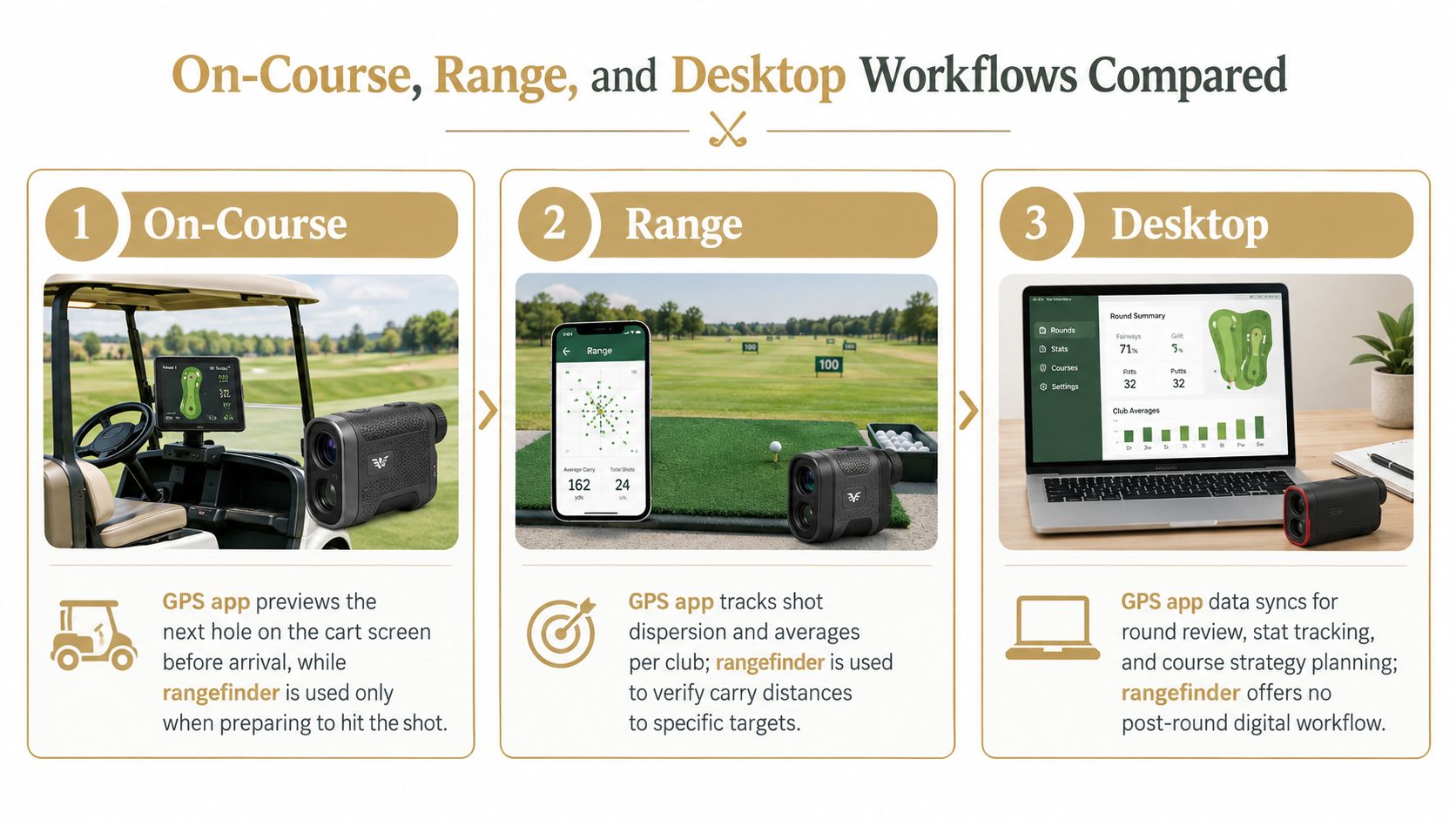
The two tools become easier to evaluate when placed in the golfer's actual routine. A GPS app has a role before and during the hole. A rangefinder has a role at the moment a visible target needs confirmation. Neither replaces a launch monitor, and neither automatically turns practice data into a usable club baseline.
On the course
The GPS app can sit on the cart or stay accessible on the phone while the golfer previews the next hole. Before reaching the ball, the player can review the fairway shape, identify hazards, and decide whether the next shot should favor position or distance.
The rangefinder comes out when the shot matters. The golfer aims at the flag, confirms the target, considers the lie and conditions, then compares the number with the personal club-distance record. The practical workflow is fast when the player doesn't use the laser for every object on the hole.
At the range
A GPS app doesn't measure the practice shot's carry or spin. It can provide course context, but it isn't the primary measurement system on a practice range.
A launch monitor records the shot. A laser can then verify the distance to a visible target when the range has marked flags or fixed targets. That check helps identify whether the launch monitor's carry number and the target's physical distance make sense together, especially when the player is building a club table.
The practice process should separate carry, total distance, and dispersion. A single target reading can't replace those fields. It can, however, anchor the session in the physical environment.
On the desktop
A desktop simulator gives the golfer a different environment again. Course mapping can support virtual rounds and strategy review, while a laser has no meaningful role once the player is hitting into a screen.
The valuable connection is the golfer record. Launch-monitor sessions can arrive through live pairing or file import, then sit alongside on-course scores and shot history. Independent app documentation shows a common workflow that imports sessions from multiple launch monitors and simulators through photo or CSV files, with automatic format detection (launch-monitor data import documentation). Another analytics workflow describes CSV ingestion from several launch-monitor formats, followed by club tables, dashboards, and progress charts, while retaining compatibility with existing session exports (CSV-based golf analytics workflow).
For a practical explanation of how launch-monitor data fits into a broader practice system, see Dialed Golf's launch-monitor app workflow.
Dialed Golf's desktop workflow is live-pair first for compatible devices, including the Garmin R10 and an expanding set of integrations, with CSV and import support for Garmin, Rapsodo, SkyTrak, FlightScope, Uneekor, GSPro, Awesome Golf, and more. Its consumer app is a pocket caddy currently available through TestFlight, not general App Store availability. The result is a single golfer record across the app and desktop, rather than separate practice and on-course histories.
Cost of Owning Each Tool Over a Full Season
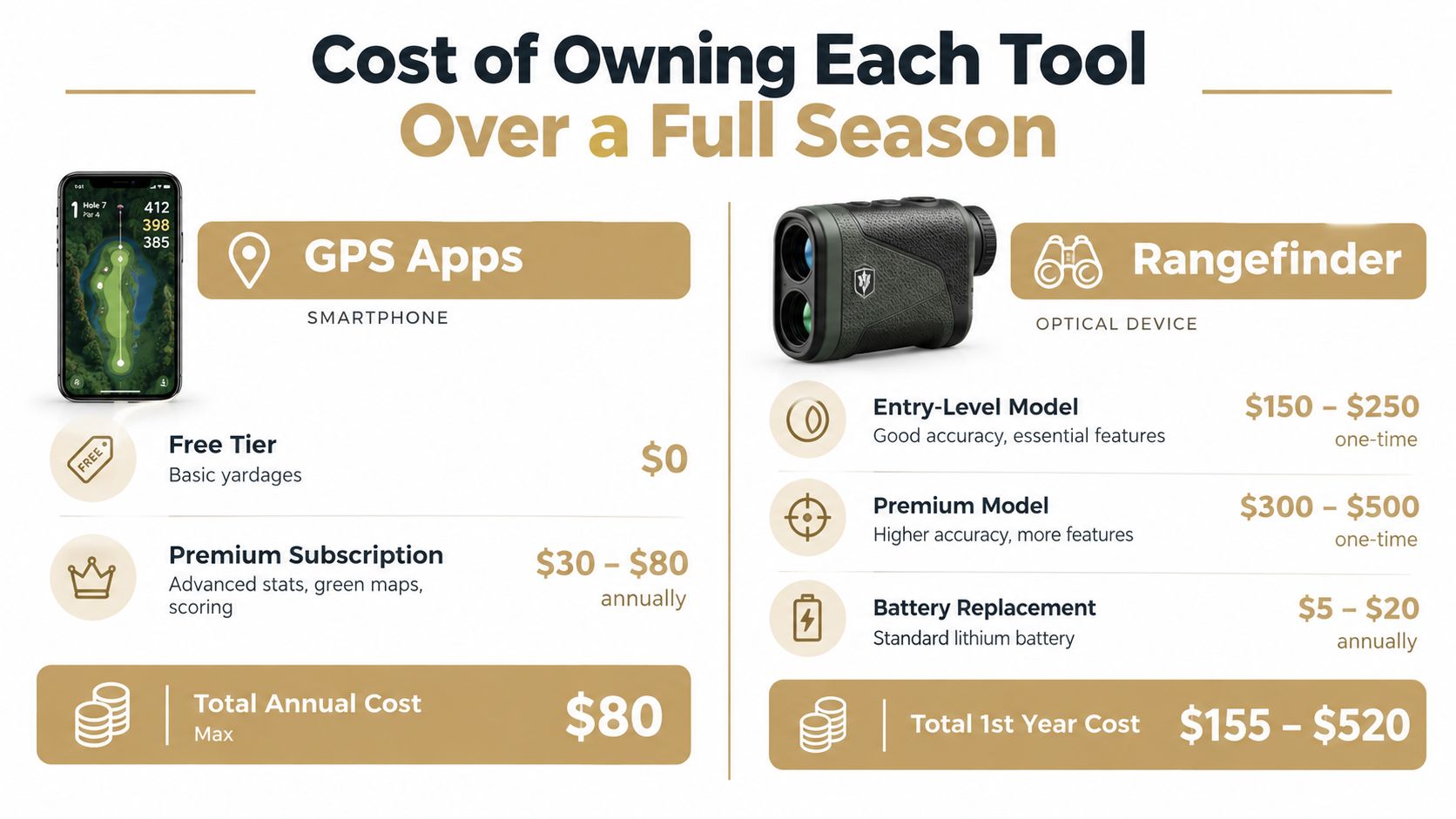
Cost depends on the golfer's existing phone, playing frequency, and appetite for practice analysis. A GPS app can begin with a free tier, while a rangefinder requires dedicated hardware. The right comparison isn't just purchase price. It's the cost of maintaining a workflow the golfer will use.
GPS app ownership
Free GPS tools can cover basic yardages, depending on the app. Paid tiers may add advanced stats, richer course mapping, green information, and other planning features. The golfer should evaluate those additions against the number of rounds played and whether the data will be reviewed after the round.
The broader GPS category has reached substantial everyday adoption. Hole19 says it's trusted by 4.8M+ golfers worldwide, while 18Birdies reports 10M global users and 120M rounds scored, demonstrating the scale of smartphone-based golf GPS use. Those figures describe adoption, not a guarantee that a paid plan will improve an individual golfer's scoring.
Rangefinder ownership
A laser has a higher entry cost but no recurring software fee in the basic ownership model. The player still needs to manage charging or battery replacement, protect the device from weather, and decide whether advanced functions are useful outside competition rounds.
A rangefinder makes more sense when the golfer frequently faces approach shots where pin position changes the club choice. It makes less sense as a purchase driven by occasional curiosity if the player rarely checks the number or doesn't have a stable club-distance baseline.
The combined setup has a clear logic. GPS handles mapping and blind-hole planning, while the laser confirms the visible target. The expense is easier to justify for golfers who play unfamiliar courses, practice consistently, and review performance instead of collecting devices without changing decisions.
The driving-range launch-monitor guide from Dialed Golf is relevant for golfers evaluating the practice side of that ownership decision.
The key cost test is behavioral: if the tool won't be opened before a shot, consulted during practice, or used during post-round review, its feature list doesn't matter.
Matching the Right Tool to Your Golfer Profile
The best choice changes with the golfer's job. A recreational player planning a safe route around hazards has a different need from a coach comparing several players' practice patterns or a fitter verifying a target distance in a bay.
Five useful profiles
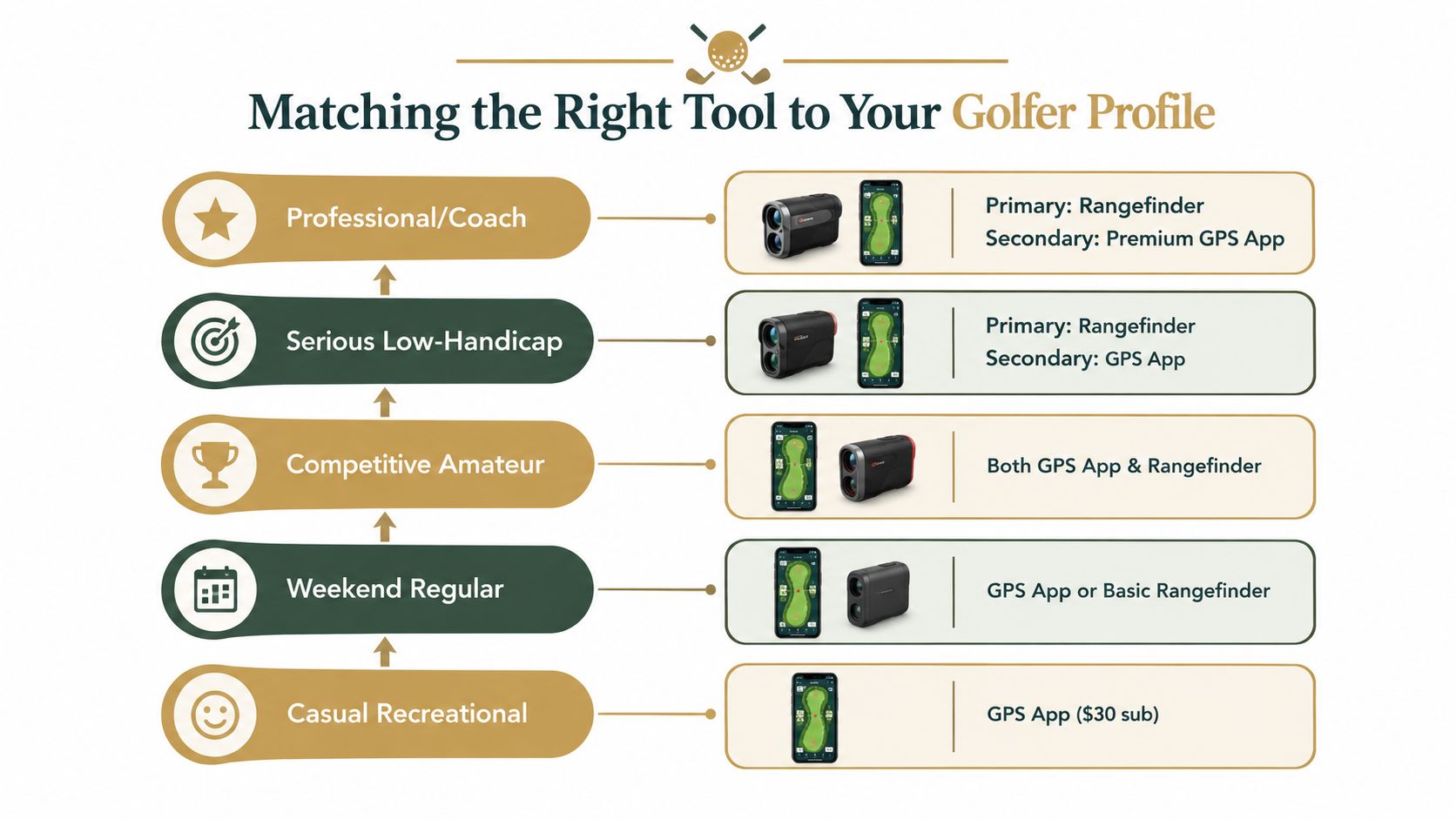
Casual recreational player: A GPS app usually covers the main need, especially when the player wants hazard carries, layup information, and a quick green reference. Precision to the exact flag matters less when swing consistency is still developing.
Weekend regular: Either a GPS app or a basic rangefinder can work. The deciding factor is whether the golfer spends more time navigating unfamiliar holes or choosing between adjacent clubs on approach shots.
Data-driven amateur: This golfer benefits from both categories. GPS supplies round context and shot history, while launch-monitor sessions establish club baselines and a rangefinder provides a physical check against visible targets.
Coach or instructor: A shot-tracking app can make it easier to organize player sessions, review patterns, and share reports. The rangefinder remains useful when a lesson includes target control or distance verification, but it isn't the main record of student performance.
Club fitter or range operator: A laser can support quick target checks, while a structured desktop workflow handles session exports, dashboards, and customer handoffs. CSV-based workflows are particularly useful when customers arrive with files from different launch-monitor systems, as documented in a range-caddie import workflow for exported practice sessions.
The practical synthesis
The golfer should identify the repeated decision that costs the most confidence. If the issue is “Where is the trouble, and what's the safest route?”, GPS is the natural first tool. If the issue is “Is this a 7-iron or an 8-iron to the actual pin?”, the rangefinder earns priority.
A data-driven player should also avoid treating a device reading as a complete answer. The reading becomes actionable only when paired with strike patterns, club carry, lie, wind, and the golfer's preferred miss.
Recommendations and When to Upgrade to Pro
A clear recommendation matrix prevents the golfer from buying technology for its own sake. The primary tool should solve the most common on-course problem, the secondary tool should cover the main blind spot, and a Pro plan should support a workflow that already exists.
| Golfer profile | Primary tool | Secondary tool | Pro justification |
|---|---|---|---|
| Casual recreational player | Free GPS app | None at first | Upgrade only when advanced round history or planning becomes a regular need |
| Weekend regular | GPS app or basic rangefinder | The tool that addresses the weaker decision | Pro is useful when the golfer consistently reviews rounds or practice data |
| Competitive amateur | Both GPS app and rangefinder | Launch-monitor record | Pro can connect frequent practice sessions with on-course trends |
| Serious low-handicap golfer | Rangefinder | GPS app | Pro earns its place when mobile and desktop data need one long-term record |
| Professional or coach | Rangefinder | Premium GPS app | Pro supports structured player records, session review, and shared analysis |
| Club fitter or range operator | Rangefinder plus desktop workflow | GPS app for course or customer context | Dialed Academy provides memberships and front-desk tools at $99.99 per month or $999.99 per year, with the club keeping its dues |
When the combined setup makes sense
A combined setup is sensible for golfers who play unfamiliar courses, practice with a launch monitor, and care about improving the connection between practice numbers and on-course choices. GPS handles the hole-level plan. The laser handles the visible target. The practice record explains what the selected club can realistically produce.
Pro should come after the golfer has a reason to use it. Dialed Golf offers Golfer Pro across its app and desktop products at $9.99 per week, $29.99 per month, $149.99 for six months, or $249.99 per year. Free web tools remain free, and the consumer app is currently in TestFlight rather than general App Store availability. The Pro decision should be based on repeated launch-monitor imports, ongoing trend review, and the need to keep mobile and desktop data together, not on the promise of more features alone.
A laser can sharpen one shot. A connected golfer record can improve the decisions made across an entire season.
The golf GPS app vs rangefinder choice doesn't require loyalty to one category. It requires a clear answer to the golfer's most frequent question, then a workflow that turns the answer into better club selection.
Dialed Golf connects a pocket caddy on the course with desktop launch-monitor practice, live pairing first and CSV imports across supported systems, under one golfer record and one Pro plan. Visit Dialed Golf to review the free tools, consumer app availability, desktop workflow, Golfer Pro options, and Dialed Academy services for ranges and clubs.