


The Saturday morning scene is familiar. A starter has a printed tee sheet on the counter and a booking screen open beside it. A front-desk volunteer is checking whether a member is paid up, squinting at a list that was exported three weeks ago. The finance officer is chasing dues in a separate ledger and has two phone numbers for the same member, because one came from the booking system and one from a card payment. Nobody is doing anything wrong. The facility is running on four tools that each hold a fragment of the same truth.
That fragmentation is the actual problem golf club management software solves, and it is also why buying it goes wrong so often. Feature lists look interchangeable because features are the easy part of the decision. What decides the outcome is whether one member is one record, whether the money reconciles at month end, and what the club goes through to get from the system it has to the system it wants.
The market has grown because operators are trying to consolidate. The global golf management software market was estimated at about $1.54 billion in 2024, with North America holding roughly 42% of that value at about $647 million, and is projected to reach $3.74 billion by 2033 at a 10.2% compound annual growth rate from 2025 through 2033, according to Global Market Statistics. Golf clubs are the largest end-user group in that figure, because their operations combine membership administration, tee-time and facility bookings, payment processing, customer communication and wider resource management. For a buying committee, the growth matters less as a headline than as a warning: a market expanding this fast attracts new entrants and acquisitions, so the platform you sign today may be sold, merged or repriced before the contract renews.
The platform worth signing is the one a front desk can run alone on its worst day, at a five-year cost the committee can defend, with member data the club can export and carry out. Most evaluations spend nearly all their time comparing modules and almost none on the switch itself, which typically means seven to eight months of running old and new systems side by side before cutover is done.
Table of Contents
- Core Modules Every Club Management System Needs
- Matching Software to Your Type of Facility
- How Membership and Front-Desk Workflows Run Day to Day
- Data Architecture, Integrations and Exports to Check
- Pricing Models and Five-Year Cost
- Migration Timeline and Staying Open During Cutover
- Choose and Test Your Software Before Signing
Core Modules Every Club Management System Needs
Start with the list, because most evaluations fail from omission rather than from choosing badly among good options. A complete system runs seven modules, and each one has a named person who depends on it daily.
| Module | What It Does | Main User |
|---|---|---|
| Membership records | Stores member profile, category, dues, joining date and status | Membership secretary and front desk |
| Tee sheet and bookings | Books tee times and range bays, enforces capacity and member priority | Starter and pro shop |
| Front-desk check-in | Verifies membership and access at arrival | Front-desk staff |
| Point of sale | Posts shop, food and lesson sales to the member account | Pro shop and café |
| Payments and recurring billing | Collects dues and charges by card or direct debit | Finance officer |
| Member communications | Sends renewal notices, event invites and booking confirmations | Membership team |
| Reporting and utilization | Shows bookings, revenue, no-shows and tee-slot use | Management committee |
Read that table against a real morning. The starter takes a call for a 9:40 four-ball. The front desk checks a member's status at the door. The café puts a coffee on a member's account. Each action touches a different module but the same member, and if the modules do not share one record, somebody reconciles it by hand.
Where the gap shows up first
A missing module never announces itself. It turns into a workaround. The tee sheet that exists as a spreadsheet beside the booking system is the classic one, because the starter is the first person to notice that the screen in front of them does not reflect a booking that came in by phone, or a cancellation that never left the diary.
Practical rule: If staff keep a parallel list in a spreadsheet or on paper, the software has a gap, and they've built a bridge around it. Find every one of those bridges before you shop.
Communication is the other silent omission. A club that sends renewal notices by exporting members to a mail merge is one duplicate record away from sending the wrong member the wrong dues. It looks like a mailing problem. It's a data problem.
Point of sale deserves attention for a different reason: it's where the money gets separated. A shop sale posted to a standalone till and a lesson sale posted to an instructor's spreadsheet never reach the member's account, so the monthly statement the member receives is incomplete and the club argues about it.
The inventory exercise
Before any demo, take stock. Mark which of the seven modules the facility runs inside software today, which runs in a spreadsheet, and which runs on paper or in one person's head. The spreadsheet column is the one that predicts the migration effort, because that data has to be cleaned and loaded like everything else.
That inventory also tells the club which module to fix first. Most will find membership records and billing are the weakest link, and that's the right place to begin, since a booking or a sale is only as good as the member record it posts against.
Matching Software to Your Type of Facility

Three facilities can buy the same platform and get three different outcomes, because what each one does at its busiest moment is not the same. Match the software to the peak, not the average day.
A driving range with a busy evening shift lives or dies on speed at the counter. Check-in has to take seconds, bays have to be prepaid so a no-show does not cost a slot, and the membership offer has to be simple enough to sign someone up at the till. If the system asks a staff member to build a plan or apply a discount during a Thursday queue of people waiting with their bags on, the queue wins and memberships stop growing.
A private members' club needs the opposite emphasis: dues management across categories, member priority on the tee sheet, and reporting the committee can trust. Its pain is administration, not throughput. A public course with resort guests sits between the two and adds pricing complexity, because guest and member rates, packages and seasonal rates all need to coexist in one tool rather than being patched together from separate systems.
Academies and coaching facilities need lesson booking attached to membership, plus a way to record student progress, and the lesson record has to reach billing. A lesson logged in a diary but never invoiced is revenue walking out the door.
| Facility Type | Priority Features | Gap to Watch For |
|---|---|---|
| Driving range | Fast check-in, prepaid bay bookings, recurring memberships | Slow evening check-in during peak hours |
| Private members' club | Dues management, member tee-sheet priority, committee reporting | Dues changes that require manual re-billing |
| Public course with resort guests | Flexible tee-time pricing, point-of-sale integration | Guest and member rates managed in separate tools |
| Golf academy or coaching facility | Lesson booking tied to membership, student progress tracking | Lesson records not linked to billing |
One facility-side option worth pricing against a current contract is Dialed Golf Academy, a separate business product for ranges, clubs and academies. It's priced as a facility platform at $99.99 per month or $999.99 per year, per the Dialed Golf range membership overview, and the club keeps its membership dues, so the listed amount is a platform fee rather than a percentage taken out of every member payment. It also lets a club model dues, joining fees, seats and commitment terms, which matters because a plan that can't express a three-month minimum or a household seat isn't a plan the club can sell. That flat structure changes the five-year comparison: a percentage-of-dues model grows more expensive as the membership succeeds, while a platform fee stays fixed.
The gap column in the table is the true test. Ask each vendor to walk through a dues change from start to finish, and watch whether it means re-billing everyone by hand or editing a category that updates automatically. The same question doubles in weight at migration time, because every plan structure the club sells has to be rebuilt in the new system before members move over, and a structure the software can't express becomes a plan the club has to retire or grandfather. For ranges running launch monitors alongside the front desk, there's a related question about what the practice side of the operation records and where it lands, covered in this guide to the best launch monitor for a driving range.
How Membership and Front-Desk Workflows Run Day to Day
Front-desk work is a set of small, repeated actions: enrol, bill, verify, book, post, reconcile. The system either holds the thread between them or the staff do, usually in a spreadsheet no one else can read. Run one membership from enrolment to month end and the same eight steps come up, each with a predictable slip.
- Enrol the member and assign a category. The category sets dues and booking rights, so it drives everything downstream. The common slip is enrolling someone under a temporary or junior category to speed up the signup, which produces the wrong dues for months before anyone notices.
- Set the dues schedule and joining fee against that category. Billing should follow the category automatically rather than being entered as a one-off invoice. When it is keyed in by hand, a fee change later applies to new members but misses existing ones.
- Collect the first payment and confirm the recurring method. Card or direct debit, with the mandate recorded. A first payment taken in cash with no mandate on file becomes a member who has to be chased every month.
- Issue access, such as a key tag or app credential. The front desk needs to verify status at arrival, so the credential must be tied to the live membership record. A tag issued before the status is active is the most common way a lapsed member walks in.
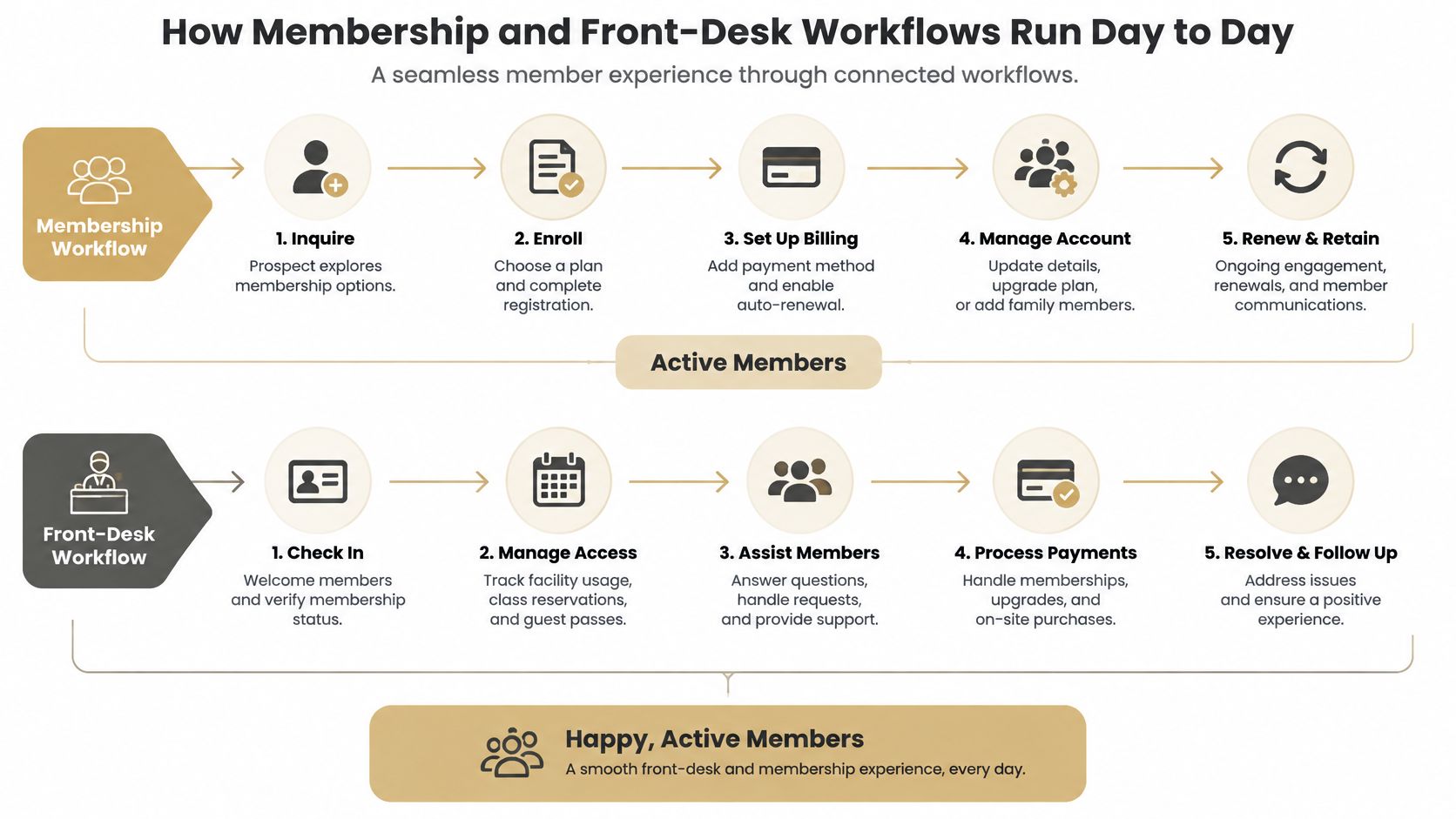
- Check the member in on arrival and confirm the status is active. This is a two-second action that should show the actual position, including a payment problem flagged before the round. If the front desk has to phone the office to confirm, the check-in isn't a check-in.
- Book the tee time or range bay against priority and capacity. Member priority and capacity limits have to be enforced by the system rather than the starter's memory. When they live in the starter's head, a visitor gets a prime slot on a Saturday and the club hears about it for a week.
- Post shop, food and lesson sales to the member account. One account for every sale. Orphan sales are why a member's statement doesn't match what they remember spending.
- Reconcile payments and no-shows at month end. Match every payment to a member, list the exceptions, and send that list to finance. The exceptions are the work; matched items should need no attention at all.
A clean month-end has three properties. Every payment is matched to a member, no sale sits without an account, and no access credential exists without an active status. If any of those fails, the fix belongs in the workflow, not in a monthly cleanup routine.
Whichever system runs this sequence, the front desk needs three things from it: member lookup that returns the live record at check-in, an access credential the club can revoke when a membership lapses, and an audit trail of who looked up or scanned what. An audit trail lets the club answer a member's question about their own account from the record.
What makes this workflow hold is restraint at step seven. Every new revenue stream tempts a club to add a separate till or a spreadsheet on the side, and each one breaks the reconciliation at step eight. Post it to the member account or don't post it. A club that keeps that discipline also keeps its options, because clean member records are what turn a future move to different software into a project rather than an excavation.
Data Architecture, Integrations and Exports to Check
The failure mode is easy to picture and expensive to fix. A member joins at the front desk. The booking system creates a record. The payment processor creates another, keyed to a card and an email. A staff member adds a third to a spreadsheet for the social committee. Now the club has three versions of one person, balances that don't agree, and a member receiving two renewal notices with different numbers on them.
A 2025 report on UK and Irish club software describes the alternative: a shared operational data layer connecting membership records, tee sheets, point of sale, payments, customer communications and financial reporting. Where systems are fragmented, staff transfer and reconcile data by hand, and bookings, payments or member records fail to synchronize. Most of the club managers it surveyed were already exploring alternative systems. That is what three versions of one member eventually costs.
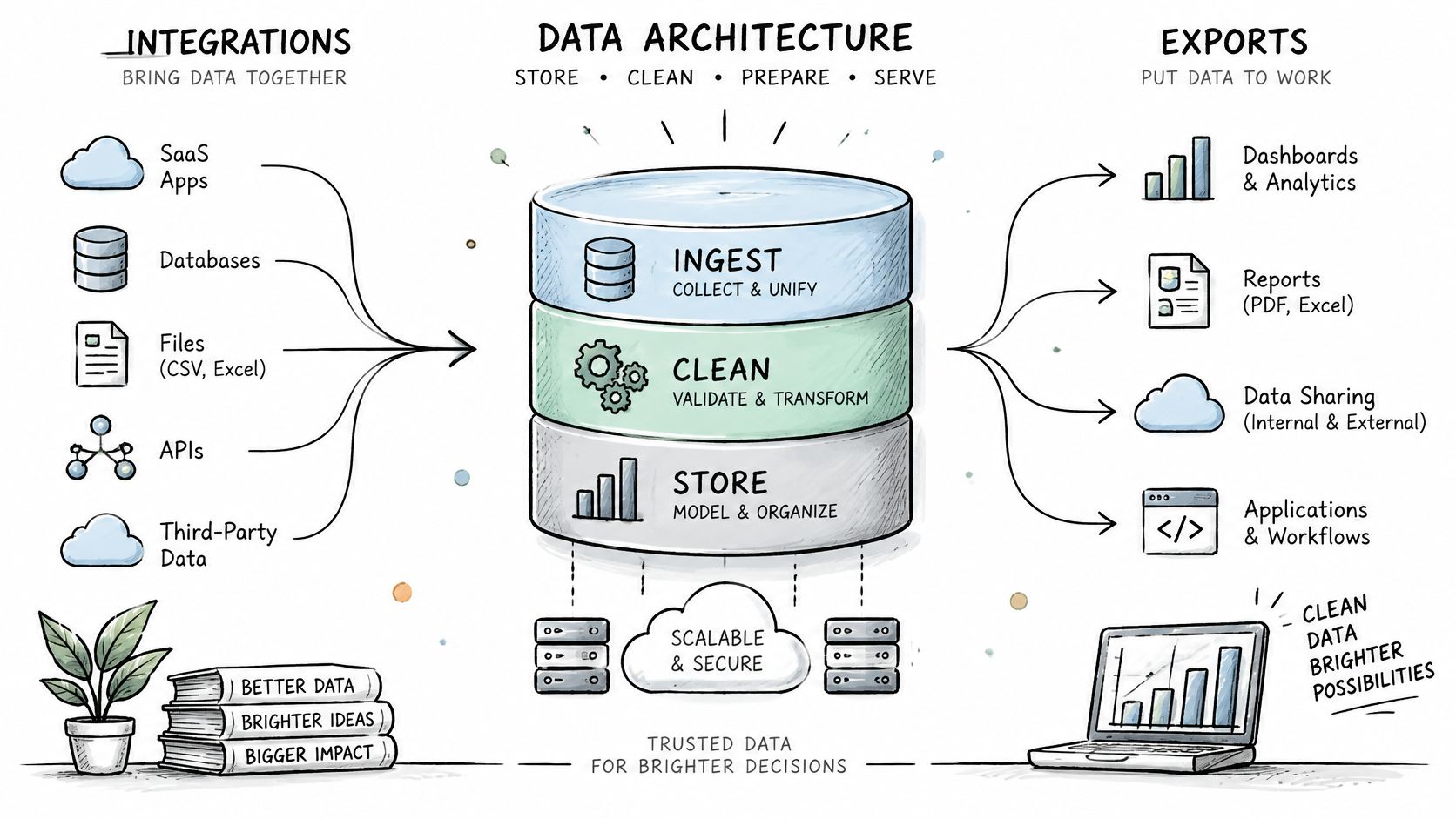
Architecture terms matter only as questions to put to a vendor, and each one has a plain answer.
- Does one member equal one record? Ask whether the system uses a canonical member identifier that every module references. If a booking can create a new customer record, it will.
- Are there documented APIs, or at least reliable import and export tools? Documentation, a named format, and a person who can show it working. A promise of integration proves nothing.
- Does every transaction carry an audit trail? Who changed what, and when. This is what settles a dispute about a balance without a phone call.
- Does role-based access limit what each person sees? Front-desk staff need to verify status without reading a member's full payment history. If permissions are all-or-nothing, the club will share logins to get the job done.
- Is migration tooling included before signing? Cleanup and import are billed hourly by some vendors, and that line item can exceed the first year of subscription.
Data ownership deserves its own answer in writing. Player and member data belongs to the golfer and the club. Dialed Golf states that users retain ownership of the golf data and other content they submit, and limits its license to hosting, processing, transmitting, displaying and backing it up solely to provide, secure and improve the service. Whatever system a club chooses, the contract should confirm the club can export member and booking history in a usable format if it changes provider. Ask for a real export file during the demo: a file you can open and read is proof, while a slide about exports is a promise. Launch-monitor sessions are a useful test case here, since a session exported from a bay or a garage sim is only worth keeping if it can be imported and read later, which is the workflow described in this look at the launch monitor app.
The one-screen test: Ask the vendor to show a single member record, that member's booking history, and their payment trail on one screen, without switching applications. Vendors who can do it will do it in the first meeting.
Pricing Models and Five-Year Cost
The advertised monthly fee is one line item, and usually the smallest one after year one. Comparing on that number alone is how clubs end up paying more for a cheaper system, because the costs that decide the outcome rarely appear on the pricing page.
Cloud delivery is now the default, so the question is no longer whether to move to it. One market estimate reported that cloud-based systems accounted for 62.4% of global golf-software deployments in 2025, up from about 41% in 2020, with cloud's share projected to reach 79% by 2034, according to Inkl's reporting on golf's fragmented technology. The relevant question is which contract terms make leaving affordable when the club eventually changes its mind.
Compare total cost over five years, not one. The PwC 2025 golf technology analysis puts privacy protection and transparent data policies high on the checklist as clubs connect member records, reservations, payments, launch-monitor data and coaching notes. It also notes that upfront subscription costs, training requirements and a shortage of staff able to integrate technology are real barriers, particularly for facilities with constrained budgets. Moving to cloud hosting removes none of those.
| Cost Line | One-Time or Recurring | What to Confirm |
|---|---|---|
| Subscription fee | Recurring | Pricing unit (per facility, seat or module) and annual increase cap |
| Setup and data migration | One-time | Whether member cleanup and import are included or billed hourly |
| Staff training | One-time, repeats with turnover | Whether training materials and refresher sessions are free |
| Integrations and maintenance | Recurring | Connector fees and whether updates are covered |
| Payment processing | Recurring | Card and direct debit rates and who holds the merchant account |
| Support | Recurring | Support hours and response time for a weekend outage |
| Exit and data export | One-time, at contract end | Export format, export fees and notice period required |
Two rows on that table do more damage than the rest combined. A low subscription with no annual increase cap is how a cheap contract gets expensive by year three, and payment processing becomes one of the larger recurring lines at any facility that takes cards at the desk.
Totalling it without a spreadsheet model
Multiply the recurring lines by 60 months and add the one-time lines. That's the number the committee should see.
A per-facility platform fee makes the arithmetic easy to follow. Dialed Golf Academy, the memberships product sold to clubs, charges $99.99 a month or $999.99 a year per facility. At the monthly rate, the fee alone totals $5,999.40 across 60 months. On the annual plan, it totals $4,999.95 across five payments. Member dues still flow to the club in both cases, so only the platform line is counted here. Setup, training, integration and exit costs sit on top of whichever figure applies. The annual option saves about a thousand dollars over the term, which is exactly the kind of comparison a monthly-fee evaluation never makes.
Bring this question to every vendor: What does the club pay in year five, not year one? A vendor who can't answer it in writing is telling you something about year five.
The line that most often surprises a committee is training, because it recurs with turnover. Seasonal staff at a busy range turn over constantly, and a system that takes days rather than hours to train each new hire charges the club again every spring without ever sending an invoice. Exit costs carry the same blind spot at the other end of the contract: an export fee and a long notice period are small numbers on paper, and the reason a club stays on a system it has already outgrown.
Migration Timeline and Staying Open During Cutover
The fear that delays most switches is simple. If the front desk goes down, the club stops taking money. That fear is reasonable, and it keeps facilities on software they have already decided to leave.
A cutover planned properly never closes the doors. In the 2025 survey of 134 UK and Irish club managers reported by CPG, 48% of managers said their current product did not meet requirements while only 10% cited cost as a reason to consider moving. Fit drove most switches in that survey, not price. That matters for planning, because a switch motivated by fit is a switch worth doing carefully, and careful here means months of phased work rather than a weekend swap.
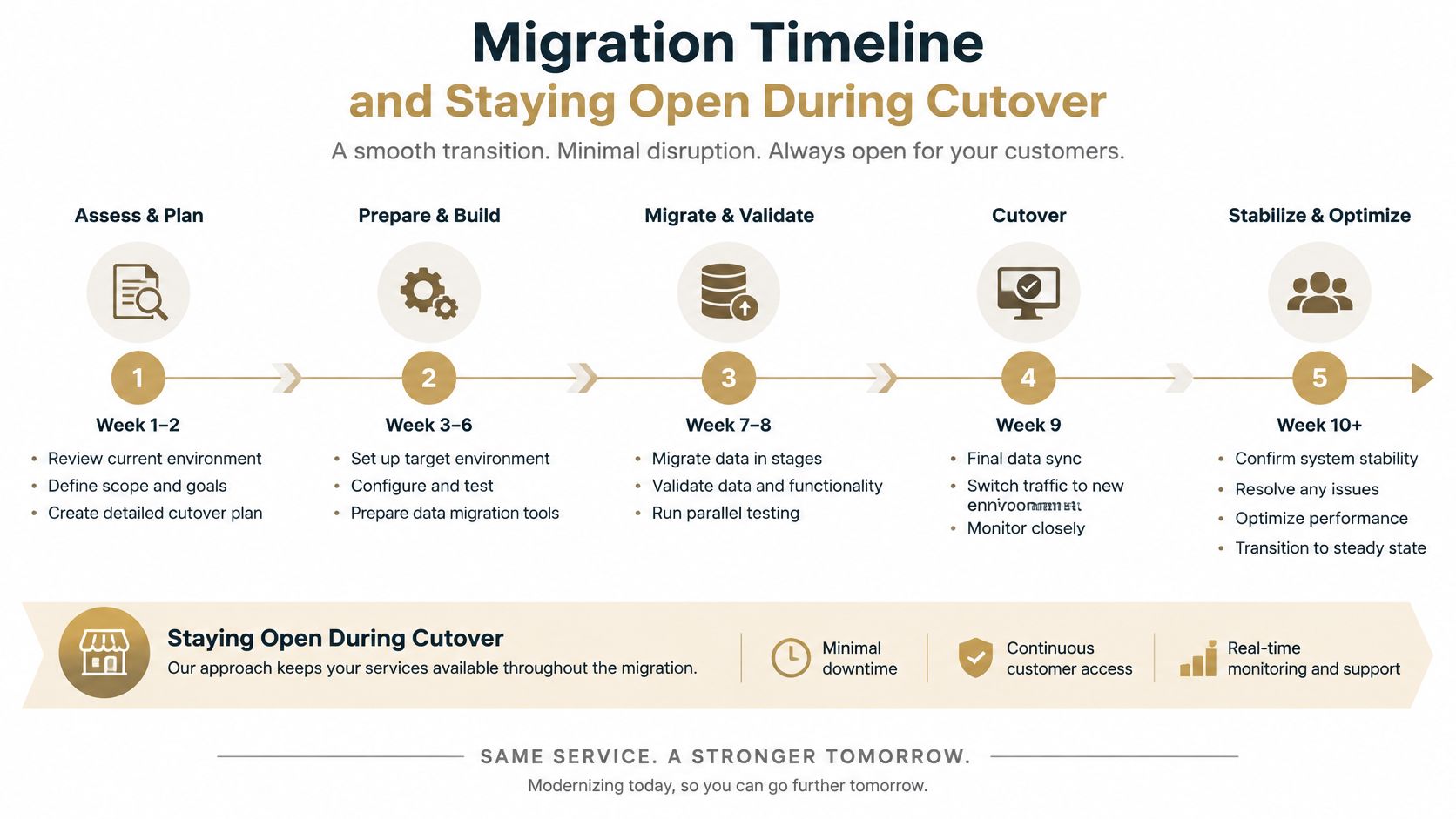
| Phase | Typical Timing | Go-Live Check |
|---|---|---|
| Data export and cleanup | First two months | Duplicate member records removed and balances matched |
| Parallel run | Months three to five | New bookings and payments match the old system for two weeks |
| Staff training | Months four to six | Front-desk staff complete a shift without help |
| Member communication | Two to four weeks before cutover | Members know how to book, check in and pay |
| Cutover | Final month | Old system set to read-only and kept for lookups |
The parallel run is the phase clubs try to skip and the one that saves them. Both systems record real bookings for a stretch of weeks. Every tee time, check-in and card payment gets entered twice, and staff will complain about it. It is also the only way to prove the new system handles a Saturday before the old one is switched off. Budget for the overlap too, because both systems carry fees during those months and that double-payment window is a line the quote rarely itemizes.
Staging the rollout by module reduces the risk further. Start with membership records and front-desk check-in, run them until they're boring, then move billing, then bookings, then point of sale. Changing one thing at a time means a bad week is traceable to a single change.
Cutover doesn't mean deletion. The old system goes read-only and stays available for lookups through the first full billing cycle, which is when the questions about last year's history actually arrive.
Data portability is what makes this phase survivable. Import and export in a plain, documented format is the difference between a controlled migration and a rebuild, and a working CSV import path is what carries member records, balances and history across without retyping them. A club that can move its own data can also leave, and that option is worth more than any feature on a comparison sheet.
Choose and Test Your Software Before Signing
By this point the shortlist should be short. Score the finalists on the criteria that architecture and cost checks do not already cover, then put them on real work before a signature locks in the next five years.
Score each vendor one to five on six criteria.
- Five-year cost stated in writing, export fees included. If the number is undocumented, treat it as unknown.
- Migration tooling and onboarding inside the quoted price. A separate services estimate usually means the quoted subscription is only the entry fee.
- Support that covers weekend peaks, with a stated response time. Weekends are when the club earns.
- Two facilities of similar size willing to take a call. Similar membership structure matters more than a flagship logo.
- The product handles your busiest shift, not your average one. Demonstrate it at peak, on purpose.
- The vendor can reproduce one reconciliation from last month's payments on your own data. This is the test most vendors fail and the one that predicts the first month-end.
Treat any vendor scoring below four on the first two criteria as a no. Those two are the most expensive to get wrong and the hardest to repair after signing, because they decide whether the club can afford both the platform and the exit.
Then run a pilot rather than deciding from a demo.
- Choose one membership cohort or one bay block, small enough to unwind.
- Run real bookings and check-ins through the new system for 30 days.
- Track the go-live checks from the migration phases, especially whether the numbers match.
- Require a demo on your own member list through your busiest shift.
- Decide on the scores and pilot results together, and write down which criteria moved.
The best software is the system the front desk can run alone on its worst day, when the regular staff member is off, the printer is down, and the queue is out the door.
A pilot also surfaces the training question early. If a seasonal hire cannot check a member in after twenty minutes of instruction, the club will be retraining every spring, and that labor belongs in the five-year figure beside subscriptions, migration, exports and support.
Dialed Golf brings the same thinking to the facility side of the game. Its separate B2B memberships platform handles front-desk work for ranges, clubs and academies at $99.99 per month or $999.99 per year per facility, lets clubs model dues, joining fees, seats and commitment terms, and leaves membership dues with the club. The golfer side runs on one record too, with free web tools that stay free and Golfer Pro at $9.99 per week, $29.99 per month, $149.99 per six months or $249.99 per year across the pocket caddy app and desktop launch-monitor practice. Visit Dialed Golf to see how the free tools and the facility platform fit the way your club already runs.