


Saturday morning exposes every weak membership process. A regular arrives expecting a reserved bay, a guest follows close behind, a payment has failed overnight, and the front desk is still checking three spreadsheets to confirm who gets access. The range may be full, but staff can't tell whether capacity is being used by profitable visits, discounted visits, lessons, or members who haven't returned since joining.
Driving range membership management works when it connects those decisions in one operating system. The membership isn't merely a discount card. It determines who can book, when they can visit, what they can spend, how staff verify access, and which members need attention before renewal.
Table of Contents
- Why Driving Range Membership Management Is a Revenue System Now
- Designing Tiers and Pricing That Members Understand and Renew
- Signup and Onboarding Flows That Work In Person and Online
- Billing Access and Front Desk Integration Without the Chaos
- Reporting KPIs and Retention Plays That Prevent Churn
- Launch Checklist Migration and Staff Training That Sticks
Why Driving Range Membership Management Is a Revenue System Now
A paid member can still create an operational loss. If unrestricted visits consume peak bays, staff cannot verify access quickly, or unused memberships renew without meaningful engagement, recurring dues hide problems rather than solve them. Membership management has to connect revenue with capacity and daily service.
Practice facilities are also becoming a larger part of club operations. In the UK club market, the share of members' clubs with a driving range or practice ground rose from 41% in 2022 to 77% in 2023, according to the Hillier Hopkins Golf Clubs Report. The same report describes a longer shift. Members' clubs historically reported range access at roughly 20% to 40%, while proprietary clubs generally had near-universal availability.
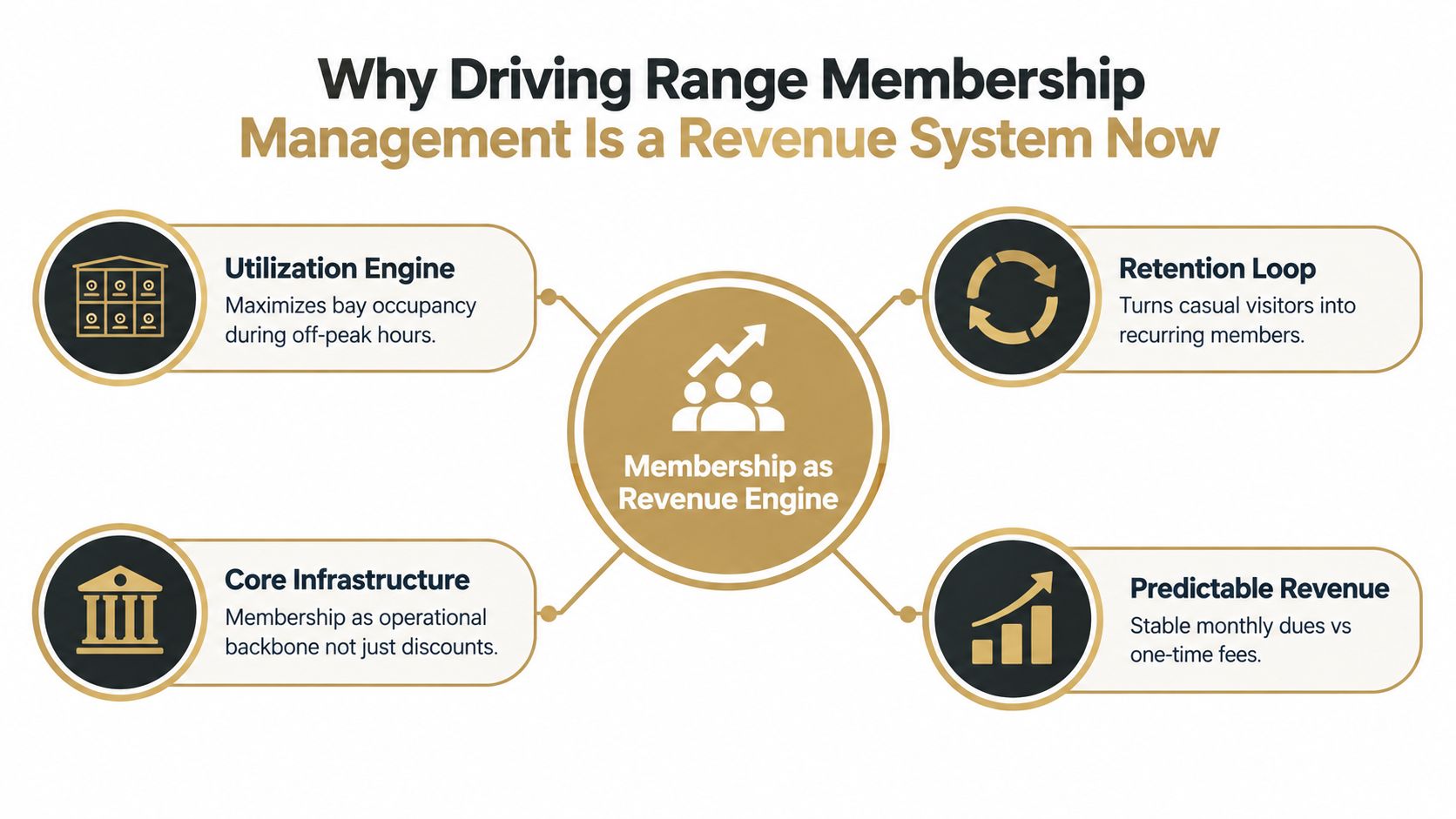
That growth makes the front desk the pressure point. Staff need one golfer record linking dues, access rights, visit history, lessons, credits, guests, and practice activity. When those records remain in separate spreadsheets or systems, a paid member may be blocked at the bay, appear absent from the access list, or claim a benefit that staff cannot confirm during a busy check-in.
The cost of treating membership as a discount
Golf clubs have faced sustained membership pressure. In Australia, estimated golf club membership reached about 500,000 golfers in 1998, then declined by an average of 1.3% per year through the 2018 reporting period. The same participation analysis recorded female membership falling from 31% in 1979 to 20% in 2018. A separate New South Wales study reported membership peaking at almost 210,000 in 1998, followed by a decline of nearly 18% by 2008 and a 13% fall from 2003 to 2008 (Australian Golf Participation Report).
The operating lesson is direct. Dues alone do not protect retention. Operators need to see whether members use the facility, whether the experience supports the fee, and whether access remains easy to understand and deliver.
Practical rule: A member record should answer three questions immediately: Is the account paid, what access is available now, and how often has this golfer used the facility?
Effective driving range membership management connects four operating jobs:
- Create predictable revenue: Recurring dues provide a base that one-off bucket sales cannot provide.
- Control utilization: Membership access must fit available bay capacity, particularly during high-demand periods.
- Support retention: Visit history gives staff time to contact under-engaged members before renewal risk becomes obvious.
- Reduce front-desk decisions: Clear account and access records let staff resolve exceptions consistently instead of negotiating every visit.
Designing Tiers and Pricing That Members Understand and Renew
A membership tier should be explainable at the counter in one short conversation. If staff need a spreadsheet to determine whether a member can use a bay, the offer is too complicated or the system is too weak.
The most practical structure usually starts with two or three tiers built around usage patterns. The exact price depends on local demand, operating costs, and the value of the facility. The architecture matters more than the label.
| Tier Model | Best For | Capacity Risk | Renewal Lever |
|---|---|---|---|
| Unlimited access | Frequent regulars and members who value simplicity | High if peak visits are unrestricted | Convenience and habit |
| Off-peak access | Operators with quiet daytime or late-period inventory | Lower during protected peak windows | Affordable access without peak congestion |
| Credit packs | Variable users, families, and guests | Easier to cap through credits | Flexibility and visible value |
| Hybrid membership | Ranges balancing regular access with capacity control | Requires clear quota rules | Base access plus optional top-ups |
Match the plan to the bay grid
Unlimited access isn't automatically the most generous or profitable option. It works when the range has enough unused capacity or when the operator can define protected periods, booking limits, or member-only quotas. Without those controls, a small group of heavy users may occupy the inventory that casual members need to experience value.
Off-peak plans are useful when demand has a predictable shape. The plan can include practice access during quieter windows while reserving peak periods for full-price bookings, lessons, or higher-value members. The rule must appear clearly during checkout and booking, not emerge as a surprise at the counter.
Credit packs suit members who visit irregularly. They also make utilization visible because every booking consumes a defined benefit. A hybrid plan can combine a recurring base with optional credits, which gives regulars a reason to renew without forcing the range to offer unrestricted peak access.
Pricing should control demand, not punish attendance. Members accept limits more readily when the benefit, booking window, and upgrade path are obvious.
Keep flexibility visible
Month-to-month terms can reduce the psychological risk of joining. The industry guidance on range memberships identifies simple tiering, month-to-month flexibility, visit frequency, spend per visit, and churn as useful inputs for refining offers, while framing memberships as a revenue system tied to utilization rather than discounts.
Lock-ins may produce a more predictable billing schedule, but they can also make an unhappy member feel trapped. Easy cancellation can support trust and retention when the member knows the facility has to earn the next renewal.
Guest privileges need the same discipline. Set a guest allowance, identify whether guests can use peak inventory, and require the member to be present if that is part of the offer. Lesson bundles should also be separated from bay access, so a coaching appointment doesn't consume a general practice benefit.
Signup and Onboarding Flows That Work In Person and Online
A membership isn't activated when the payment succeeds. It's activated when the golfer can arrive, verify access, book the correct bay, and understand the benefit without asking staff to repair the account.
The walk-up and online flows should collect the same information and produce the same member profile. Different entry points are fine. Different records aren't.
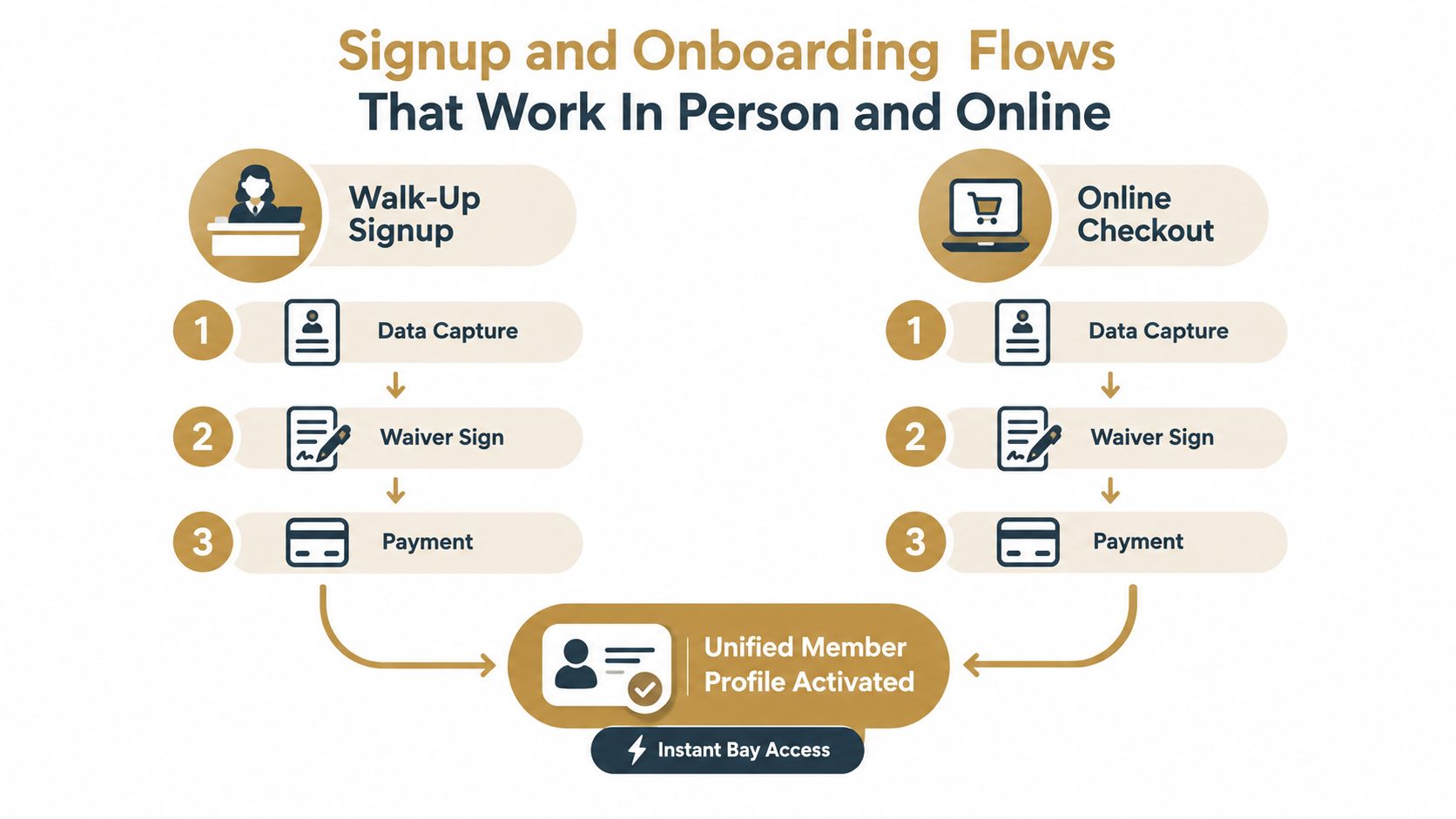
Build one profile from both channels
At the front desk, staff should follow a short sequence:
- Capture the golfer: Record the name, email, mobile number, membership tier, and any household or junior relationship.
- Confirm the rules: Explain access windows, bay booking limits, guest permissions, lesson treatment, cancellation terms, and any credit expiry.
- Collect the waiver: Present the facility waiver before access is granted, then store its status against the golfer record.
- Take payment: Confirm the recurring amount or credit purchase, the billing date, and the payment method.
- Activate access: Issue the card, QR credential, app access, or another verification method immediately.
- Book the first visit: A first booking turns an abstract membership into a scheduled habit.
The counter script should be direct: “This plan gives access during these periods, allows these bookings, and handles guests this way. The first visit is ready now. Would the member like to reserve it?”
Online checkout should mirror those steps. The website needs to show the tier, eligibility, billing schedule, access conditions, waiver, and next action before the customer submits payment. After checkout, the confirmation should state exactly how to enter the facility and who to contact if access fails.
Make the first visit a test
Staff should test the profile before the member leaves the counter. Search the account by the same identifier used at arrival, verify the correct tier, confirm the active dates, and create a sample booking or access check. Online members should receive an immediate activation message rather than a promise that staff will process the account later.
The same principle applies to practice data. Operators building a connected workflow can use the launch monitor app guide to understand how a golfer's practice activity can sit alongside the membership relationship, rather than being trapped in a separate record.
A smooth onboarding flow reduces the most avoidable peak-hour problem: a paid member standing at the desk while staff search for proof of payment, a waiver, or an access entitlement.
Billing Access and Front Desk Integration Without the Chaos
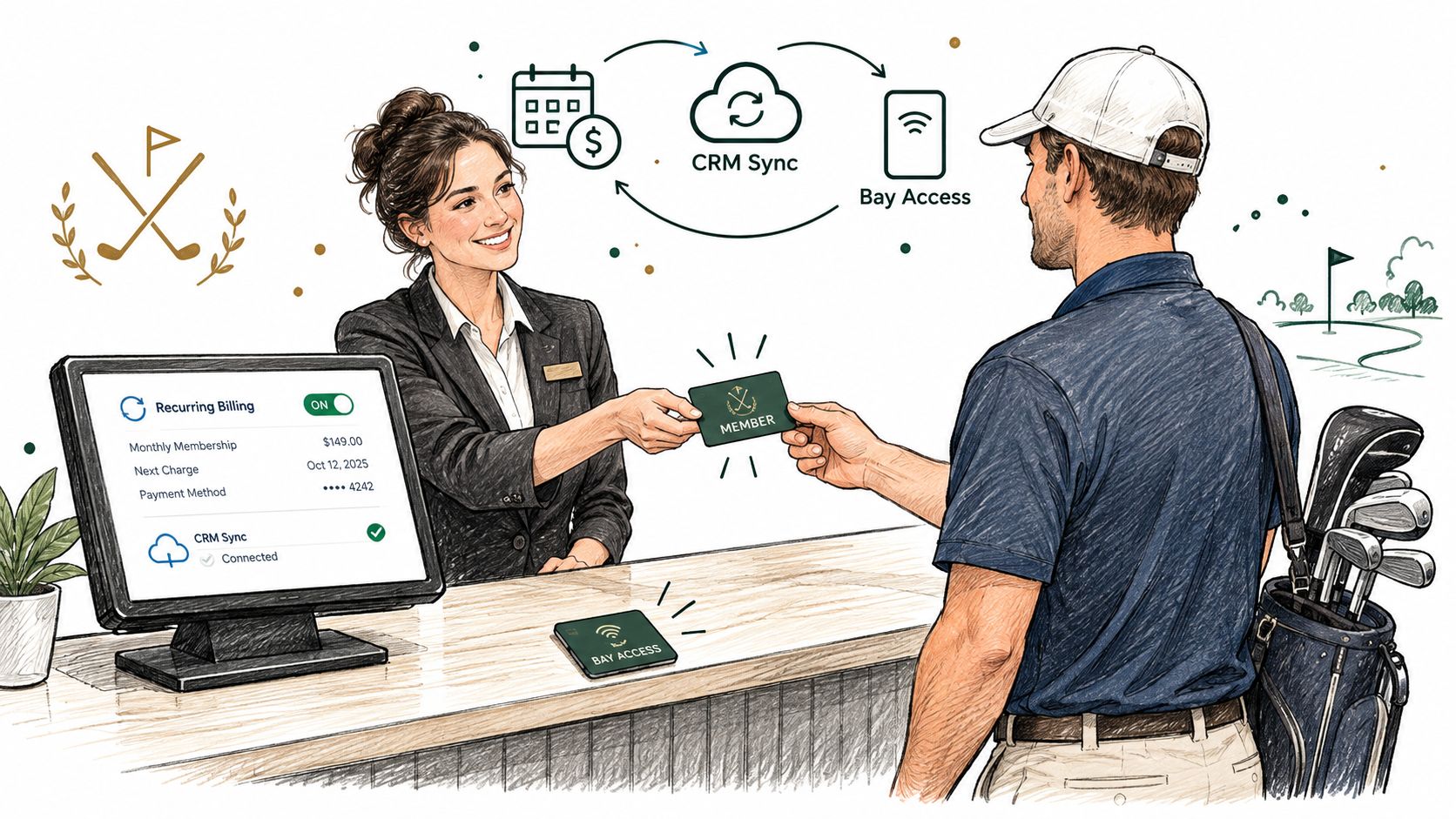
A member arrives during the busiest hour, the card fails, and the desk team cannot tell whether the issue is payment, access, or a booking rule. That delay creates frustration for the golfer and a queue for everyone else. Ongoing operations need one owner and one visible workflow across billing, access, booking, point of sale, and practice history.
Start with recurring billing. Store the payment authorization, billing date, plan status, joining fee if applicable, and cancellation terms. When a charge fails, the system should mark the account clearly, notify the member, and give staff a defined grace policy. A failed payment should produce a documented next step, not an argument at the entrance.
Give the front desk a single operating view
The front desk needs to see:
- Payment status: Active, failed, paused, cancelled, or awaiting action.
- Access rights: Eligible bays, time windows, lesson benefits, and remaining credits.
- Booking status: Existing reservations, no-show handling, and member-only quotas.
- Guest rules: Whether guests are permitted and what charges or restrictions apply.
- Account history: Visits, purchases, communication, and previous exceptions.
A member-only quota protects peak inventory when demand is concentrated. It can limit advance bookings, session length, or access to particular bays. Display the rule before booking, then release unused inventory under a stated policy. This keeps membership value visible without allowing frequent users to absorb every desirable slot.
Guest restrictions need the same clarity. If guests may attend only with the member, require the member account during booking. If guests may use a bay during off-peak periods but not peak periods, the booking logic should enforce that distinction rather than leave staff to interpret it at arrival.
Keep practice data attached to the golfer
Launch-monitor history adds useful context when the import process is controlled. Dialed Golf's desktop product supports pairing with or importing data from major launch monitors and simulators via live pairing and CSV import, among other sources, according to the Dialed Golf product page. The value is connecting practice activity to the same golfer record used for facility access and retention work. Visit frequency, bay use, and practice patterns can then inform tier limits and renewal conversations.
For ranges and clubs, Dialed Academy provides memberships and front-desk functionality at $99.99 per month or $999.99 per year, while the club keeps its dues and free web tools remain free. Evaluate the product as a membership and access workflow, rather than as hardware, a swing-analysis camera, or a ranked golf app.
The broader software market spans from entry pricing around $29 per month to enterprise suites exceeding $1,000 per month, based on a 2026 private club software comparison. Compare ownership costs, staff time, integration limits, and access control alongside the subscription line. A cheaper system can cost more if staff still reconcile payments, quotas, and entry permissions by hand.
Reporting KPIs and Retention Plays That Prevent Churn
A range can show a healthy member count while peak bays stay overbooked and quieter members stop visiting. Reporting should connect membership revenue with capacity and usage, so operators can protect availability and act before renewal is at risk.
Track visit frequency, spend per visit, churn by cohort and tenure, renewal status, credit use, guest activity, and bay utilization. Add peak versus off-peak usage and unused quota where the system supports it. These measures show who receives value, who consumes scarce capacity, and which members have gone quiet. The goal is a short operating review, not a dashboard collection.
Measure retention by cohort
Calculate retention monthly and annually, then segment it by membership type, tenure, and access pattern. A new member who stops visiting needs a different response from a long-standing member whose payment failed. A frequent peak-time user may need a capacity conversation rather than a discount.
Reported natural attrition for golf and country clubs is typically 5% to 8%, implying a strong-club retention target of 92% to 95%, according to a private club marketing retention benchmark. Treat those figures as reference points, not promises. An aggregate result can conceal a weak tier, location, age group, or tenure cohort.
Smaller clubs may have less room for error. Reported average attrition was 20.5% for clubs with fewer than 250 members, compared with about 6.5% for clubs with more than 1,000 members (Golf Australia membership retention guidance). The practical response is a regular visit and payment review, not an annual surprise.
Turn signals into interventions
Set simple triggers. A member with no recent visits can receive an off-peak booking suggestion, coaching prompt, or unused-credit reminder. A member visiting often but spending little may need a tier that adds convenience while preserving peak access for the capacity the plan can support.
Useful retention plays include:
- Payment flexibility: Give members a clear way to update payment details or adjust billing before cancellation is the only path.
- Transition rules: Explain junior-to-adult changes early, including timing, pricing, and access effects.
- Personal outreach: Contact under-engaged members with a relevant reason to return, not a generic renewal message.
- Cohort review: Compare each group with its prior period and investigate the cause before changing every tier.
- Capacity review: Check whether quotas and peak restrictions are creating value or frustrating high-frequency users.
Use CSV import guidance when bringing historical practice or membership records into reporting. Map fields consistently, remove duplicate golfer records, and verify that visit history attaches to the correct member. Clean inputs produce usable retention signals.
Launch Checklist Migration and Staff Training That Sticks
Migration fails when the operator treats it as a file transfer. Task is deciding which data deserves to become the new source of truth.
Begin with the existing spreadsheet or legacy export. Remove duplicate golfers, normalize names and contact details, identify inactive accounts, and separate current members from historical records. Map each field before importing it, including tier, payment status, renewal date, access permissions, credits, waiver status, and household relationships.
Use a controlled rollout
A practical launch sequence looks like this:
- Clean the source data: Resolve duplicates and mark uncertain records for manual review.
- Define membership rules: Write the access windows, quotas, guest limits, cancellation process, and failed-payment policy.
- Import a test group: Check that profiles, tiers, billing states, and access rights appear correctly.
- Run systems in parallel: Compare bookings, payments, and front-desk searches before retiring the old process.
- Test edge cases: Include a failed renewal, a guest booking, a peak-capacity conflict, a cancelled account, and a member with unused credits.
- Train by role: Front-desk staff need lookup and access practice. Managers need reporting and exception control. Coaches need lesson and golfer-profile workflows.
- Set launch ownership: Name the person who approves plan changes, resolves billing exceptions, and reviews the first reports.
Staff should practice the exact language members will hear. “The account is active, but this plan doesn't include that peak window. The next available eligible slot is here, or the member can use the upgrade option.” Clear scripts protect both the relationship and the capacity model.
Before launch, success should mean more than completed imports. Staff should find a member quickly, verify access without a spreadsheet, process a failed payment consistently, and explain every tier without improvising. For operators assessing connected practice workflows, the best launch monitor for driving range resource can help frame how equipment data fits into the broader golfer record.
Dialed Golf connects three products through one golfer record, including a consumer pocket caddy, desktop launch-monitor practice with live pairing first and CSV imports, and Dialed Academy for memberships and front-desk operations. Visit Dialed Golf to evaluate a membership workflow that links access, utilization, billing, and practice data without turning the front desk back into a spreadsheet.