

You've just walked off the 18th green after shooting 92, opened the handicap app, and found a 14.3 Handicap Index. A few days later, a 95 produces 15.1. That feels backwards until the system's purpose becomes clear. A Handicap Index measures playing potential across courses and conditions, not the score from one particular afternoon.
The practical path is straightforward once the terminology is separated. A posted score becomes an adjusted gross score, that score becomes a Score Differential, the best differentials from the scoring record shape the index, and the index converts into a Course Handicap for the tees being played. The USGA's Handicap Index guidance provides the official framework used within the World Handicap System.
This guide follows the actual math, including net double bogey, course ratings, slope, playing conditions, and competition allowances. It also connects that process with a modern workflow, where practice and play can live in one golfer record through Dialed Golf.
Table of Contents
- Why the Number on Your Card Is Not Your Handicap
- What You Need Before You Start Calculating
- Applying the Net Double Bogey Max Score
- Computing Score Differentials and the Index
- Converting Your Index to a Course Handicap
- Caps and Exceptional Scoring Reductions
- From Launch Monitor to Posting With Dialed Golf
Why the Number on Your Card Is Not Your Handicap
You finish a round with a 92, post it, and see your Handicap Index change only slightly. A later 95 might produce a lower result than expected. The reason is that your scorecard records one round, while your Handicap Index estimates playing potential from a broader scoring record under the World Handicap System.
Those measures answer different questions. The 92 may create one of your stronger Score Differentials, while the 95 may be affected by course difficulty, playing conditions, and the low differentials already in your record. The system is not predicting your next score. It is creating a portable measure of ability that can be applied across courses and tee sets.
Practical rule: Your Handicap Index travels with you. The strokes you receive depend on where you play.
A course with a higher Slope Rating will generally produce a larger Course Handicap for the same index. Course Rating, par, and the selected tees also affect the conversion. The Course Handicap conversion covered later keeps your index separate from the course-specific stroke allocation. See Converting Your Index to a Course Handicap for that formula and application.
The calculation in practical order
The process works like a chain. Each stage uses the result from the stage before it:
- Post an acceptable score with the correct tee, Course Rating, and Slope Rating.
- Apply the net double bogey limit to each hole.
- Calculate the Score Differential from the adjusted gross score.
- Select the lowest differentials required for the size of the scoring record.
- Average those differentials to establish the Handicap Index.
- Convert the index into a Course Handicap for the course and tees being played.
A scorecard therefore shows your gross result, not the number of strokes you automatically receive next time. The index summarizes your recent record, and the Course Handicap translates that summary into strokes for a specific round.
The same record can support practice and play. Dialed Golf connects launch-monitor sessions with playing data under one golfer record, so a practice result and an on-course score can remain part of the same workflow when the score is acceptable for posting. Its free tools are an entry point, while the broader offering includes a consumer app currently in TestFlight, a desktop practice experience built around launch-monitor data, and Dialed Academy for range, club membership, and front-desk operations.
What You Need Before You Start Calculating
A launch-monitor session can produce pages of useful data, yet still leave you without a handicap score. The calculation begins with three matched inputs: an acceptable scoring record, the Course Rating, and the Slope Rating for the tees played.
The three starting inputs
An acceptable score record gives the handicap system results to evaluate. A full record contains 20 scores, from which the lowest 8 Score Differentials are used. Golfers with fewer scores may still receive an index, but the number of differentials used changes with the record size. The USGA Handicap Index calculation guidance sets out that progression based on record size, with fewer differentials used for shorter records.
Course Rating estimates the score a scratch golfer would be expected to make from a particular tee set. Slope Rating expresses how much more difficult those tees are for a bogey golfer than for a scratch golfer. They work together like a course's baseline and difficulty adjustment, so both values must match the tees recorded for the round.
Check the scorecard, the club's score-posting area, or the course's official handicap information. Ratings can differ between tee sets, and the men's and women's ratings for the same tee are not automatically interchangeable. Copy the exact values before calculating.
Scores must be acceptable
A practice session does not automatically become a handicap score. A round played under modified conditions, a format that does not follow acceptable scoring procedures, or a round without the required attestation may not qualify. The handicap committee reviews the scoring record and resolves questionable entries.
Post acceptable scores promptly, ideally on the day of play. A current record gives the club or governing body an opportunity to review unusual submissions while the details remain clear.
Keep practice data and handicap data separate, even when they come from the same golfer. The Dialed Golf launch monitor app workflow can organize launch-monitor sessions and support CSV imports, while a qualifying round still needs appropriate hole-by-hole data and scoring treatment before it can support a handicap entry. Using one golfer record across practice and play makes the workflow easier to audit without treating every practice result as an acceptable score.
Before calculating: Confirm the date, course, tee set, Course Rating, Slope Rating, format, and whether every hole was played under acceptable conditions.
Applying the Net Double Bogey Max Score
A raw hole score doesn't always enter the handicap calculation unchanged. The World Handicap System uses net double bogey as the maximum score for posting. The USGA defines that limit as double bogey plus any handicap strokes the player receives on the hole, as shown in its net double bogey guidance.
The working formula is:
Net Double Bogey = Par + handicap strokes received on the hole + 2
The adjustment is applied hole by hole. It protects the scoring record from being dominated by one disaster hole while preserving the relationship between the player's Course Handicap and the strokes allocated on the scorecard.
A six-hole example
Consider a golfer playing six holes with the following pars and stroke allocations. The player receives one stroke on three holes. On the par-4 hole with a stroke, a raw 9 becomes a posted maximum of 7. On the par-5 hole without a stroke, a raw 8 becomes 7. On the par-3 hole with a stroke, a raw triple becomes a net double bogey of 6.
| Hole | Par | Strokes Allotted | Raw Score | Net Double Bogey |
|---|---|---|---|---|
| 1 | 4 | 1 | 9 | 7 |
| 2 | 5 | 0 | 8 | 7 |
| 3 | 3 | 1 | 6 | 6 |
| 4 | 4 | 0 | 5 | 6 |
| 5 | 5 | 1 | 7 | 8 |
| 6 | 4 | 0 | 4 | 6 |
The table shows why stroke allocation matters. On hole 5, the player's maximum is 5 + 1 + 2 = 8, so a raw 7 remains 7. On hole 4, the maximum is 4 + 0 + 2 = 6, so the raw 5 also remains unchanged. Only scores above the applicable ceiling are reduced.
The same principle applies whether the golfer posts 9 holes or 18 holes. The adjusted score, not the untouched sum of every raw hole score, feeds the differential calculation.
Why the cap exists
One unusually bad hole can reflect a lost ball, a penalty sequence, weather, or a temporary lapse rather than the golfer's normal potential. Capping that hole keeps the record more representative and helps prevent a single blow-up from producing an exaggerated differential.
The golfer doesn't need to perform this adjustment from memory if the score-posting system accepts hole-by-hole results. The important habit is to enter accurate hole scores, confirm the stroke allocation, and check that the resulting adjusted gross score looks reasonable. More rules and handicap explanations are available in Dialed Golf's rules and handicap resources.
Computing Score Differentials and the Index
Once the score has been adjusted, the calculation moves through two separate ideas. First, the round receives a Score Differential. Then, the scoring record selects the lowest differentials needed for the Handicap Index.
Step one, calculate the differential
The standard formula is:
Score Differential = (113 ÷ Slope Rating) × (Adjusted Gross Score − Course Rating)
The USGA also describes the formula with the Playing Conditions Calculation adjustment included when applicable:
Score Differential = (Adjusted Gross Score − Course Rating − PCC adjustment) × 113 ÷ Slope Rating
The USGA handicap manual formula identifies the required inputs and the rounding requirement. The value is rounded to the nearest tenth.
Use an 18-hole example:
- Adjusted Gross Score: 92
- Course Rating: 71.2
- Slope Rating: 128
Calculation:
(113 ÷ 128) × (92 − 71.2)
0.8828125 × 20.8 = 18.35625
Score Differential = 18.4
The slope changes how the score is interpreted. A 92 on a higher-slope course can produce a lower differential than the same adjusted score on an easier course, because the system accounts for the relative challenge of the tees.
Step two, choose the record's lowest differentials
The Handicap Index isn't the average of every score ever posted. It uses the required number of lowest differentials from the most recent scoring record.
| Total Differentials Posted | Lowest Differentials Used |
|---|---|
| 3 | 1 |
| 4 | 1 |
| 5 | 1 |
| 6 | 2 |
| 7 | 2 |
| 8 | 2 |
| 9 | 3 |
| 10 | 3 |
| 11 | 4 |
| 12 | 4 |
| 13 | 5 |
| 14 | 5 |
| 15 | 6 |
| 16 | 6 |
| 17 | 7 |
| 18 | 8 |
| 19 | 9 |
| 20 | 10 |
The current USGA framework differs from older explanations that describe the lowest 8 of 20. The official current guidance states that, once the record contains 20 scores, the index uses the lowest 8 Score Differentials from those most recent 20 rounds, averaged and rounded to the nearest tenth. The record-size table above reflects the current verified progression through 20 scores, where 20 uses the lowest 10 under the supplied calculation guidance. Players should follow the calculation displayed by their authorized handicap service and local association when a platform's implementation differs from a simplified manual example.
The key operational point is that the record is selective. A poor round can increase the record's range without immediately overwhelming the stronger differentials already being used.
The 0.96 multiplier and nine-hole scores
The supplied USGA-linked guidance identifies the score-differential formula and current best-score averaging framework. A separate published explanation of the traditional calculation describes a 0.96 multiplier applied to the average before rounding. Because current World Handicap System calculations and legacy explainers can differ, golfers should avoid mixing formulas from different systems in one manual calculation.
Nine-hole play has also become more practical. Since January 2024, the WHS has automatically converted a posted 9-hole score into an 18-hole Score Differential immediately, using the player's current Handicap Index and an expected differential. That means a valid 9-hole round can enter the record without waiting for another nine to be paired later, making the index more responsive for golfers who mix shorter and full rounds.
Converting Your Index to a Course Handicap
You arrive at a new course with an 18.4 Handicap Index. The number stays with you, but the strokes you receive depend on the tees you choose. The conversion produces your Course Handicap, the number used to determine how many strokes apply before a competition allowance.
Use this formula:
Course Handicap = Handicap Index × (Slope Rating ÷ 113) + (Course Rating − par)
The baseline Slope Rating is 113. Round the result to the nearest whole number for play, including net double bogey adjustments. For nine-hole play, enter half of the 18-hole Handicap Index, rounded to one decimal, then apply the nine-hole rating and slope. The USGA's course and playing handicap guidance explains how these figures are applied.
One index, three tee sets
Use the same 18.4 Handicap Index with the course details below.
Men's back tees
- Slope Rating: 132
- Course Rating: 74.1
- Par: 72
18.4 × (132 ÷ 113) + (74.1 − 72) = 23.4867, which rounds to 23.
Men's middle tees
- Slope Rating: 124
- Course Rating: 71.8
- Par: 72
18.4 × (124 ÷ 113) + (71.8 − 72) = 19.9965, which rounds to 20.
Women's forward tees
- Slope Rating: 118
- Course Rating: 69.4
- Par: 73
18.4 × (118 ÷ 113) + (69.4 − 73) = 15.6212, which rounds to 16.
The index remains fixed across these examples. The Course Handicap changes because the Slope Rating, Course Rating, and par change with the tee set.
Use the ratings assigned to the player's actual tees. Choosing the wrong set can produce the wrong Course Handicap even when the Handicap Index is accurate.
Competition allowances change the playing number
The Course Handicap may be adjusted for a competition format. A handicap allowance, such as the 95% rule for net par or net bogey events, produces the Playing Handicap used for that event.
This distinction affects leagues, team events, and match formats. Allowances can differ by format or jurisdiction, so the same golfer may use a different Playing Handicap while keeping the same index. Recalculate after changing tees, playing a course with a substantially different slope, or entering an event with a stated allowance. A digital workflow can keep the same handicap record connected to practice rounds, launch-monitor sessions, and posted scores, reducing the chance of applying an old tee or allowance setting.
Caps and Exceptional Scoring Reductions
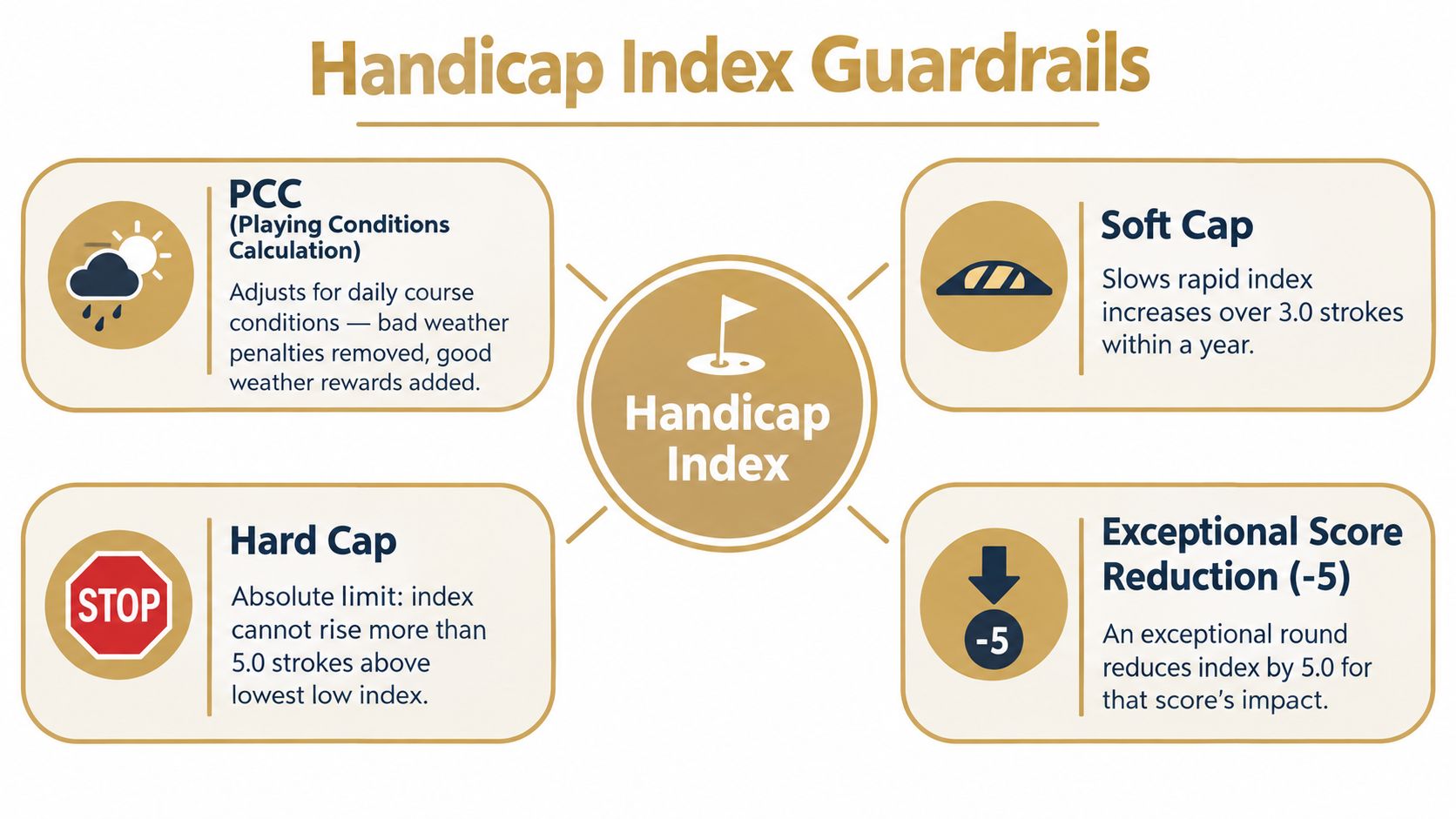
The Handicap Index includes guardrails that limit how quickly unusual conditions or unusual scores can move the number. Four mechanisms deserve attention: the Playing Conditions Calculation, the soft cap, the hard cap, and the exceptional scoring reduction.
PCC adjusts the day
The Playing Conditions Calculation, or PCC, accounts for conditions that affect scoring across the field. The daily expected score range runs from −10 to +3, and the adjustment can lift or trim the differential for players at that course by as much as 3 strokes. The PCC adjustment appears inside the differential formula, before the slope conversion.
A golfer doesn't manually decide whether wind, rain, course setup, or another condition deserves a PCC adjustment. The authorized handicap system evaluates the posted scoring pattern and applies the result when the criteria are met.
Caps limit upward movement
The soft cap applies when the 20-score average rises more than 3 strokes above the player's low-handicap index. Any further upward movement is slowed by 50%. The hard cap limits the index from rising more than 5 strokes above that low index.
Consider a golfer whose low index is 12.0. The hard-cap ceiling is 17.0. If deteriorating scores would otherwise push the index to 18.0, the hard cap prevents the displayed index from rising beyond that limit. If the increase passes the soft-cap threshold first, the upward movement is slowed before the hard ceiling is reached.
These mechanisms protect the record without freezing it. A sustained change in ability can still move the index, but a short run of unusually high scores won't create an unlimited jump.
Exceptional scores can reduce the impact
An exceptional scoring reduction applies when a posted differential is 7.0 or more below the current index and at least 3.0 below the current 20-score lowest-differential average. The calculation caps that score's impact at index minus 5.0 for the index calculation.
These safeguards happen inside the handicap system. Players don't apply the soft cap, hard cap, PCC, or exceptional score reduction by hand. Understanding the rules does help explain why an index may not move exactly as a simple average suggests.
From Launch Monitor to Posting With Dialed Golf
Practice data can support a golfer's development, but it doesn't automatically become a handicap score. A launch-monitor session must represent an acceptable round, use the correct tee and rating set, and receive the same hole-level net double bogey treatment as an on-course score before it can produce a Score Differential.
Dialed Golf's desktop workflow is built for launch-monitor practice at a range or garage simulator. The live pair is desktop-first, with Garmin R10 supported first and additional live connections expanding. Desktop also supports CSV or import workflows from Garmin, Rapsodo, SkyTrak, FlightScope, Uneekor, GSPro, Awesome Golf, and more. The consumer app is a separate pocket-caddy experience, currently in TestFlight rather than general App Store availability, while Dialed Academy provides memberships and front-desk tools for ranges and clubs at $99.99 per month or $999.99 per year, with the club keeping its dues.
A clean import sequence
A practical workflow looks like this:
- Export the session CSV. The file should contain enough information to reconstruct the round or scoring record, not merely isolated swing metrics.
- Upload through the Dialed Golf desktop dashboard. The desktop experience handles the launch-monitor practice workflow and imports.
- Tag the round correctly. Identify whether it represents 9 holes or 18 holes.
- Confirm the tee and rating set. Course Rating, Slope Rating, par, and the applicable player rating must match.
- Apply net double bogey. Convert raw hole results into the adjusted gross score used for handicap purposes.
- Submit and verify the record. Check the resulting differential and the Course Handicap before the next tee sheet.
The Dialed Golf CSV import workflow is useful for moving structured practice data into a consistent golfer record. Stroke-level metrics can support analysis, but they aren't a substitute for hole scores. Simulated rounds should also be flagged distinctly from peer-reviewed on-course scores unless the round meets the applicable requirements for an acceptable score.
The record is the important link. Dialed Golf is three products, one golfer record, and one Pro plan. Golfer Pro costs $9.99 per week, $29.99 per month, $149.99 for six months, or $249.99 per year across the app and desktop. Free web tools remain free, and Pro is not the same thing as the free-tool top of funnel.
Before posting, a golfer can use this checklist:
- Confirm the tee: Match the tee, Course Rating, and Slope Rating.
- Adjust every hole: Apply the net double bogey maximum.
- Calculate the differential: Include PCC when the system applies it.
- Post the score: Use the authorized scoring record.
- Verify the conversion: Recompute the Course Handicap for the next tee set.
A valid launch-monitor round, once adjusted and posted, can use the same golfer record as an on-course round. That gives practice data a direct path into handicap management without confusing swing analysis with an official score.
Dialed Golf connects a pocket caddy, desktop launch-monitor practice, and Dialed Academy operations through one golfer record, with free web tools available for handicap workflows. Visit Dialed Golf to calculate the number, organize launch-monitor CSV data, and keep the next posted round tied to the same record.