


At 8:42 on a Saturday morning, the first lesson block is minutes away. The coach checks the bay schedule on one screen, the front desk checks memberships in a separate payment dashboard, and the general manager is matching last weekend's receipts against accounting records. A junior member arrives for a make-up class, but nobody can confirm whether her package has a usable credit. One system shows a lesson remaining, another shows two, and an old waiver suggests a different prepaid balance.
That isn't a scheduling glitch. It's a ledger failure. Dues, lesson packages, bay time, retail, refunds, and house credits are all financial events, and golf academy billing software has to keep them attached to the same member record. The global golf software market was estimated at USD 1.64 billion in 2025 and is projected to reach USD 3.12 billion by 2032, while club-management functionality represented 44.9% of total value in 2025, according to market research on golf software. Operators should therefore judge billing platforms as operating systems for the academy, not as simple monthly subscription engines.
Table of Contents
- The Front Desk Problem Most Billing Software Leaves Unanswered
- Core Features Golf Academy Billing Software Must Have
- Membership Models and Pricing Structures That Actually Fit
- Integrations With Launch Monitors, Consumer Apps, and Payments
- Implementing and Migrating to a New Billing Platform
- Pricing Models and Who Keeps the Revenue
- Compliance, Security, and Reporting as One Workflow
- How Dialed Academy Fits the Stack
The Front Desk Problem Most Billing Software Leaves Unanswered
A generic billing platform can collect a recurring fee and still leave the front desk exposed. It might know that a member paid dues, while the booking calendar knows that the member reserved a bay and the coaching tool knows that a lesson package exists. Those systems can each be accurate in isolation and still disagree when staff need one answer immediately.
The Saturday scenario becomes expensive when the member record isn't shared. Staff may grant access to an expired package, charge for a lesson that was already prepaid, or send a refund to the wrong payment method. The academy then spends time reconstructing what happened instead of teaching, checking in golfers, or selling the next session.
The real unit of control
A member account should show the full commercial relationship:
- Recurring dues: The current plan, renewal date, payment status, pause status, and access rules.
- Lesson inventory: Purchased credits, redeemed credits, expiration terms, transfers, and make-up eligibility.
- Bay usage: Reserved time, actual usage, included hours, overages, cancellations, and no-show treatment.
- Retail activity: Range products, rentals, apparel, food, and other point-of-sale purchases tied to the member or guest profile.
- House credits: Promotional balances, refunds issued as credit, family balances, and restrictions on redemption.
The important distinction is between a booking record and a financial record. A booking says what someone intended to use. A ledger says what the academy sold, what the golfer consumed, what remains, and where the money settled.
Practical rule: If a front-desk employee has to open three systems to answer “what does this golfer still have?”, the academy doesn't have one member record.
The golf academy market reached USD 1.42 billion in 2024 and is projected to reach USD 2.77 billion by 2033, with North America valued at USD 570 million in 2024, according to market research on golf academies. As academies expand their membership, instruction, and facility offerings, fragmented records create more exceptions for staff to resolve.
The right platform settles the full transaction path. It collects dues, sells and redeems credits, posts bay usage, records retail, and preserves the club's ownership of its revenue. That is the standard the rest of the buying decision should follow.
Core Features Golf Academy Billing Software Must Have
A member can book a lesson, use a bay, buy a glove, and spend house credit in the same visit. Golf academy billing software must reconcile those products through one ledger, not treat payments and scheduling as separate jobs. Evaluate the system as five connected functional layers, with the member record linking each layer.
The five layers
| Layer | Must-Do |
|---|---|
| Recurring billing | Store payment credentials through a processor vault, charge dues on schedule, retry failed payments, and send reminders before access lapses. |
| Scheduling and sessions | Connect members to class rosters, coaches, bays, attendance, lesson credits, cancellations, and usage charges. |
| Point of sale | Post walk-in purchases, rentals, range products, retail, and food to a member or guest profile. |
| Reporting | Reconcile revenue by product, coach activity, utilization, refunds, taxes, and processor settlement. |
| Integrations | Exchange data with launch monitors, booking apps, member portals, and payment systems through documented interfaces. |
Recurring billing provides the collection mechanism, but automated charging alone is insufficient. The platform should support automatic renewals, failed-payment retries, payment reminders, multiple payment methods, and clear account status. Guidance for golf lesson software connects recurring subscriptions with predictable cash flow and emphasizes reminders and payment flexibility to reduce lapses, as described in golf lesson software guidance.
Scheduling must distinguish a reservation from an entitlement. If a member books an included lesson, the system should reserve the coach and bay, verify eligibility, and redeem the correct credit only after the academy's attendance or cancellation rules permit it. That prevents a cancelled or missed session from consuming value.
The point-of-sale layer keeps the front desk from creating a second profile for every walk-in. A golfer who purchases a lesson package, rents equipment, uses a bay, and buys retail should remain one customer, whether the transaction occurs at a terminal, kiosk, or online checkout.
Reporting and integrations determine whether the system holds together
Reports should answer operating questions without spreadsheet reconstruction. Managers need product-level revenue, coach capacity, facility utilization, unused credits, refunds, taxes, and processor settlements in the same review. The report must show both what the academy sold and what the golfer still holds.
Open APIs or webhooks matter because equipment and member-facing experiences rarely come from one source. A bay session, online booking, or payment event should update the same account and ledger. If staff must manually merge parallel statuses, the system is creating reconciliation work instead of removing it.
Membership Models and Pricing Structures That Actually Fit
A fixed monthly membership is easy to sell and easy to bill, but it isn't the right structure for every academy. A facility serving committed members can use unlimited access or included coaching hours, while a teaching studio with irregular attendance may need credits, packages, or usage-based charges.
The strongest platforms let operators change the commercial model without asking a developer to rebuild the account structure.
Match the model to the operating pattern
Fixed monthly dues fit facilities with predictable access rules and a stable membership base. The academy receives recurring revenue, members understand what they get each cycle, and staff can manage renewals through an established account status.
Punch cards and lesson packages work better for golfers who buy instruction in blocks and redeem sessions over time. The system must show the remaining balance, apply expiration windows, enforce non-transferability rules where needed, and stop staff from manually decrementing credits.
Metered access suits facilities that charge by bay time or usage. It requires reliable start and end events, clear rounding rules, cancellation handling, and a way to distinguish included access from billable overage.
Installment plans split an annual commitment into scheduled charges. They can smooth member payments while preserving the academy's annual plan structure, but the platform must handle failed installments, pauses, refunds, and early cancellations without losing the original agreement.
Hybrid structures are often the practical answer. A base membership can include coaching hours, a member can buy extra lesson credits, bay usage can be metered separately, and retail can remain a la carte. The ledger should show the margin and utilization of each component rather than collapse every purchase into one vague membership line.
Operator view: The best pricing model is the one staff can explain at the counter and the ledger can enforce without exceptions.
The purchasing test is simple. Ask whether the platform can pause a plan, resume it, prorate a partial month, issue a credit, redeem a package, and preserve the academy's revenue share. If those actions require manual spreadsheets, the advertised flexibility isn't operational flexibility.
Integrations With Launch Monitors, Consumer Apps, and Payments
Integrations decide whether the academy has one ledger or several loosely connected stories. The evaluation should start at the bay, continue through the member app, and finish at the payment processor.
Equipment at the bay
Launch-monitor and simulator systems can create usage events, but the billing platform needs a dependable way to receive them. API webhooks are useful when equipment exposes live events such as session start, session end, cancellation, or usage status. File-based import remains important when a device doesn't offer a suitable live connection.
A practical desktop practice workflow can accept CSV exports from Garmin, Rapsodo, SkyTrak, FlightScope, Uneekor, GSPro, Awesome Golf, and other systems. Launch-monitor CSV compatibility matters because a facility shouldn't have to discard historical practice data because every bay uses a different ecosystem.
Consumer software and payment rails
Member portals and consumer booking apps need shared member IDs or an identity method such as OAuth. Otherwise, the booking app may create a duplicate account, fail to recognize included credits, or show an outdated payment state.
Payment processing needs a separate review. Online, in-person, and app-based payments should flow into one finance view, while card handling should follow PCI DSS-aligned practices. Depending on geography, member information can also involve GDPR or CCPA obligations, as outlined in golf academy payment and compliance guidance.
For processors, tokenized card storage is preferable to retaining raw card numbers. ACH can serve members who prefer bank payments, and counter terminals should post into the same account as online checkouts. The exact processor matters less than merchant-of-record clarity, settlement visibility, and reliable event delivery.
A point-to-point design connects every system to every other system. That becomes difficult to maintain when the academy adds another bay type, booking channel, or payment method. A hub-and-spoke model gives the member ledger a central role, so each system sends and receives the information it needs without becoming the authority for everything.
Implementing and Migrating to a New Billing Platform
Migration starts with cleanup, not software configuration. The academy should export members, remove duplicate profiles, normalize names and contact fields, identify active plans, and decide which historical invoices need to move into the new system. Older records can remain archived if they aren't needed for daily operations, but the decision should be deliberate.
The payment setup follows. The operator verifies the destination bank account, configures processor connections, confirms card tokenization, and decides which plans will bill on the first live cycle. Existing recurring subscriptions create the hardest choice. The academy can migrate mid-cycle, run old and new systems in parallel for a controlled period, or cancel and reissue subscriptions with clear member communication.
The controlled parallel run
A clean go-live includes terminal tests, test refunds, permission checks, staff training, and a written counter procedure for failed payments. Members whose stored cards need to be re-entered should receive direct instructions before the first charge, not a surprise decline at check-in.
Member import should preserve the facts staff use. That includes active memberships, package balances, renewal dates, family relationships, access restrictions, credits, and relevant invoice history. A CSV import workflow can help standardize the transfer, but the academy still needs a field map and an exception report.
The first billing cycle should be treated as a controlled parallel run, not a hard cutover. Staff compare successful charges, declines, refunds, credits, and processor deposits against the old records. They should also document disputes and member questions while the old data remains available for reference.
The review cadence should continue after launch:
- First 30 days: Check charge status, duplicate invoices, account access, terminal receipts, and failed-payment workflows.
- First 60 days: Review package redemption, cancellations, refunds, staff corrections, and revenue by product.
- First 90 days: Compare retention, utilization, settlement accuracy, and unresolved exceptions against the academy's operating baseline.
A short video can help staff understand the new workflow before launch.
Pricing Models and Who Keeps the Revenue
Software pricing isn't just a subscription comparison. The decisive question is who controls and receives the academy's dues.
A flat per-location fee is usually easiest to forecast. Per-member pricing grows with the roster, which can make a small academy accessible but create a rising software bill as membership expands. A percentage-of-transaction model ties software cost to sales volume, while a revenue-share arrangement can place the vendor between the academy and its members.
| Pricing Model | Example Cost (200 members) | Academy Keeps Dues? | Risk |
|---|---|---|---|
| Flat per-location subscription | A fixed location fee | Usually, if the academy uses its own merchant account | Cost remains even during a slow period |
| Per-member pricing | A fee multiplied by each active member | Usually, subject to processor terms | Expense rises with membership |
| Percentage of transactions | A percentage of processed sales | Not in full | Cost grows with revenue and can complicate reconciliation |
| Revenue share | A negotiated share of dues or sales | Not in full | Less control over settlement, refunds, and account ownership |
The preferred structure is straightforward. The academy should keep dues, lesson revenue, and retail sales in its own merchant account, while the software charges a separate management fee. That preserves control over refunds, settlement timing, revenue reporting, and the relationship with members.
A vendor that requires pooled accounts or revenue sharing should face a high bar. The operational benefit might justify it in a narrow situation, but the academy should understand exactly who owns the funds, who handles disputes, how refunds are approved, and what happens if the relationship ends.
Total cost of ownership includes more than the advertised fee. Payment processing, terminals, kiosk equipment, implementation, staff training, data cleanup, chargeback work, and manual reconciliation all belong in the calculation. A cheaper subscription can become expensive when staff must keep correcting the ledger.
Compliance, Security, and Reporting as One Workflow
Compliance, security, and reporting should be evaluated together because the same transaction creates all three responsibilities. When a member pays, the academy needs safe payment handling, appropriate access to personal information, and a record that explains exactly what happened.
PCI DSS scope depends on how the platform handles card data. A tokenized processor connection can limit the academy's exposure, while storing original card numbers creates a far more serious obligation. The vendor should explain whether it stores payment credentials, passes them directly to a processor, or supports bank payments without retaining card data.
Privacy controls matter alongside payment controls. Member profiles may contain contact details, waivers, lesson notes, and information about junior golfers. Role-based permissions should limit what coaches, front-desk staff, managers, and finance users can view or change. Audit logs should show who changed a plan, issued a refund, modified a credit, or altered access.
Reports are evidence, not decoration
A useful system connects daily operations to audit-ready records:
- Refund records: Reason codes, approvals, dates, original payment references, and destination of the refund.
- Void records: The employee, transaction, time, item, and explanation.
- Chargeback trails: The original sale, supporting documents, response status, and final outcome.
- Settlement reports: Processor deposits matched against individual sales, refunds, fees, and adjustments.
- Access history: Changes to memberships, packages, credits, and account permissions.
The academy should ask vendors for a recent PCI attestation, a data-retention policy, and a SOC 2 or equivalent report. It should also test whether reports can be exported without a support ticket.
Practice data deserves the same discipline. A unified golfer record can connect account activity with training history, but access should remain appropriate for the role. The practice-data category provides useful context for how golf data can be organized without turning every user into a finance administrator.
Weak reporting usually appears first as a billing annoyance, then becomes a security or compliance problem during a dispute. A system that can't explain a transaction can't protect the academy when a member challenges it.
How Dialed Academy Fits the Stack
Dialed Golf is built as three products, one golfer record, and one Pro plan. The consumer app is a pocket caddy for the course and is currently in TestFlight rather than general App Store availability. Apple's App Review Guidelines state that demos, betas, and trial versions should use TestFlight instead of the App Store, and Apple's TestFlight channel is designed for distributing those builds to iOS and iPadOS testers.
The desktop product handles launch-monitor practice at a range or garage simulator. It is desktop-first for live pairing, starting with Garmin R10 and expanding, and it also supports CSV and import workflows across Garmin, Rapsodo, SkyTrak, FlightScope, Uneekor, GSPro, Awesome Golf, and more. The broader file-based approach is practical because device compatibility guidance describes manual CSV uploads as a way to unify exports from multiple launch-monitor ecosystems.
The academy ledger
Dialed Academy is the front-desk product for ranges and clubs. It combines memberships, recurring dues, lesson scheduling, bay scheduling, point of sale, and reporting in one member account. Punch cards, house credits, and recurring memberships can post to that ledger instead of being split between a calendar, spreadsheet, CRM, and separate terminal.
The pricing is $99.99 per month or $999.99 per year, with the club keeping its dues. Dialed Academy is structured as a flat software fee rather than a revenue-share arrangement, so the academy retains its membership, lesson, and retail revenue while the platform operates as the management layer.
Payment handling uses connected processor accounts and tokenization rather than storing raw card numbers. The platform supports member import, historical invoice migration, and a parallel billing cycle before cutover, which aligns with the controlled migration approach required for a live academy.
Golfer Pro is priced at $9.99 per week, $29.99 per month, $149.99 for six months, or $249.99 per year across the consumer app and desktop product. Free web tools remain free and serve as the top of the funnel, not as a forced upgrade path. Dialed Golf isn't hardware, a swing-analyzer camera, or a ranked “best golf app” entry. It is a connected product line for golfers, practice data, and academy operations.
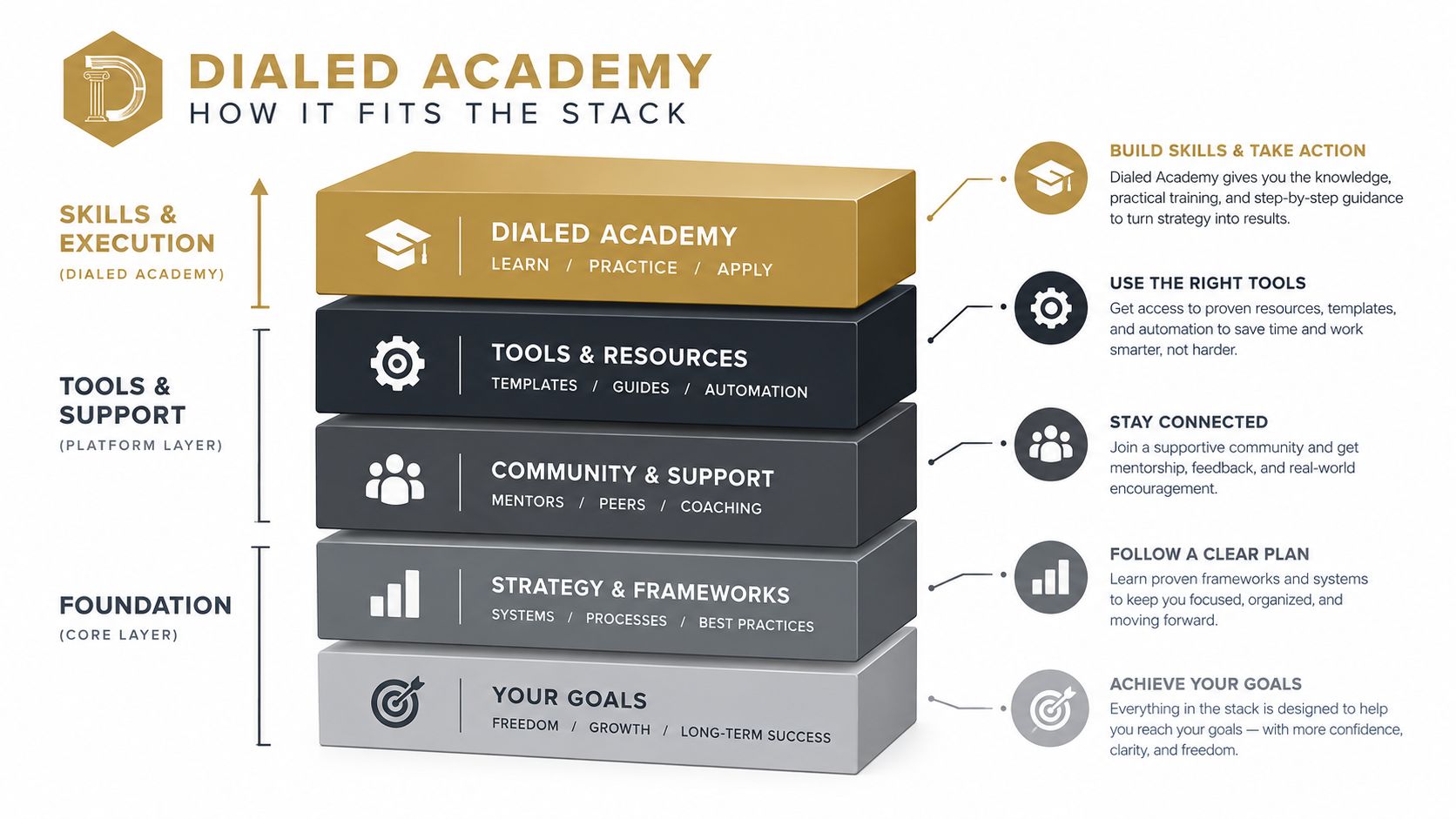
Dialed Academy fits indoor academies, simulator facilities, and multi-coach clubs that need one golfer record across dues, lessons, bay usage, retail, and credits. The selection decision still belongs to the operator, but the required test is clear: one account, one ledger, transparent merchant ownership, and reports that staff can reconcile without rebuilding the weekend in a spreadsheet.
Dialed Golf offers a connected consumer app, desktop launch-monitor practice, and Dialed Academy for memberships and front-desk operations. Visit Dialed Golf to evaluate how its unified golfer record and flat-fee academy billing model can fit a range or club's reconciliation workflow.