


Saturday morning starts with a familiar queue. One golfer has a tee time but can't remember the booking name, another is a guest whose eligibility needs checking, and a third wants to collect a rental set before heading to the starter. Behind the counter, staff are answering the phone, taking payment, searching the tee sheet, and trying not to send an unverified golfer toward the first tee.
That's why golf club front desk check in is more than a greeting. It's the club's control point for revenue protection, eligibility, pace of play, and usable member data. A well-designed process lets staff move quickly without making every golfer feel processed.
Table of Contents
- Why Golf Club Front Desk Check In Sets the Whole Day
- The Arrival Workflow From Greeting to Tee Sheet Handoff
- Member Guest and Lesson Check In Paths That Actually Differ
- Scripts Payments and Service Prompts That Feel Helpful
- Troubleshooting Slowdowns Errors and Privacy at the Desk
- Training Your Team and Connecting Front Desk Software
Why Golf Club Front Desk Check In Sets the Whole Day
A Saturday queue exposes weak controls quickly. One arrival needs guest eligibility checked, another has an unpaid balance, and a third needs a rental set directed to bag drop. If the desk confirms identity, reservation, payment status, and next destination in one controlled exchange, the starter receives a ready golfer. If any check is missed, the starter or pro shop repeats the work and the golfer sees a disorganized operation.
The administrative burden starts before arrival. One analysis of premium Australian golf clubs estimated 22 minutes per visitor booking, including pre-arrival verification and day-of re-verification of handicap, home club affiliation, and attire. At 400 visitor rounds per year, that workflow represented 146 hours, or roughly 3.6 full working weeks, of booking administration, as detailed in this analysis of visitor booking costs. Clubs will have different volumes and rules, but the labor behind visitor access still warrants a defined standard.
The desk protects more than the tee time
A useful front desk check-in record answers four questions:
- Who arrived: Match the person to a member profile, guest booking, lesson reservation, or rental visit.
- Why they're there: Confirm whether the visit is for golf, a lesson, range use, equipment collection, dining, or a meeting.
- What must be cleared: Check membership access, guest eligibility, waiver, payment, attire, or rental agreement.
- Where they go next: Direct the golfer to bag drop, the pro shop, practice area, cart staging, starter, or first tee.
Those fields protect revenue and eligibility while giving the next team a usable handoff. A connected club system can carry the booking, payment status, check-in state, and attendance record through the operation. Staff should update the original record rather than re-keying details at the counter. That preserves cleaner member data and shows who arrived, not only who was booked.
A check-in is an operational event, not merely a timestamp.
Consistency creates a calmer arrival
Strong desk teams do not improvise the first thirty seconds. They use a short script, then branch according to the golfer's answer. A benchmark from 59club's arrival-experience analysis found that only 52% of affiliated venues and 40% of non-affiliated venues asked whether the golfer had played there before. Only 43% used the guest's name during the visit.
That context question has a practical purpose. Returning golfers usually need confirmation and a clear direction to staging. First-time visitors need orientation, such as where to leave bags, find the starter, or access practice facilities. Asking early helps staff tailor the handoff without extending every interaction.
Practical rule: Verify identity and context first. Clear the booking and payment status. Give directions second. The starter should receive a golfer who has been checked and oriented.
The Arrival Workflow From Greeting to Tee Sheet Handoff
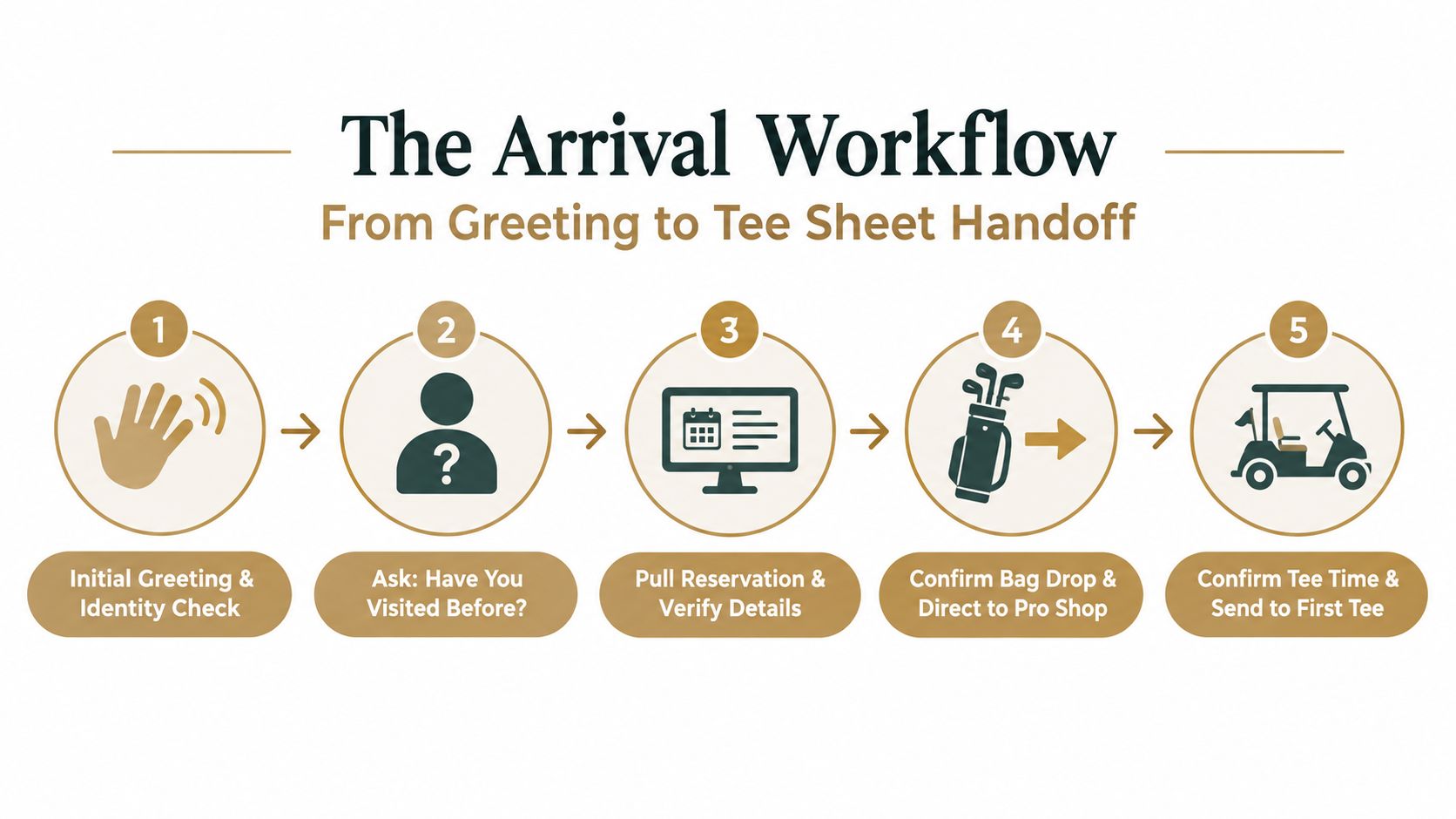
A Saturday morning queue forms quickly when one reservation cannot be found, a guest fee is unclear, or the starter receives an incomplete group. The front desk controls more than the greeting. It confirms revenue, eligibility, attendance, and the information passed to the next station. Keep the process short for the golfer, while completing each control in the booking record.
Start with recognition, not interrogation
Greet the golfer as they approach and ask for the name on the reservation or membership. If the system supports lookup by name, phone, email, or member number, use the identifier that gives the cleanest match. “Good morning, what name is the booking under?” keeps the first exchange moving.
Ask whether the golfer has visited before. A returning member may need confirmation and a direction to staging. A first-time visitor may need the locations of bag drop, the pro shop, changing facilities, practice areas, and the starter. That answer determines how much orientation to give without turning every arrival into a long interview.
Pull the reservation instead of rebuilding it
After identifying the golfer, open the existing tee-time, lesson, range, or event reservation. Do not re-key details already entered by the golfer or booking team. Confirm the fields that affect the visit:
- Reservation purpose: Round, lesson, practice session, rental, or another visit.
- Scheduled time: Confirm the tee time or appointment without making the golfer repeat the booking.
- Group details: Check the party attached to the reservation and identify missing arrivals.
- Account status: Verify the applicable balance, member charge, guest fee, or payment requirement.
- Outstanding requirements: Check for a waiver, eligibility condition, attire rule, or rental agreement.
An integrated tee-sheet-to-POS workflow can connect the reservation directly to payment and attach transactions to the same record. The Golf Pro Payments and TeeControl partnership announcement describes a live pilot that reported 20% faster check-in times, along with real-time check-ins and synchronized member data. The operational benefit is fewer duplicate entries and a clearer record for the desk, retail, and food-and-beverage teams.
Make the destination explicit
After verification, state the next step plainly: “Your booking is confirmed. Please leave your bag at the drop area, then go to the pro shop for the starter briefing.” “You're all set” leaves too much for the golfer to interpret.
Mark the arrival in the system, then make the handoff. Notify the starter when the group is complete or a player is missing, and direct rental golfers to the equipment point. Use the same status language at the desk and starter station so the golfer is not asked to repeat the same details. A completed check-in should leave a clean record and a clear destination.
Member Guest and Lesson Check In Paths That Actually Differ
A Saturday arrival can look orderly while the desk misses a guest fee, sends a lesson student to the wrong area, or records attendance twice. Start with the same greeting and identity check, then change the verification path immediately. Members, invited guests, lesson students, and rental-only visitors have different eligibility, payment, and handoff requirements.
Members need access confirmation, not full re-onboarding
For a member, confirm the active profile, reservation, and any account condition affecting the visit. A useful script is: “Good morning. The tee time is under Taylor, and the booking is confirmed. Is the full group here?”
If membership includes access restrictions, dues conditions, or booking privileges, resolve them before directing the golfer onward. Record arrival and round status accurately. Membership records are more useful when they show actual activity rather than planned bookings alone.
Retention gives this discipline a practical purpose. Australian golf-organization guidance recommends that clubs measure attrition annually, maintain membership and rounds records, and use surveys and direct contact to understand retention issues. The guidance reports average attrition of 20.5% for clubs with fewer than 250 members and 6.5% for clubs with more than 1,000 members, as documented in this golf club membership guidance PDF. Check-in data will not explain every departure, but it can identify inactive members and keep records current.
Guests require eligibility and payment discipline
A guest path can include home club affiliation, handicap, attire, invitation, guest limits, and payment. Present these as standard arrival requirements rather than suspicion:
“Welcome. The booking is under Taylor. The club requires guest verification before play, so we'll confirm the home club and handicap details, then complete the applicable charge.”
The exact checks depend on club policy. The desk must know which requirements are mandatory and record completion once. A guest should not be sent between reception, the pro shop, and the starter to repeat the same details. If the tee-sheet and payment records connect, the charge and eligibility status can stay with the booking instead of being re-keyed.
Lessons and rentals have a different endpoint
A lesson student may not need a tee-time handoff. Confirm the instructor, appointment time, lesson location, payment status, and waiver, then direct the student to the correct meeting point. A rental-only visitor needs equipment availability, sizing or collection instructions, the rental agreement, and a clear return expectation.
| Golfer Type | Verify At Desk | Capture and Charge |
|---|---|---|
| Member | Member profile, reservation, access status, group arrival | Round status, attendance, member charge or balance |
| Guest | Booking host, home club affiliation, handicap where required, attire and eligibility | Guest fee, waiver, payment method, attendance |
| Lesson student | Instructor, appointment, location, waiver and payment status | Lesson attendance, lesson charge, equipment or range add-ons |
| Rental-only visitor | Reservation, equipment type, collection details and agreement | Rental charge, deposit or balance, return status |
Use the shortest path that fits the visit. A first-time guest needs orientation, while a regular lesson student may only need, “Your coach is on the practice tee.” The desk should mark the correct status, send the relevant handoff, and avoid explaining the entire property to every arrival.
For clubs reviewing where these paths still rely on duplicate entry or informal handoffs, a gap analysis framework can help identify the control points that need clearer ownership.
Scripts Payments and Service Prompts That Feel Helpful
Peak Saturday mornings expose weak scripts quickly. A front desk line slows when staff ask broad questions, repeat information already in the reservation, or start a second payment record. Use a short sequence: establish the visit, confirm the control points, then give one clear direction.

Use short language with a clear purpose
Useful phrases include:
- “Good morning. What name is the booking under?”
- “Have you visited the club before?”
- “Your tee time is confirmed. Is the whole group here?”
- “The bag drop is just past the pro shop. The starter will meet the group there.”
- “Would you like to add range balls before the round?”
- “Are clubs already arranged, or should the desk check rental availability?”
- “There's a balance due today. Would you prefer the member account or another approved payment method?”
- “The waiver is still outstanding. It needs to be completed before the lesson begins.”
Use the golfer's name to confirm the record discreetly. Say it once, then verify the relevant booking or member detail without announcing personal information across the desk. The goal is accurate eligibility, payment, and attendance capture, not a longer conversation.
Offer relevant services, then stop
Recommend an add-on only when it fits the visit. A golfer arriving early may want range access. A visitor without clubs may need a rental. A lesson student may need practice time or equipment preparation. A food and beverage prompt can help when the golfer has time before play.
Keep the choice with the golfer: “The practice area is available if you'd like to warm up.” Staff should attach approved purchases to the existing golfer or reservation record. Creating another transaction leaves the team to reconcile charges later and can distort revenue reporting.
Keep one record across the golfer's club activity
Dialed Golf fits this operating model as three products, one golfer record, and one Pro plan. The consumer app is currently distributed through TestFlight rather than general App Store availability. Apple describes TestFlight as a beta system in which developers upload builds through App Store Connect, invite testers by email or public link, and make each build available for testing for up to 90 days after upload in its TestFlight documentation.
The desktop product supports launch-monitor practice at a range or garage simulator, with live pairing and CSV or import workflows that keep practice data connected to the golfer record. The documented device compatibility list defines supported device and workflow coverage. That connection gives the desk and coaching team one activity history instead of separate files that require re-keying.
At checkout, confirm the charge, save it against the same golfer or reservation, and state the next handoff. A useful close is, “You're checked in, the balance is settled, and the starter is expecting your group at bag drop.”
Troubleshooting Slowdowns Errors and Privacy at the Desk
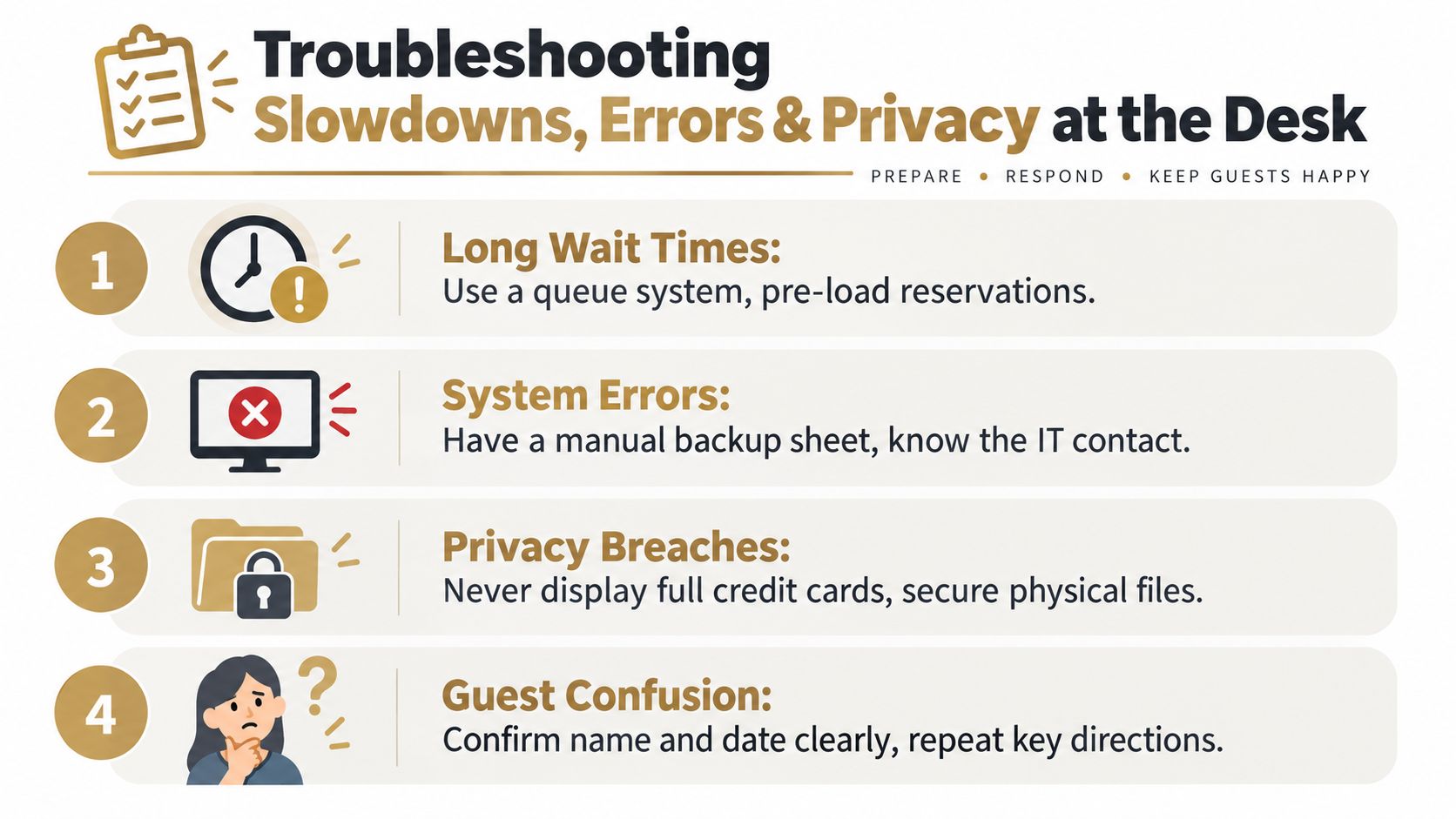
At 8:55 on a busy Saturday, one missing reservation can stop the line. The desk must protect three things at once: the tee time, the golfer's eligibility, and an accurate record for payment and follow-up. Common failures include an unfindable booking, duplicate profiles, a missing waiver, repeated payment entry, or no notice that a group is incomplete.
Diagnose the queue before adding staff
Watch the exact point where each transaction stops. A slow search usually means the identity details are incomplete or inconsistent. Repeated payment entry signals a broken handoff between the tee sheet and point of sale. Recurring waiver issues mean booking and arrival staff do not share a clear ownership rule.
Separate exceptions from ordinary arrivals immediately. Move a confirmed golfer aside with a clear instruction, then let another employee resolve the duplicate record, missing waiver, or payment question. The manual fallback should record only what protects the tee time and supports later reconciliation. It must not become a second permanent database.
Imported launch-monitor files can create the same identity problem. Inconsistent file names, golfer names, or session dates may attach one golfer's practice activity to several profiles. A defined CSV import workflow gives staff a repeatable way to preserve one golfer identity instead of creating a new record for every upload.
The handoff needs an owner. If a group is incomplete, the desk alerts the starter before sending the confirmed players toward bag drop. If a lesson or rental visitor is delayed by an eligibility check, the relevant coach or service area receives the status rather than making the golfer repeat the story.
Collect necessary data without overreaching
Explain the purpose before requesting a detail. “The club uses this information to verify access and manage today's booking” gives the golfer a clear reason. If a field is not needed for eligibility, payment, safety, service delivery, or a defined operational purpose, leave it blank.
Privacy covers screens, paper forms, and self-check-in devices. Keep full payment details out of view, avoid announcing personal information across a crowded lobby, and secure physical forms at shift end. Set access rights and retention practices for member and guest records as arrival processes become more digital. Earlier golf check-in guidance included operational information collection for purposes such as contract tracing, while later privacy policies place more emphasis on access controls and retention, as reflected in this golf playing and information update.
Recovery rule: Keep the golfer moving, preserve the minimum accurate record, and resolve the exception away from the main queue whenever possible.
Training Your Team and Connecting Front Desk Software
Train staff against the actual arrival sequence, not a feature tour. New team members should rehearse the greeting, exact lookup, context question, reservation confirmation, payment decision, and destination handoff until each step is clear during a busy Saturday morning.
Use a shift checklist with named ownership:
- Before opening: Confirm the tee sheet, lesson schedule, rental availability, system access, payment terminal, and manual fallback.
- At arrival: Identify the golfer, ask whether they have visited before, retrieve the booking, complete required checks, and record the correct status.
- At handoff: State the next destination, alert the starter when a group is incomplete, and send rental or lesson visitors to the correct area.
- At shift change: Review unresolved records, outstanding payments, missing waivers, expected groups, and system issues.
- After the rush: Review exceptions as well as completed check-ins. Repeated exceptions show where the workflow needs redesign.
Managers should coach one consistent two-step script. First confirm identity and context. Then give directions. This supports a personal welcome without making returning guests sit through instructions they already know.
Connect tools around the golfer record
Dialed Academy provides membership and front-desk functionality for ranges and clubs at $99.99 per month or $999.99 per year, with the club keeping its dues. Golfer Pro is available through the app and desktop at $9.99 per week, $29.99 per month, $149.99 for six months, or $249.99 per year. Free web tools remain free and serve as a top-of-funnel option rather than replacing the paid Pro experience.
The consumer app remains in TestFlight. The desktop product supports launch-monitor practice with live pairing that is desktop-first and expanding, plus import workflows that keep data connected to the golfer record. The launch-monitor app overview can support the club's workflow review, provided staff define which system owns reservations, payments, memberships, and practice data.
Start with one shift. Define the universal arrival script, map member and guest exceptions, connect the tee sheet to payment where possible, test the manual fallback, and observe the first busy morning. The front desk becomes an operational control point when it captures the right identity, confirms eligibility, records payment status, and hands each golfer to the right person without re-keying information.
Dialed Golf offers clubs and ranges a membership and front-desk option through Dialed Academy, while connecting golfer activity across its consumer app and desktop practice experience. Visit Dialed Golf to review the products and build a front-desk workflow around one golfer record instead of repeated manual entry.