


A golfer finishes a range session, exports the file, and opens a spreadsheet full of rows. Ball speed is there. Launch angle is there. Spin rate, carry, club path, face angle, and dispersion are all present. Yet the file still doesn't answer the useful question: what should change in the next practice session?
That's the problem with practice data analysis when it stops at collection. A launch monitor can describe every shot, but improvement requires a diagnosis, a decision, and a drill. The practical workflow is simple: define the question, clean the evidence, identify one priority, train it, and re-test it under comparable conditions.
Table of Contents
- When the CSV Stops Being the Point
- The Core Metrics Worth Tracking Every Session
- Getting Practice Data Off the Device and Into One Place
- Reading Trends Without Fooling Yourself
- Using Practice Data for Gap Analysis
- Turning the Numbers Into One Drill This Week
When the CSV Stops Being the Point
The first warning sign usually appears after a productive-looking session. A golfer hits a full bag, saves the export, and sees hundreds of rows. The numbers look authoritative, but the session has no label beyond a date. There's no record of whether the goal was driver dispersion, wedge distance control, or a club comparison.
Without that context, the spreadsheet can't distinguish a deliberate experiment from a warm-up, a mishit from a representative strike, or a useful change from random variation. A single best carry number becomes more memorable than the middle of the shot distribution, even though the best shot rarely describes the golfer's normal result.
Practical rule: Raw launch-monitor data is evidence, not a diagnosis.
A usable session needs three additions. First, the golfer records the question in plain language, such as “Can the driver start closer to the target without losing playable carry?” Second, the golfer defines what counts as a usable shot. That might exclude obvious tops, heavy contact, a misread ball, or a registration error. Third, the golfer chooses a comparison point, such as the previous three sessions or a baseline block.
Give every session a job
The most useful practice logs stay short. A session title such as 2026-09-28-driver-dispersion tells the golfer what the file should help decide. Notes can then capture wind, range balls, mat or grass, swing intent, and the one change being tested.
That structure turns a CSV into part of a repeatable feedback loop. This guide to CSV import reflects the practical starting point, bringing device data into a form that can be reviewed rather than left isolated in an export folder.
Ask a question before opening the columns
Practice data analysis became valuable when golf moved beyond anecdotal shot descriptions toward objective comparisons of driving, approach play, short game, and putting. Modern launch-monitor practice can capture more than 100 tour-level statistics, but access to more columns doesn't create better decisions by itself. A launch-monitor overview from Shot Scope emphasizes the shift toward structured feedback, including baseline blocks, filtered shots, and comparisons based on typical results.
The useful question is never “What happened on every shot?” It's “Which repeatable pattern is costing the golfer the most, and what controlled practice can test it?” Once that question is written down, the file has a purpose.
The Core Metrics Worth Tracking Every Session
A launch monitor can report an impressive volume of information. A practice plan needs a much smaller working set. The right filter is blunt: keep a metric only if it can change a decision, a setup, or a drill.
For most full-swing sessions, the baseline starts with club speed, ball speed, smash factor, launch angle, spin rate, spin axis, carry, and face-to-path. These metrics connect delivery to outcome. Club speed shows the input, ball speed shows the result, and smash factor helps reveal whether speed is being transferred efficiently. Launch and spin describe the flight window, while carry and dispersion show whether that flight is useful on the course.
Face-to-path deserves special attention because it helps explain curvature. Club path alone can look reasonable while the face relationship produces a start line and curve the golfer can't control. Contact location also belongs in the working set when the device or setup can provide it reliably, because a centered strike and a toe or heel strike can produce different ball-speed and spin outcomes even when the delivery numbers look similar.
Build the minimum viable session
Five shots per club is a practical minimum for a quick comparison, though a serious baseline should use a larger repeated block. The key is consistency. A golfer who uses three shots for one club, twelve for another, and keeps only the best results creates a biased comparison before analysis begins.
The working set can look like this:
- Delivery: Club speed, club path, face angle, and face-to-path.
- Impact: Ball speed, smash factor, and contact location where available.
- Flight: Launch angle, spin rate, spin axis, and carry.
- Outcome: Dispersion, ideally separated into left-right pattern and distance spread.
Not every device presents these fields identically. A desktop workflow may combine live data with imported records, while a manual sheet may use only the fields needed for the current question.
Core Practice Metrics vs. Ignore List
| Metric | What It Tells You | Track Every Session? |
|---|---|---|
| Club speed | How fast the club is moving | Yes, when speed is part of the goal |
| Ball speed | Quality of energy transfer and strike outcome | Yes |
| Smash factor | Ball speed relative to club speed | Yes for strike and efficiency work |
| Launch angle | Initial trajectory window | Yes |
| Spin rate | Flight and stopping behavior | Yes when relevant to the club |
| Spin axis | Curvature tendency | Yes for directional diagnosis |
| Carry | Usable distance before rollout | Yes |
| Face-to-path | Curvature relationship | Yes |
| Contact location | Strike position and likely gear-effect influence | Yes when reliable |
| Club path | Direction of delivery | Yes when changing start line or curve |
| Best-shot distance | Outlier potential, not typical performance | No |
| Every available clubhead field | Detail without a planned decision | Usually no |
A metric can be accurate and still be irrelevant to the session. If the golfer won't adjust anything after seeing it, it belongs on the ignore list for that session.
Getting Practice Data Off the Device and Into One Place
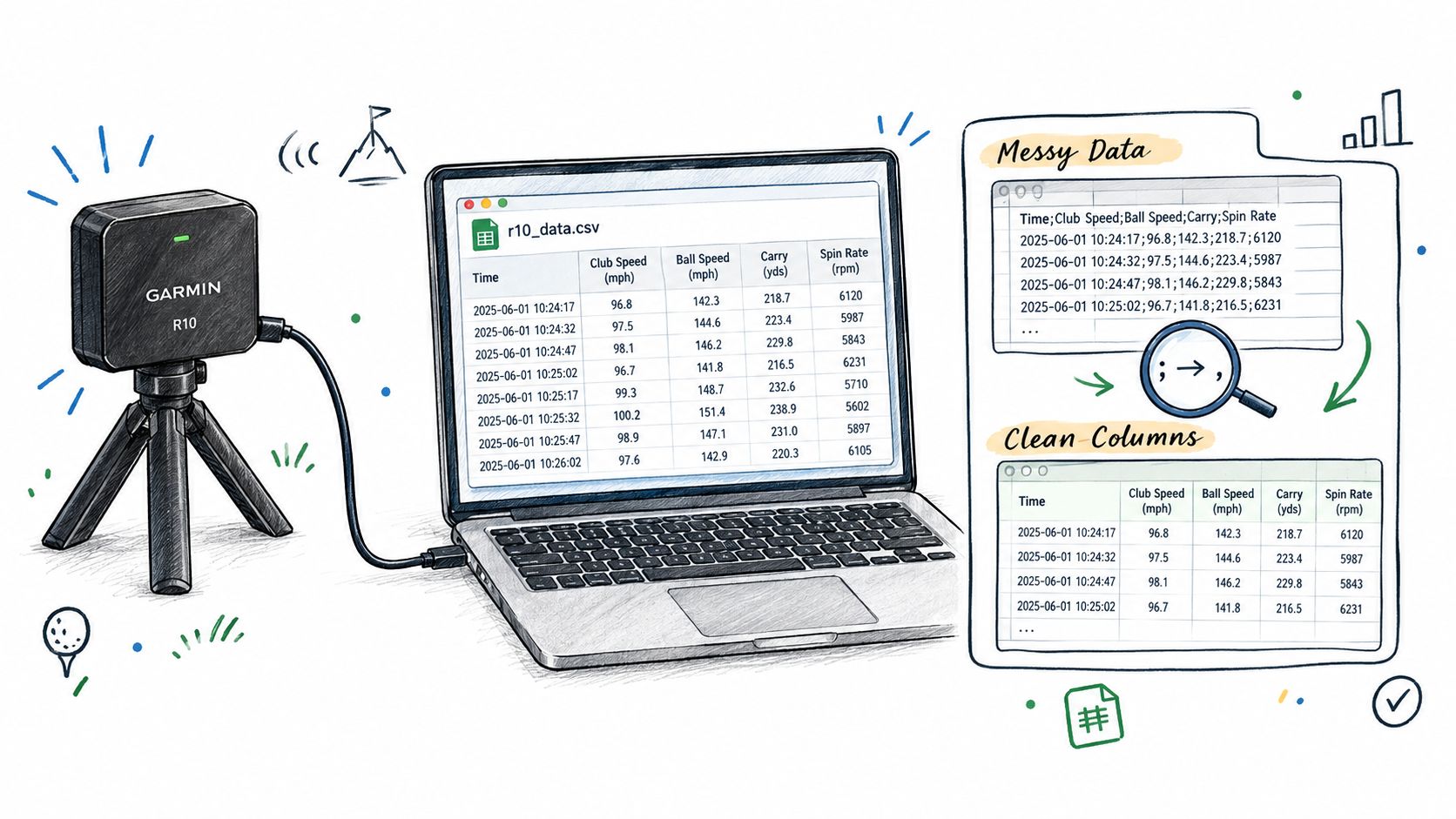
CSV cleanup isn't glamorous, but poor data preparation can invalidate the conclusion. A Garmin R10 export makes a useful worked example because the same issues appear across many launch-monitor and simulator files, including inconsistent headers, regional delimiters, duplicate records, and missing values.
Start by importing a copy, not the original. If the columns appear in one long field, check the delimiter before touching the data. Files created under a European locale may use semicolons instead of commas, so a delimiter check can solve what first looks like a corrupted export.
Standardize before calculating
Map equivalent columns into one template. “Carry,” “carry distance,” and a device-specific carry label should resolve to the same field. Do the same for club name, ball speed, launch, spin, face-to-path, and dispersion. Keep the original export untouched so every cleaning decision remains reversible.
Then inspect repeated records. Putting data can register twice, and an identical timestamp or duplicate shot identifier can quietly distort an average. Remove the duplicate only after confirming it's a registration repeat rather than two genuine strokes.
Obvious mishits need a deliberate rule, not an emotional reaction. A topped shot that clearly wasn't part of the intended test may be excluded, but the exclusion should be logged. If mishits happen often, that frequency is itself useful practice information. Removing every uncomfortable result just makes the spreadsheet flatter without making the swing better.
Use names that sort themselves
A practical file convention is:
date-club-goal
Examples include:
2026-09-28-7iron-carry2026-09-30-driver-dispersion2026-10-02-wedge-gapping
The same naming rule should apply to the session sheet and any notes. A template can include date, environment, club, intent, usable-shot rule, baseline, tested change, and next action.
The best setup has one folder, one naming rule, and one template. That sounds basic, but it removes the friction that causes golfers to abandon trend review after a few sessions. A launch-monitor app workflow can help centralize the records, but the underlying discipline still matters. No software can rescue files that lack a question or contain unmarked outliers.
Keep the raw export, cleaned table, and session conclusion separate. The raw file preserves evidence. The cleaned table supports calculation. The conclusion records the decision. Mixing all three makes it difficult to tell whether a result came from the golfer, the device, or the cleanup process.
Reading Trends Without Fooling Yourself
The most dangerous number in a practice session is often the best one. A single long carry or perfectly centered strike can create a false sense of progress, especially when the golfer is testing a new setup. A useful trend gives more weight to the middle of the distribution and to the shape of the dispersion.
For a stable comparison, establish a baseline with about 10 balls, remove obvious mishits, and summarize the middle rather than relying on the full sample. This launch-monitor practice guide recommends trimming the top and bottom 10% of shots before averaging and testing one variable at a time for 5 to 8 balls per change. Those rules reduce the influence of outliers, but they don't turn a small sample into certainty.
Judge the cluster, not the bomb
Median carry often gives a more honest distance reference than the longest carry. Standard deviation adds the missing context by showing how widely results spread around the typical shot. Dispersion should be read alongside carry, because a modest distance gain that sends shots farther offline may not improve scoring.
Face-to-path helps connect the outcome to a controllable delivery relationship. If face-to-path moves closer to the intended window while dispersion tightens, that's more meaningful than a single shot with an ideal curve. If carry rises but the middle of the shots becomes wider, the session may have improved speed without improving control.
Compare blocks, not moods
A golfer should compare repeated blocks of sessions rather than a single “good” or “bad” day. A three-session rolling average can be compared with the next session, but the next session should be treated as a test, not a verdict. Regression to the mean is common after an unusually strong or weak day, so a return toward normal performance doesn't automatically prove that a swing change failed.
The structured workflow described in this analytical framework for golf scoring and strategy starts with the question, then validates and cleans the data, models key performance indicators, and deploys the practice change. It also recommends tracking only 3 to 5 key numbers, reassessing every 5 to 10 rounds, and annotating weather, firmness, and course difficulty so comparisons remain meaningful.
A real change earns a swing adjustment only after it appears across at least three sessions.
That rule protects the golfer from chasing noise. If the same metric improves across comparable blocks and the dispersion doesn't worsen, the change deserves promotion into regular practice. If it appears once, it remains a hypothesis.
Using Practice Data for Gap Analysis
Distance gaps usually fail for one of four reasons: overlap, hole, mislabel, or mixed environment. Each type needs a different response. Overlap may indicate two clubs producing the same usable carry. A hole means the golfer has no dependable club for a portion of the course. Mislabel means the club name or loft assumption doesn't match the actual flight. Mixed environment means indoor and outdoor results, different balls, mats, or device settings have been combined without normalization.
A trustworthy yardage ladder starts with cleaned sessions, not one memorable shot. Sort clubs by median carry, calculate the interval to the next club, and flag any interval outside the golfer's chosen playable band. For this audit, a practical band is 8 to 12 metres, but it's a decision range, not a universal law. A golfer with unusual loft spacing or a pronounced speed gap may need a different target.
Build the ladder from comparable shots
Use well-struck shots for the initial ladder, then verify the result over multiple sessions. Normalize club labels first. “Hybrid,” “4 hybrid,” and a personal shorthand shouldn't appear as separate clubs if they describe the same club. Keep conditions visible, because a simulator estimate, a range ball, and an outdoor ball flight may not be directly interchangeable.
The four classifications make the next action clearer:
- Overlap: Two clubs have nearly the same reliable carry. Test whether one produces a different launch or stopping pattern before removing anything.
- Hole: The interval is too large for a recurring course demand. Consider a controlled club or loft comparison, not an immediate purchase.
- Mislabel: The recorded club identity doesn't match the actual club. Correct the label before drawing conclusions.
- Mixed environment: The data comes from conditions that aren't comparable. Rebuild the interval from consistent sessions.
Yardage Gap Audit Template
| Club | Median Carry (m) | Interval to Next (m) | Gap Type |
|---|---|---|---|
| Wedge | |||
| Wedge | |||
| 9-iron | |||
| 8-iron | |||
| 7-iron | |||
| 6-iron | |||
| 5-iron or hybrid | |||
| Hybrid or fairway club |
The audit can be completed quickly if the sheet already contains cleaned medians. Record the club, median carry, interval to the next club, and gap type. Then cross-check the resulting ladder against on-course yardages, especially the distances that appear repeatedly in approach shots.
The mixed-environment gap analysis guidance is useful because it treats a distance ladder as a measurement problem, not merely an equipment-shopping exercise. If a gap appears in one indoor session, it's a clue. If it survives several comparable sessions and on-course checks, it becomes a practice or fitting priority.
Turning the Numbers Into One Drill This Week
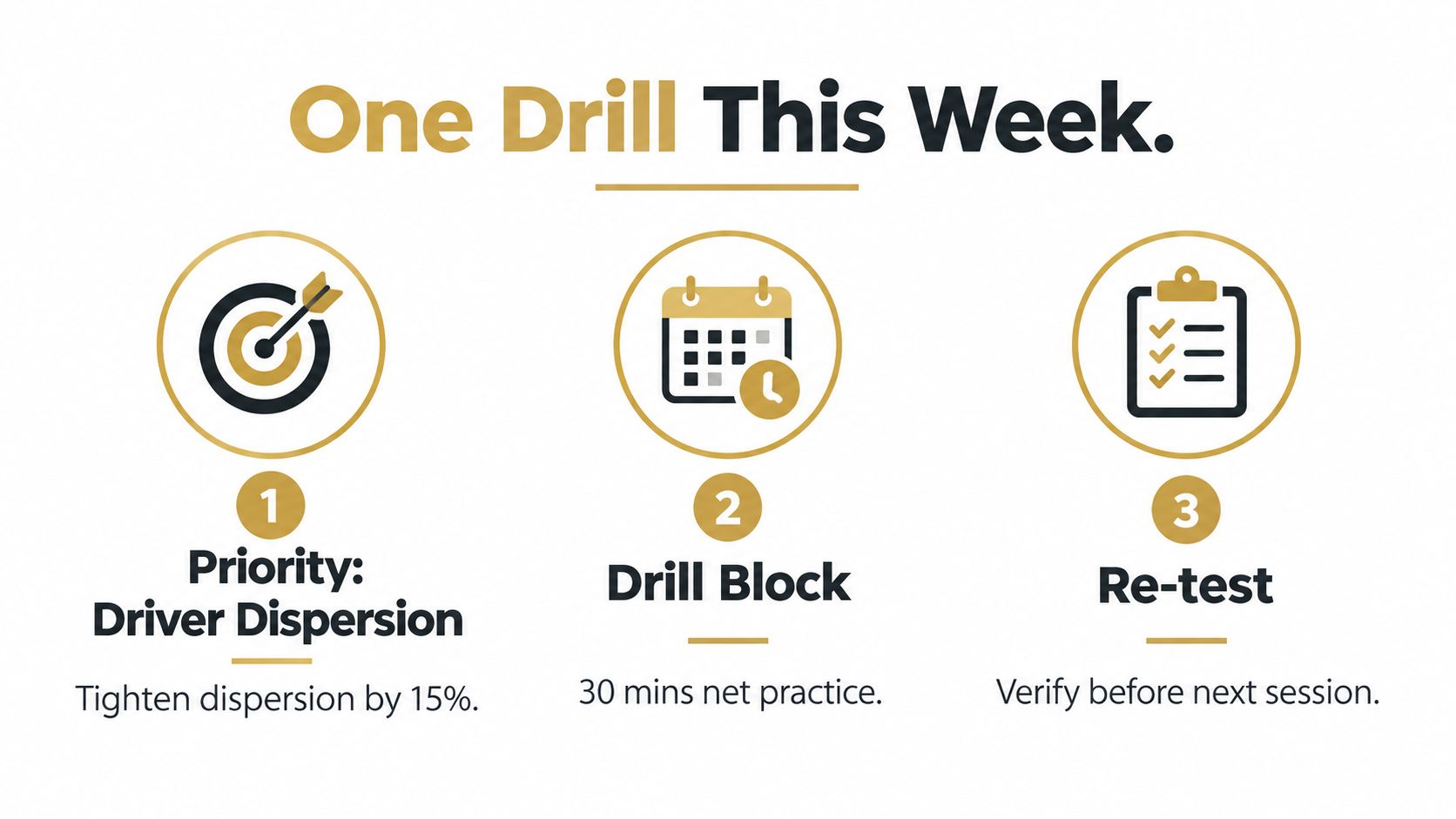
A useful analysis ends with less work on the spreadsheet and more precision in practice. The operating rule is one priority, one drill block, and one re-test. More than one major change at a time makes it difficult to identify what created the result.
The priority should name both the club and the outcome. “Improve driver” is too broad. “Reduce right-side driver dispersion while preserving typical carry” gives the session a measurable target and a clear trade-off.
Three diagnoses, three practice responses
A driver with reasonably tight distance but a recurring face-to-path issue needs a face-control gate drill. Create a start-line gate with two alignment references, hit controlled shots through it, and record face-to-path plus dispersion. The re-test succeeds only if the typical dispersion tightens without a meaningful loss of carry across a comparable block.
A wedge audit that reveals a hole between two dependable distances calls for a 70 to 90 metre ladder. Hit partial shots at several intended distances, record carry rather than total distance, and note the swing length or tempo used. The re-test passes when the golfer can reproduce the missing window with a stable carry cluster, not when one ball reaches the target.
Mislabelled hybrids need a club-up comparison session. Correct the labels, then compare the candidate clubs using the same target, ball, and shot-selection rule. The re-test should confirm which club produces the more dependable carry and dispersion for the relevant course distance.
The drill is successful only when the re-test answers the original question.
The session card can fit on one page:
- Priority: One club and one outcome.
- Baseline: Median carry, dispersion, and the chosen supporting metric.
- Hypothesis: The delivery or setup change being tested.
- Drill: The exact task, target, and shot block.
- Dosage: The planned number of shots or time block.
- Re-test condition: The result that earns adoption.
- Notes: Ball, surface, weather, fatigue, and any unusable shots.
- Next decision: Keep, modify, or abandon the change.
The infographic uses a 15% dispersion-tightening target and a 30-minute practice block, but those values should be treated as the card's defined test condition, not as a universal promise. The golfer still needs comparable baseline data and a re-test before deciding whether the change holds.
Dialed Golf can organize launch-monitor practice around imported or paired shot data, session comparisons, gapping, trends, and a practice priority. The desktop experience is live-pair first, with Garmin R10 support expanding, while CSV and import workflows cover Garmin, Rapsodo, SkyTrak, FlightScope, Uneekor, GSPro, Awesome Golf, and more. The consumer app is currently distributed through TestFlight rather than general App Store availability, and Golfer Pro covers the app and desktop experience at $9.99 per week, $29.99 per month, $149.99 for 6 months, or $249.99 per year.
Practice data analysis works when every session produces a decision, not another unexamined export. Use Dialed Golf to bring practice records, gap checks, trends, and session priorities into one golfer record, then arrive at the range with one drill and a defined re-test. The free web tools remain available for golfers who want to start organizing their numbers before choosing a deeper workflow.