


A 10-handicapper reaches the 14th hole with a familiar problem. The carry is 145 yards over a bunker to a back pin, but the rangefinder reads 143, the phone GPS app shows 147, and a playing partner remembers seeing 138 from the back tees the previous week. She spends three seconds deciding which number deserves trust, chooses a club that feels safe, and leaves the ball 12 yards short. The next chip runs away from the hole, and a manageable par opportunity turns into a double bogey.
That moment has little to do with a lack of golf knowledge. The player has too many disconnected inputs and no system to convert them into one usable decision. Modern golf caddie programs are designed to close that gap by combining course position, hole-specific yardages, personal carry distances, conditions, hazards, and practice data before the swing, not after it.
Table of Contents
- The Round Where the Numbers Stop Making Sense
- What a Golf Caddie Program Actually Is Today
- The Four Capabilities That Define a Modern Program
- Pace of Play and the Friction Budget
- How Launch Monitor Pairing and CSV Import Fit Together
- Choosing and Configuring a Program That Fits Your Setup
- Rethinking Who Golf Caddie Programs Are Really For
- Putting It All Together Before Your Next Round
The Round Where the Numbers Stop Making Sense
The problem becomes obvious when the numbers disagree but none is obviously wrong. A rangefinder may measure the flag accurately while a GPS system references a mapped point, and a remembered yardage may have come from a different tee, pin location, or wind direction. Each source can be useful on its own. Together, without a recommendation layer, they create hesitation.
The player in this example isn't asking for more data. She needs the program to answer a narrower question: what club gives her the best chance of carrying the hazard and finishing in a safe area? That answer should use her actual club distances, not a generic chart based on loft or an optimistic range-session total.
The decision behind the number
A useful pocket caddy separates several inputs that golfers often blend together mentally:
- Target distance: The number to the selected pin or landing area.
- Required carry: The distance needed to clear the bunker, water, or front edge.
- Playable miss: The side of the green or fairway that leaves the simplest next shot.
- Personal carry: The distance this golfer reliably produces with the available club.
- Conditions: Wind, elevation, lie, temperature, and trajectory.
If the system only displays 143 or 147, it has digitized the confusion. If it converts those inputs into one club recommendation and shows why, it has started to behave like a caddie.
Practical rule: A caddie program should reduce the number of decisions at the ball, not give the golfer more numbers to reconcile.
The same principle applies after a poor shot. A good system records what happened, updates the golfer's knowledge of a club, and helps distinguish a bad decision from a poor strike. That feedback loop is where the on-course experience connects to practice.
Human caddies remain part of the category
Digital tools don't replace the broader tradition of human caddie programs. A walking caddie can carry the bag, read greens, identify visual deception, manage emotional momentum, and help a group maintain position on the course. Coverage from Golf Digest on the expansion and limited reach of caddie programs describes a service that remains niche despite measurable demand, with caddie availability concentrated in particular facilities and markets.
The modern category therefore has two branches. One is human service, built around course knowledge and interaction. The other is digital assistance, built around data consistency and fast recommendations. The rest of this guide focuses on the digital branch, while recognizing that both aim to make the next shot clearer.
What a Golf Caddie Program Actually Is Today
A golf caddie program can mean a staffed walking service at a private or resort club, or it can mean a digital pocket caddy carried on a phone. Those products share the goal of improving decisions, but they solve the problem differently.
A human caddie observes the player, the lie, the wind, and the course. A digital program relies on course maps, GPS position, user-entered information, club-distance history, and sometimes launch-monitor data. The digital system doesn't see every variable automatically, so its value depends on the quality of its inputs and the clarity of its recommendation.
The digital definition
For practical evaluation, a modern digital caddie program usually includes four connected layers:
- Yardage engine: Hole-specific distances, targets, hazards, and green information.
- Recommendation engine: A mapping between the current situation and a club from the player's bag.
- Player record: Carry distances, shot history, tendencies, and practice results.
- Practice connection: A way to move launch-monitor data into the player record.
This isn't the same as a simulator. A simulator recreates a playing environment. It isn't the same as swing-analysis software, which may focus on motion, video, or impact mechanics. It also isn't club-fitting hardware itself. A caddie program can use fitting and launch-monitor information, but its job is to turn that information into a decision during practice or play.
Where human and digital programs overlap
Both formats help with club selection, course management, and pace, but their strengths differ. Human caddies can interpret an unusual lie or suggest a conservative target based on local knowledge. Digital systems can retain a consistent record across rounds and update recommendations when a player's verified carry distances change.
The practical question isn't whether one category is universally superior. It's whether the golfer's recurring problem is social and course-specific, or data and decision-specific. A visitor playing a strategically complex resort course may value local human judgment. A golfer practicing alone with a personal launch monitor may need dependable data plumbing and a glanceable on-course interface.
The opportunity is broader than elite clubs. Global Golf Post coverage of youth caddie programs and facility adoption shows why caddying also functions as a development and access channel, not only as a premium amenity. Digital programs extend the decision-support side of that category to golfers who don't have a staffed walking service available.
The Four Capabilities That Define a Modern Program
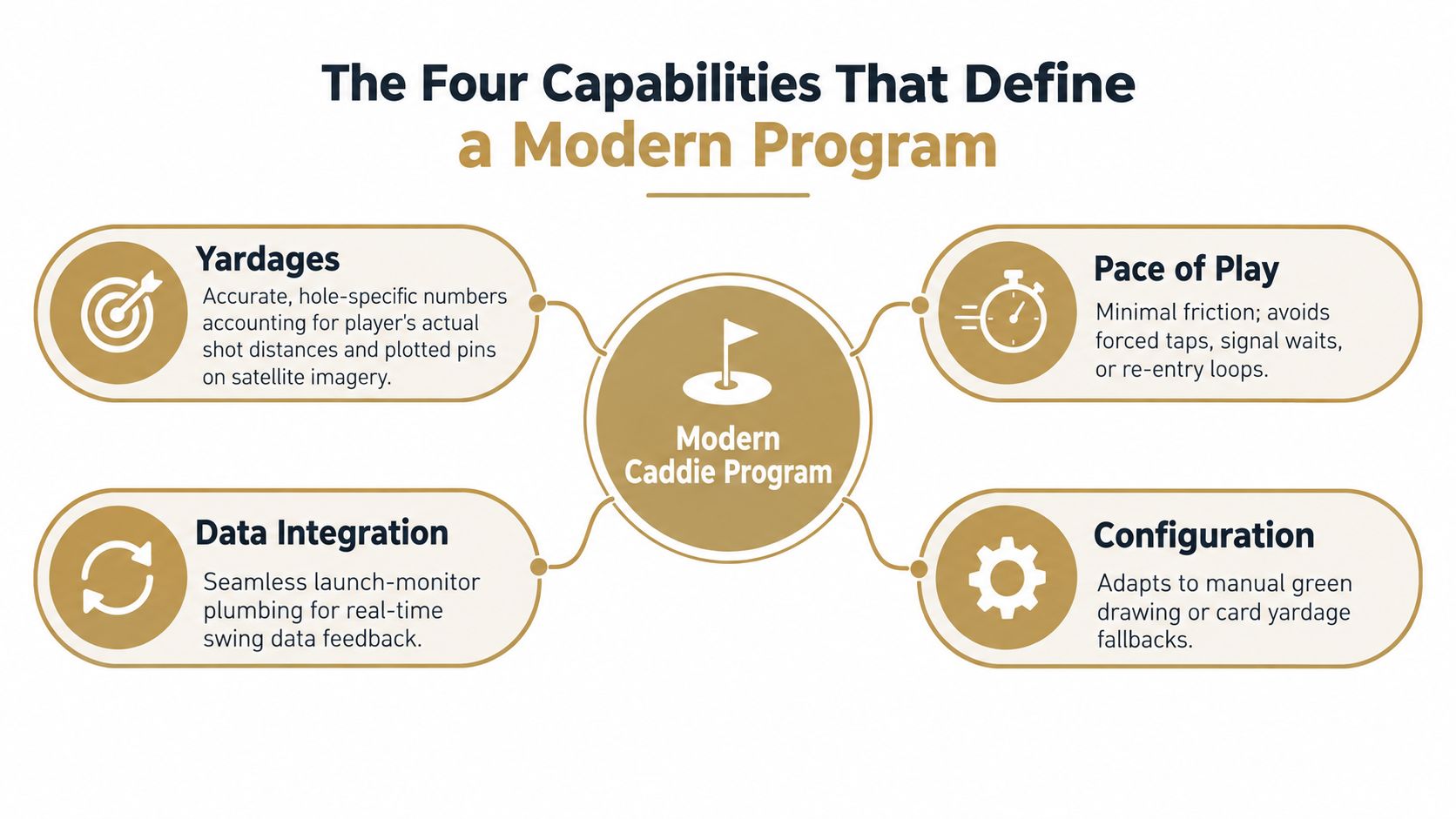
A modern program works only when four capabilities form one chain. Yardages establish the target, club recommendations translate the target into an action, on-course guidance delivers that action without delay, and launch-monitor integration keeps the underlying club model honest.
Yardages need course context
A back number on a card isn't enough for a decision engine. The program should identify the relevant target, show front and back context, account for the selected pin when available, and distinguish a carry number from total distance. If the green has been mapped poorly or the pin position is stale, every downstream recommendation inherits that error.
Manual configuration matters, too. Some courses or unusual layouts need drawn greens, adjusted targets, or a fallback to card yardages. A well-built system doesn't assume that satellite data is perfect everywhere.
Recommendations must be personal
A club recommendation should use the golfer's actual carry profile, not an idealized distance. The engine should know whether a player's 7-iron number represents a reliable carry, a maximum struck shot, or a loose average that includes mishits.
The recommendation also needs an explanation a coach can audit. If the system chooses one club because the required carry sits near the player's dependable distance, that logic should be visible. Otherwise, a golfer may follow a recommendation without learning whether the decision was sound.
Guidance has to be glanceable
On the course, a recommendation buried under menus isn't useful. The player needs target, club, hazard, and relevant condition context in a compact view. Audio can help in situations where checking a screen interrupts routine, but it shouldn't introduce additional confirmation steps.
The fourth capability is the data connection. Dialed Golf's launch-monitor app workflow illustrates the broader requirement, practice data must move into a golfer record that the on-course engine can use. If the data remains trapped in a separate session history, the caddie experience never improves.
Pace of Play and the Friction Budget
A recommendation engine has a limited friction budget. Every tap, loading delay, screen change, and manual re-entry consumes part of it. A player may tolerate a longer setup process before a practice session, but the same process becomes disruptive when the group is waiting at the ball.
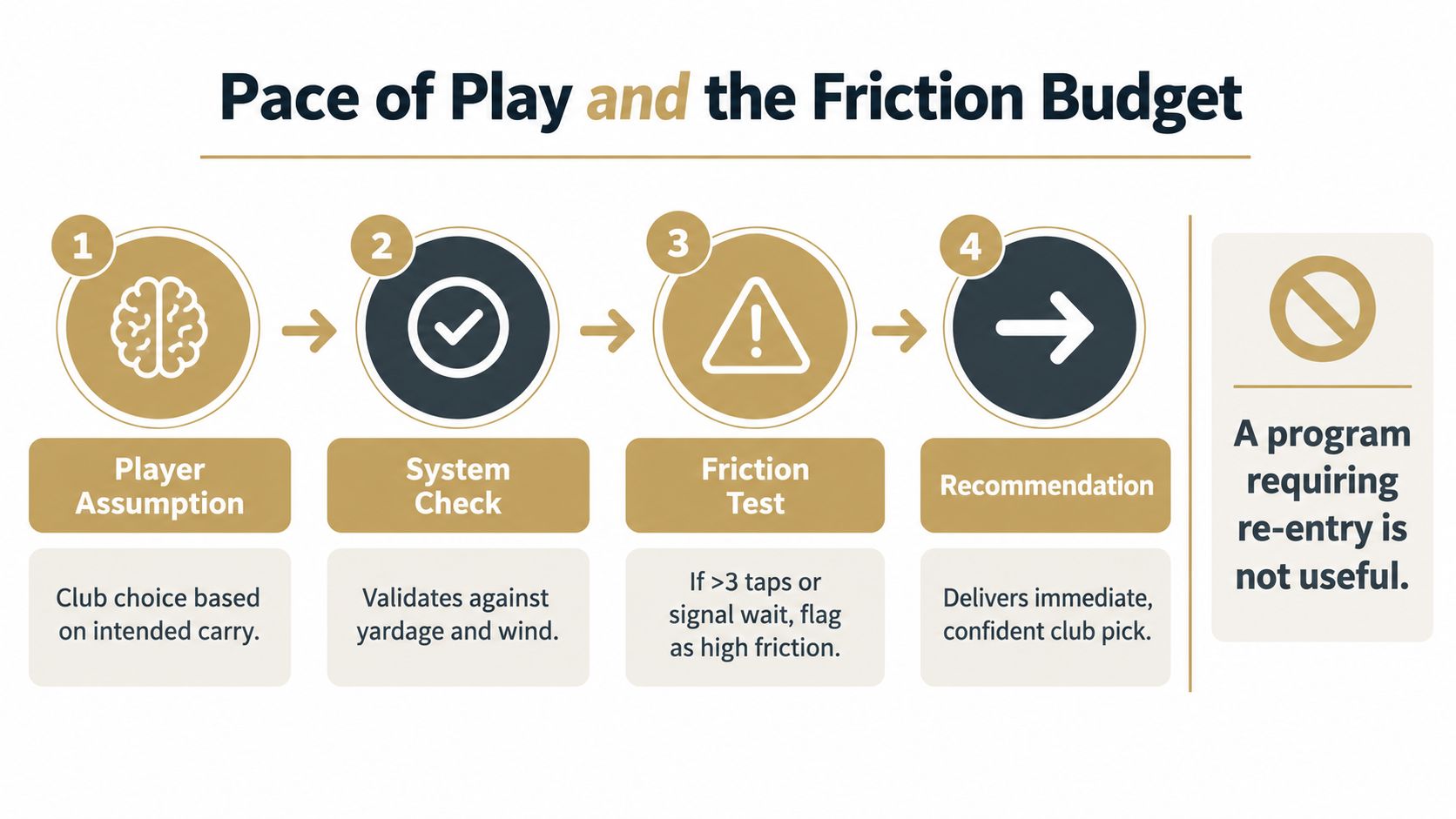
Pace research gives the issue practical weight. A PGA Tour trial found that shot time increased by 5.1 seconds from the fairway and 4.9 seconds from the rough when distance-measuring devices were added, while the policy framework allows 40 seconds per stroke and 50 seconds in some situations. These figures come from Golf Digest's reporting on the PGA Tour pace-of-play study.
The lesson isn't that measurement devices are slow. It's that a tool must fit inside the existing shot routine. Over a round of 70 to 100 shots, even a few seconds per shot can become several minutes, so the program should present the recommendation before the player reaches the ball whenever possible.
What to measure in a real trial
A golfer or coach can evaluate friction without advanced testing:
- Glance time: How long does the player need to understand the recommendation?
- Taps per shot: Does the process require repeated navigation?
- Signal dependence: Does the system stall in a weak-coverage area?
- Club readiness: Does the player arrive at the ball with a decision already made?
- Recovery behavior: Can the player handle a blind shot or changed target without restarting?
Blind shots expose weak systems quickly. So do lateral hazards, alternate-shot formats, and situations where the player wants to choose a conservative landing zone rather than the flag. The engine must compress the decision without pretending that uncertain information is precise.
Operational discipline matters at facility level as well. The USGA Pebble Beach pace-of-play case study connects pace performance with controls such as tee intervals, an on-course pace manager, and timestamped caddie readiness. A digital caddie program should be measured similarly, with events such as check-in lead time, tee adherence, and delay minutes by hole.
A program requiring re-entry after every shot has already failed the practical test. Accuracy matters, but accuracy delivered too slowly is not operational accuracy.
How Launch Monitor Pairing and CSV Import Fit Together
A golfer finishes a simulator session, then sees a club distance that does not match the shot just hit. The cause may be a dropped live connection, a mislabeled club, or a CSV field mapped to the wrong value. A digital caddie is only as useful as the practice data reaching its recommendation engine.
Launch-monitor data generally enters a caddie program through two workflows. Live pairing connects the device to a desktop or practice application while shots are hit. CSV import transfers a completed session into the player record after practice ends.
The workflows serve different jobs. Live pairing gives immediate feedback and helps confirm the club attached to each shot. File import covers more device types and supports repeatable analysis when a live connection is unavailable or unnecessary.
| Method | How It Works | Common Launch Monitors | Best Fit | Key Trade-Off |
|---|---|---|---|---|
| Live pairing | Connects the monitor to the practice application and receives shot data during the session | Devices that support a direct desktop connection | Coaches and golfers who need immediate validation | Connection drops or incorrect club labels can interrupt the session |
| CSV or file import | Uploads an exported session, maps fields, validates rows, and submits the batch | Garmin R10, Rapsodo, SkyTrak, FlightScope, Uneekor, GSPro, Awesome Golf, and more | Solo practice, historical analysis, and mixed-device workflows | Requires clean exports, correct mapping, and post-session review |
Dialed Golf's desktop workflow is live-pair first for the Garmin R10, with CSV and file imports from Garmin, Rapsodo, SkyTrak, FlightScope, Uneekor, GSPro, Awesome Golf, and other sources, according to its launch-monitor comparison. Live pairing therefore starts the practice workflow, while imports extend the system to other recording setups.
Where each path breaks
Live pairing can lose a session when Bluetooth or Wi-Fi becomes unstable. File workflows retain the exported data but can introduce mismatched club names, inconsistent units, duplicate rows, or missing session totals. Bad records can then distort the distance model used for on-course recommendations.
A reliable import needs four controlled stages: file upload, column mapping, row validation, and batch submission. Dialed Golf's CSV import guidance describes those stages, while the launch-monitor CSV import guidance covers file type, encoding, field mapping, and session-total checks.
An independent launch-monitor compatibility reference shows how CSV exchange fits across device and simulator exports. Shot-data import documentation also describes file-based workflows for Garmin R10, FlightScope, Rapsodo, SkyTrak, GSPro, and Awesome Golf sessions.
Use live pairing when a coach needs immediate shot-by-shot correction. For independent practice, a templated CSV import is often more repeatable, provided the golfer checks club labels and removes obvious outliers before the data affects on-course advice.
Choosing and Configuring a Program That Fits Your Setup
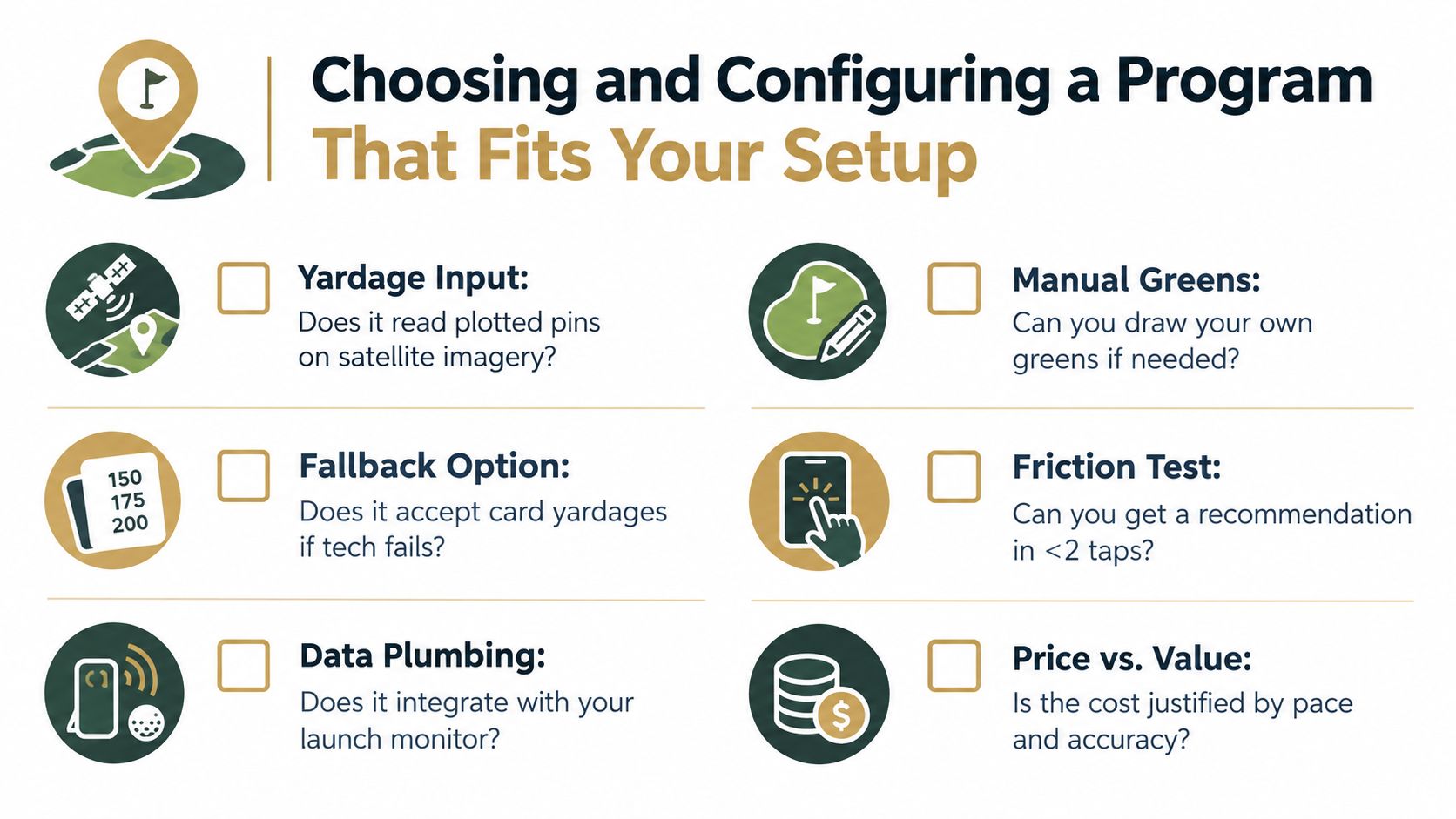
Selection should begin with the yardage source, not the subscription screen. A program that reads plotted pins on satellite imagery may suit a mapped course, while another may let the operator draw greens manually or fall back to card yardages. That choice shapes every club recommendation afterward.
The next test is personal distance logic. Load verified carry numbers and check whether the system distinguishes carry from rollout, full shots from partial shots, and reliable performance from an occasional maximum. A coach should be able to inspect the reason behind a recommendation rather than accept an unexplained club label.
Test the complete handoff
A product demo can hide the difficult part. The useful test starts with an actual launch-monitor session file, moves through import or pairing, and ends with a recommendation on the course.
- Map the course: Confirm that pins, hazards, green edges, and target points match what the player sees.
- Load the bag: Enter the clubs the golfer carries, including specialty wedges and preferred partial-shot options.
- Audit three known shots: Compare three familiar carries with the recommendation logic and investigate any unexpected result.
- Test weak connectivity: Use the program where cellular service is unreliable and check whether core information remains available.
- Check the interface: Count taps, screen changes, and confirmation requests during a normal pre-shot routine.
The recommendation should be glanceable, audible where useful, and capable of working offline for essential information. A system that requires a signal for every yardage lookup may perform well at a connected range but fail on a remote course.
Price must match removed friction
Subscription tiers deserve scrutiny. If basic yardages are free but club recommendations, precision mapping, or historical analysis require payment, the golfer should identify the exact recurring problem the paid layer solves. A rangefinder and a launch monitor may already cover parts of the workflow, so the program earns its cost by joining those inputs and reducing decision time.
For range and club operators, the economics are different from an individual golfer's setup. Dialed Academy provides memberships and front-desk functions at $99.99 per month or $999.99 per year, and the club keeps its dues. Its free web tools remain free. The product is one part of a broader workflow, not hardware, a swing-analysis camera, or a ranked golf-app list.
The driving-range launch-monitor buying guide is useful when the facility's hardware decision must support the software workflow rather than sit beside it.
Rethinking Who Golf Caddie Programs Are Really For
A golfer standing on a public-course tee may have a phone, a launch monitor file, and no caddie. That setup still supports useful guidance if the program connects reliable yardages, personal carry data, and a recommendation engine without adding delay.
The practical audience is broader than elite clubs and resorts. Mid-handicap golfers can use consistent yardages and club gaps. School coaches can manage shared devices and mixed player records. Public-course players can get course context without cart-mounted GPS. Simulator and range operators can turn launch-monitor sessions into usable player histories.
Human caddie access remains limited. Facilities with caddies rose from 775 courses to 1,282, a 65% increase since 2018, yet only about 9% of courses offer caddies and only 5% of golfers used one in the prior year, according to Golf Digest's caddie program coverage. National average fees, including tip, were listed as $113 for an adult caddie and $86 for a youth caddie. Those figures describe human service access, not software pricing. They show why a phone-based workflow addresses availability rather than replacing a person.
| Segment | Current Adoption | Typical Entry Cost | Primary Value |
|---|---|---|---|
| Mid-handicap recreational golfer | Often under-configured rather than fully integrated | A free tool or paid software tier | More consistent decisions and better club gapping |
| High school team coach | Shared devices and mixed player data | Existing phones or tablets plus team software | Standardized practice records and easier coaching review |
| Public or municipal player | Frequently lacks integrated on-course guidance | Phone-based access instead of facility hardware | Course context without relying on cart equipment |
| Budget simulator or range | May already own a launch monitor | Existing hardware plus import or pairing software | Turns session files into usable player records |
Youth development adds another dimension. A Global Golf Post report on youth caddie pipelines says 1,190 students who caddied at more than 200 clubs were enrolled as Evans Scholars at 24 universities, and 12,285 caddies had graduated since the program began in 1930. It also describes nearly $600 million in program costs, a $1 billion target by 2030, and youth-caddie growth of more than 15% since 2018.
Digital programs do not create that institutional pathway. They serve a different job: repeatable practice records and faster on-course decisions. Their value depends on clean setup, dependable course data, and practice files that reach the recommendation engine. The main barrier is often configuration friction, not expensive hardware.
Putting It All Together Before Your Next Round
A golfer can make a useful decision this week without rebuilding an entire practice system. The test is whether the program closes the loop from known shot data to a fast on-course recommendation.
Start by checking hole-specific yardages for the day's pins. Then compare the recommendation against three shots the player already understands, such as a reliable full iron, a standard hybrid carry, and a partial wedge. If the engine disagrees, the golfer should find out whether the problem is a stale pin, an incorrect carry profile, or an unsuitable target.
Run the workflow under playing conditions
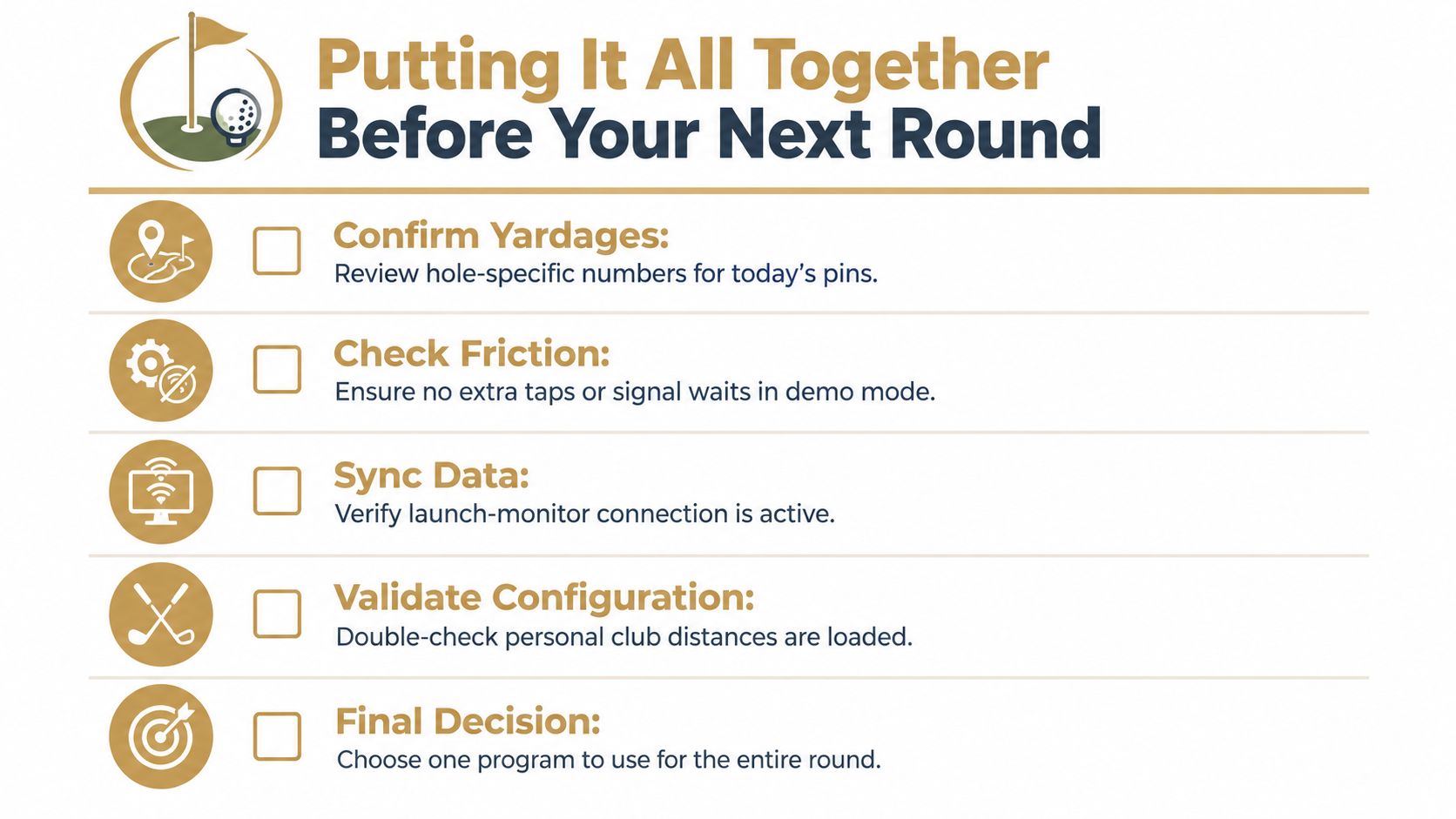
A range test proves connectivity, not usability. The player should complete a nine-hole trial and observe whether the recommendation appears without extra taps, signal waits, or repeated entry.
- Confirm yardages: Review hole-specific targets and verify that hazards and green edges look correct.
- Check friction: Use demo mode or a practice hole to identify unnecessary screens.
- Sync data: Confirm that the launch-monitor connection or import has completed successfully.
- Validate configuration: Make sure personal club distances, preferred targets, and condition settings are loaded.
- Make one commitment: Use one configured program for the entire trial instead of switching tools mid-round.
The evaluation window should cover four rounds before the golfer decides whether the paid workflow earns its place. During that period, the player should import recent practice data, calibrate carry distances by club, define wind and elevation overrides, and record situations where the recommendation helped or created doubt.
A caddie program earns its subscription when practice-side shot capture improves on-course decisions without slowing the group. The value isn't a colorful map or a long list of metrics. It's the quiet moment at the ball when the player knows the target, understands the risk, and has one sensible club in hand.
Dialed Golf connects an on-course pocket caddy with desktop launch-monitor practice through one golfer record and one Pro plan. Golfer Pro is available across the app and desktop at $9.99 per week, $29.99 per month, $149.99 for six months, or $249.99 per year, with the consumer app currently available through TestFlight rather than general App Store release. Visit Dialed Golf to test the free web tools and see whether the connected workflow fits the next round.